

Buying an RDS for MariaDB Instance
Scenarios
This section describes how to buy a DB instance on the RDS console.
RDS for MariaDB supports the yearly/monthly and pay-per-use billing modes. You can tailor your compute resources and storage space to your business needs.
Preparations
- Sign up for a HUAWEI ID and enable Huawei Cloud services.
- For fine-grained permissions management on Huawei Cloud resources, use Identity and Access Management (IAM) to create a user and user group and grant it specific operation permissions. For details, see Creating a User and Granting Permissions.
Procedure
- Go to the Buy DB Instance page.
- On the Custom Config page, select a billing mode and configure information about your DB instance. Then, click Buy.
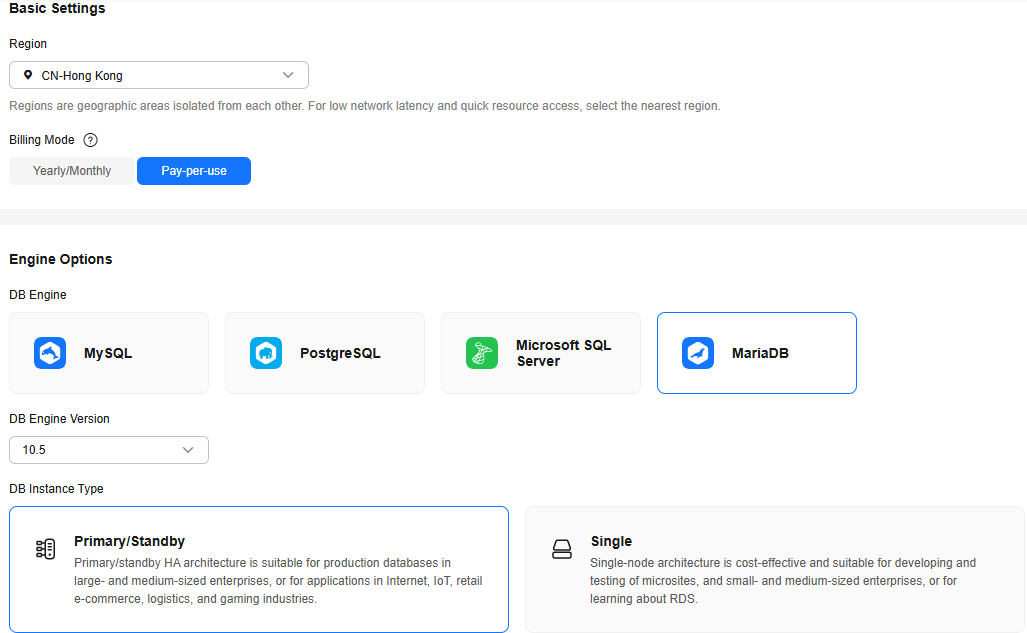
- Basic settings
Table 1 Basic settings Parameter
Example Value
Description
Region
CN-Hong Kong
The region where your resources are located.
NOTE:Products in different regions cannot communicate with each other through a private network. After a DB instance is created, the region cannot be changed. Therefore, exercise caution when selecting a region.
Billing Mode
Pay-per-use
Yearly/monthly and pay-per-use billing modes are available.
- Yearly/Monthly: A prepaid billing mode in which you pay for resources before using it. Bills are settled based on the subscription period. The longer your subscription term is, the better your discount is. This mode is a good option for long-term, stable workloads.
- Pay-per-use: A postpaid billing mode. You pay as you go and just pay for what you use. The instance usage is calculated by the second but billed every hour. If your instance has been used for less than one hour, you will be billed based on the actual duration. This mode allows you to adjust resource usage easily. You do not need to prepare resources in advance, and you never end up with excessive or insufficient resources.
- Resource configuration
Figure 1 Resource configuration
Parameter
Example Value
Description
DB Engine
MariaDB
The DB engine of an instance.
DB Engine Version
10.5
For details, see DB Engines and Versions.
Supported DB engine versions may vary by region. For the actual options, see them on the console.
DB Instance Type
Single
The architecture type of an instance.
- Primary/Standby: uses an HA architecture. In a primary/standby pair, each instance has the same instance class. When a primary instance is being created, a standby instance is provisioned along with it to provide data redundancy. The standby instance is invisible to you after being created.
- Single: uses a standalone architecture, which is less expensive than primary/standby DB instances. It is only recommended for development and testing of microsites, and small and medium enterprises, or for learning about RDS.
Storage Type
Cloud SSD
The storage type determines the read/write speed of an instance. A higher maximum throughput enables faster I/O operations.
- Cloud SSD: cloud disks used to decouple storage from compute. The maximum throughput is 350 MB/s.
- Extreme SSD: The disks combine the 25GE network and RDMA technologies to provide you with up to 1,000 MB/s throughput per disk and sub-millisecond latency.
AZ
az1
An AZ is a physical region where resources use independent power supplies and networks. AZs are physically isolated but interconnected through an internal network. Some regions support both single-AZ and multi-AZ deployment and some only support single-AZ deployment.
To achieve high reliability, RDS will automatically deploy your primary and standby instances in different physical servers even if you deploy them in the same AZ.
You can deploy your primary and standby instances in a single AZ or across AZs to achieve failover and high availability.
- Instance configuration
Figure 2 Instance configuration

Parameter
Example Value
Description
Instance Class
General-purpose | 2U | 4G
The vCPU and memory of an instance. Different instance classes support different numbers of database connections and maximum IOPS.
After a DB instance is created, you can change its vCPUs and memory.
Storage Space
40 GB
It contains the system overhead required for inodes, reserved blocks, and database operation.
Storage space can range in size from 40 GB to 4,000 GB and can be scaled up only by a multiple of 10 GB.
After a DB instance is created, you can scale up its storage space. For details, see Scaling Up Storage Space.
- Basic settings and connectivity
Figure 3 Basic settings and connectivity


Parameter
Example Value
Description
DB Instance Name
rds-1d43
Must start with a letter and consist of 4 to 64 characters. Only letters (case-sensitive), digits, hyphens (-), and underscores (_) are allowed.
- If you intend to buy multiple DB instances at a time, the allowed length for each instance name will change.
- If you create multiple DB instances at a time, their names will include a four-digit suffix. For example, if you specify instance here, the names will be instance-0001, instance-0002, and so on. If existing instances' suffixes have already reached up to 0010, the new instance names will start from instance-0011.
Administrator
root
The default login name for the database is root.
Administrator Password
****
Must consist of 8 to 32 characters and contain the following character types: uppercase letters, lowercase letters, digits, and special characters (~!@#$%^*-_=+?,()&). Enter a strong password and periodically change it for security reasons.
If the password you provide is regarded as a weak password by the system, you will be prompted to enter a stronger password.
Keep this password secure. The system cannot retrieve it if it is lost.
After a DB instance is created, you can reset this password. For details, see Resetting the Administrator Password.
Confirm Password
****
Must be the same as Administrator Password.
Enterprise Project
default
If your account has been associated with an enterprise project, select the target project from the Enterprise Project drop-down list.
For more information about enterprise projects, see Enterprise Management User Guide.
VPC
default_vpc
The virtual network in which your instance is located. A VPC can isolate networks for different workloads. You can select an existing VPC or create a VPC. For details about how to create a VPC, see Creating a VPC and Subnet.
If no VPC is available, RDS allocates a VPC to you by default.
NOTICE:After a DB instance is created, the VPC cannot be changed.
Subnet
default_subnet
A subnet provides dedicated network resources that are logically isolated from other networks for network security. Subnets are only valid within a specific AZ. Dynamic Host Configuration Protocol (DHCP) is enabled by default for subnets where you plan to create DB instances and cannot be disabled.
A floating IP address is automatically assigned when you create a DB instance. You can also enter an unused IPv4 IP address in the subnet CIDR block.
Security Group
default
Enhances security by controlling access to your DB instance from other services. A network access control list (ACL) can help control inbound and outbound traffic of subnets in your VPC. Ensure that the security group you select allows the client to access the DB instance.
If no security group is available or has been created, the system allocates a security group to you by default.
- Additional options
Parameter
Example Value
Description
Parameter Template
Default-MariaDB-10.5
Contains engine configuration values that can be applied to one or more DB instances. If you intend to create a primary/standby DB pair, they use the same parameter template. You can modify the instance parameters as required after the instance is created.
You can modify instance parameters as required after the DB instance is created. For details, see Modifying Instance Parameters.
Time Zone
Select a time zone as required.
You need to select a time zone for your instance based on the region hosting your instance. You can change the time zone after the DB instance is created.
Table Name
Case insensitive
Specifies whether table names are case sensitive.
NOTE:The case sensitivity of table names for created instances cannot be changed.
Tag
test
Tags an RDS instance. This parameter is optional. Adding tags to RDS instances helps you better identify and manage the DB instances. A maximum of 20 tags can be added for each DB instance.
If your organization has configured tag policies for RDS, add tags to DB instances based on the policies. If a tag does not comply with the policies, DB instance creation may fail. Contact your organization administrator to learn more about tag policies.
After a DB instance is created, you can view its tag details on the Tags page. For details, see Managing Tags.
Quantity
1
The number of instances to be created in a batch.
- Basic settings and connectivity
- Basic settings
- Click Buy.
- Confirm the details, read and agree to the agreement, and click Submit. Go back to the Instances page and check for the purchased instance.
Figure 4 Instance successfully purchased

Feedback
Was this page helpful?
Provide feedbackThank you very much for your feedback. We will continue working to improve the documentation.See the reply and handling status in My Cloud VOC.
For any further questions, feel free to contact us through the chatbot.
Chatbot


