

Help Center/ Document Database Service/ User Guide/ Instance Lifecycle Management/ Recycling an Instance/ Modifying the Recycling Policy
Updated on 2026-09-24 GMT+08:00
Modifying the Recycling Policy
Scenarios
During routine database management, you may accidentally delete a DDS instance due to misoperations or changes in business requirements, resulting in data loss and affecting business continuity. DDS moves unsubscribed yearly/monthly instances and deleted pay-per-use instances to the recycle bin.
Precautions
- The recycling policy is enabled by default and cannot be disabled. Instances in the recycle bin are retained for 7 days by default, and this will not incur any charges.
- Operations after an instance is deleted
- If the instance has automated full backups, the system keeps the most recent one of the previous day. If there is no automated full backup generated on that day, it retains the latest available one and moves it to the recycle bin.
- If there are fewer than 100 backups in the recycle bin, the system will create a full backup and move it to the recycle bin.
- You can select one of the backups to rebuild your instance.
- You can modify the retention period, and the changes only apply to the instances deleted after the changes, so exercise caution when performing this operation.
- Recycling and backup cannot be performed when a node is in the UNKNOWN state.
- If you delete an instance running out of storage, it will not be moved to the recycle bin.
Procedure
- Log in to the management console.
- Click
 in the upper left corner and select a region and a project.
 - Click
 in the upper left corner of the page and choose Databases > Document Database Service.
 - In the navigation pane on the left, choose Recycle Bin.
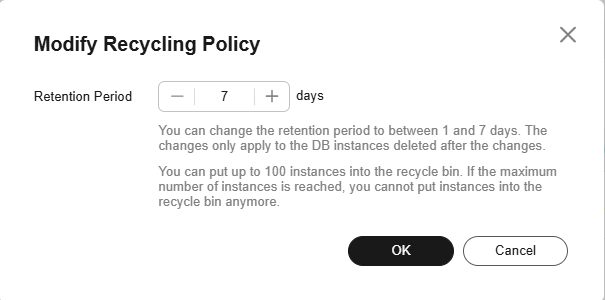
- On the Recycle Bin page, click Modify Recycling Policy. In the displayed dialog box, set the retention period for the deleted DB instances (range: 1 to 7 days). Then, click OK. Figure 1 Modify Recycling Policy
Helpful Links
Related APIs
| API | Description |
|---|---|
| Configures a recycling policy. | |
| Queries a recycling policy. | |
| Queries all instances in the recycle bin. |
What is your overall rating for this page?
0
1
2
3
4
5
6
7
8
9
10
Very dissatisfiedVery satisfied
Thank you very much for your feedback. We will continue working to improve the documentation.See the reply and handling status in My Cloud VOC.
The system is busy. Please try again later.
For any further questions, feel free to contact us through the chatbot.
Chatbot


