

Upgrading the Major Version of a DCS Redis 3.0/4.0/5.0/6.0 Instance
DCS Redis 3.0 has been discontinued. Redis 3.0 has reached its End of Life (EOL) and is no longer maintained by the open-source community. Higher DCS Redis versions are compatible with Redis 3.0. You are advised to upgrade your DCS Redis 3.0 instances to DCS Redis 5.0 or later as soon as possible.
This section describes how to upgrade a DCS Redis 3.0/4.0/5.0/6.0 instance to a later version with a few clicks.

Upgrading the major version of a DCS Redis 4.0/5.0/6.0 instance is currently restricted for use. To enable this function, submit a service ticket to contact the customer service.
Notes and Constraints
- Only Basic-Edition instances support major version upgrades.
- To upgrade a DCS Redis 3.0 instance with public access enabled, you must disable public access first. After the upgrade, you can continue to use the previously bound EIP for public access.
- DCS Redis 4.0 instances or later do not support direct binding of EIPs. Public access to these instances must be implemented through ELB. For details about how to enable public access to a DCS Redis 4.0 instance or later, see Enabling Public Access to Redis and Obtaining the Access Addresses.
- You are advised to upgrade an instance during off-peak hours.
- After a major version upgrade, self-service rollback is unavailable.
Impacts
- During the upgrade, the instance will be read-only for less than 1 minute and experience intermittent disconnections for a few seconds. Ensure that your application can reconnect to the instance and handle exceptions.
- The bandwidth of a DCS Redis 3.0 instance decreases after the upgrade. Check whether the new bandwidth can meet your service requirements. If it does not, you can purchase additional bandwidth after the upgrade.
- Backup files created before the upgrade cannot be used to restore the instance after the upgrade.
- During the major version upgrade of a DCS Redis 4.0/5.0/6.0 Cluster instance whose bandwidth has been adjusted, the system will rematch each shard by its name and restore the adjusted bandwidth. You are advised to perform the upgrade during off-peak hours.
- If audit logging is enabled before the upgrade, it will be automatically disabled after the upgrade. You can enable it again if needed.
Video Tutorial
This video demonstrates how to perform a self-service version upgrade for your DCS instance. As product functions evolve, the GUI may vary. This tutorial is for reference only.
Upgrading the Major Version
To upgrade a DCS Redis 3.0/4.0/5.0/6.0 instance to a later version, perform the steps below.
- Log in to the DCS console.
- Click
 in the upper left corner of the console and select the region where your instance is located.
 - In the navigation pane, choose Cache Manager.
- Click the name of a DCS instance to go to the instance details page.
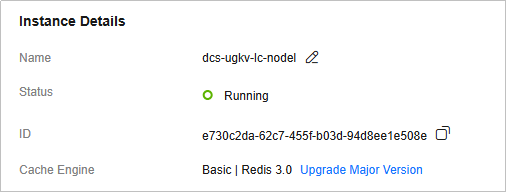
- On the Basic Information page, click Upgrade Major Version next to Cache Engine. Figure 1 Upgrading the major version
- On the Upgrade Major Version page, specify Target Version and confirm the bandwidth and price.
Redis 5.0 or later is recommended.
- Click Submit. The upgrade is complete when the upgrade task is in the Successful state.
After a DCS Redis 3.0 instance is upgraded, the new instance inherits the parameter values from the source instance for any parameters that exist in both versions. For parameters newly introduced in the target version, the default values will be applied.
- Log in to the DCS console.
- Click in the upper left corner of the console and select the region where your instance is located.
- In the navigation pane, choose Cache Manager.
- Click the name of a DCS instance to go to the instance details page.
- On the Basic Information page, click Upgrade Major Version next to Cache Engine. Figure 2 Upgrading the major version

- On the Upgrade Major Version page, specify Target Version.
- Click Submit. The upgrade is complete when the upgrade task is in the Successful state.
After the upgrade, the new instance inherits the parameter values from the source instance for any parameters that exist in both versions. For parameters newly introduced in the target version, the default values will be applied.
What is your overall rating for this page?
Thank you very much for your feedback. We will continue working to improve the documentation.See the reply and handling status in My Cloud VOC.
For any further questions, feel free to contact us through the chatbot.
Chatbot


