

Help Center/ Cloud Container Instance (CCI)/ User Guide/ Using CCI Through the Console/ Workload Management/ Workload Upgrades
Updated on 2026-07-15 GMT+08:00
Workload Upgrades
If your service requires a version update or configuration change, you can upgrade a running workload. There are two ways to upgrade a workload.
- Rolling upgrade: gradually replaces old pods with new pods. During the upgrade, service traffic is evenly distributed to the old and new pods to ensure service continuity.
- Replace: deletes an old pod and then creates a new one. Services will be interrupted during the upgrade.
Upgrading a Workload
- Log in to the CCI 2.0 console.
- In the navigation pane, choose Workloads. On the Deployments tab, locate the target Deployment and click Edit YAML in the Operation column.
- Modify the fields in the YAML file to upgrade the workload. For example, to update an image, modify the field highlighted in the following figure.
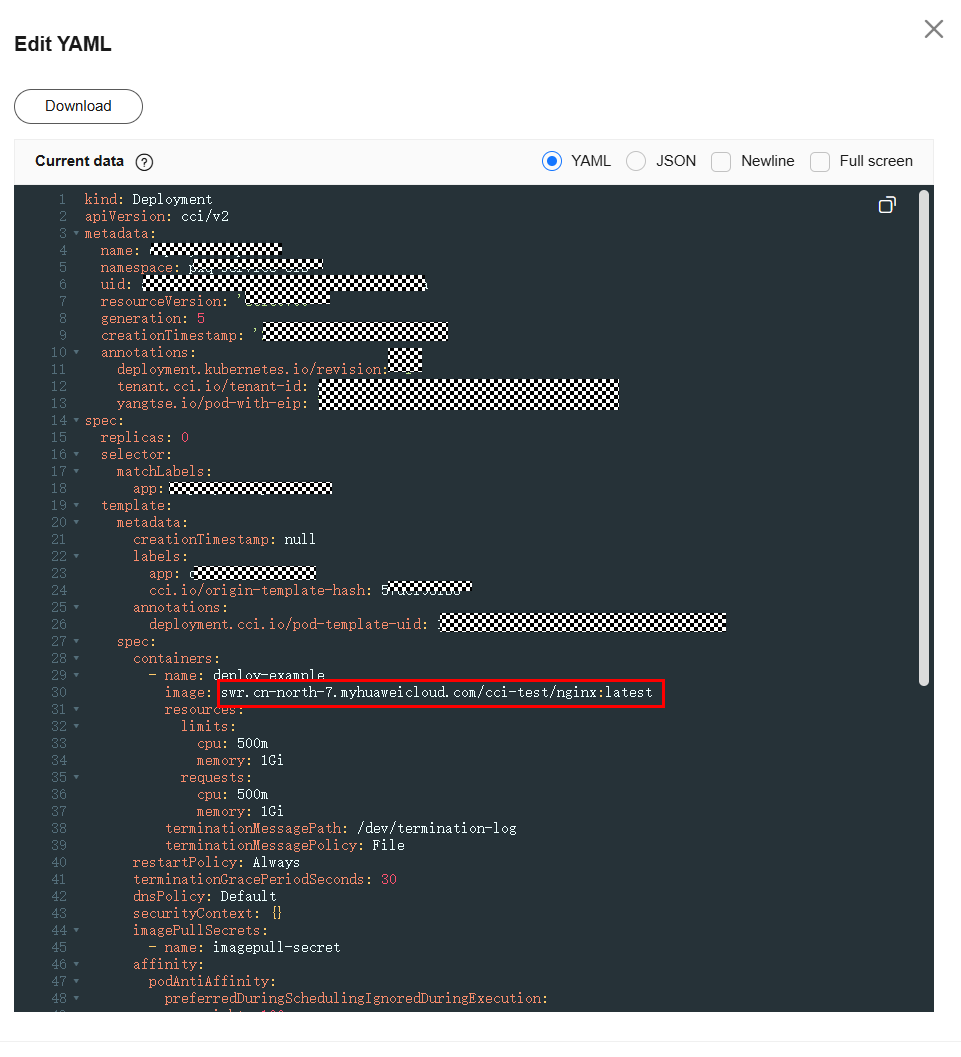
- Click OK.
What is your overall rating for this page?
0
1
2
3
4
5
6
7
8
9
10
Very dissatisfiedVery satisfied
Thank you very much for your feedback. We will continue working to improve the documentation.See the reply and handling status in My Cloud VOC.
The system is busy. Please try again later.
For any further questions, feel free to contact us through the chatbot.
Chatbot


