

Static NPU Virtualization Overview
In static NPU virtualization, a physical NPU (Ascend AI processor) is virtualized and partitioned into multiple vNPUs for allocation to multiple containers. This enables flexible partitioning and dynamic management of hardware resources. NPU compute allocation has the following advantages:
- Efficient resource utilization: A single server's NPUs can be divided into multiple vNPUs for different users, reducing computing costs.
- Strong resource isolation: Containerization technologies enable vNPUs for different users to be completely isolated, preventing computing interference or data leak.
- Unified management: The allocation and reclamation of resources of different specifications are streamlined, facilitating multi-tenant management.
How It Works
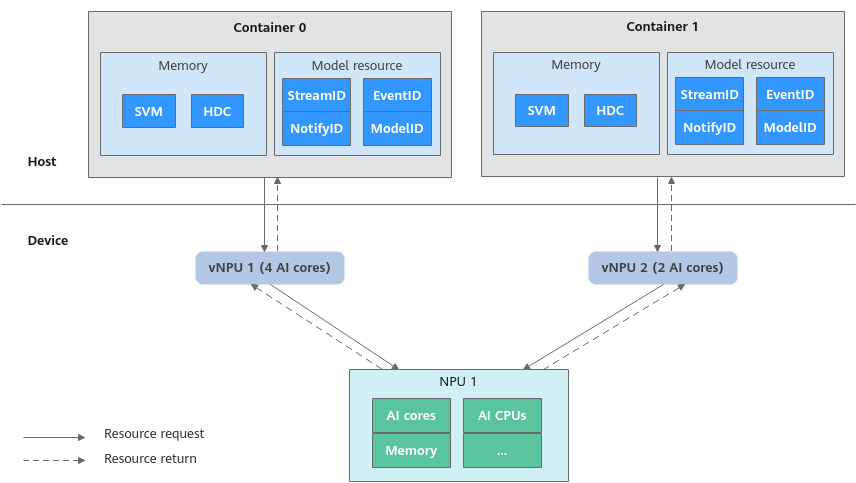
The Ascend NPU hardware provides core computing resources, including AI Cores, AI CPUs, and memory. Leveraging compute allocation, CCE can flexibly divide physical NPUs into multiple vNPUs based on your needs. Each vNPU contains resources such as a specific number of AI Cores and AI CPUs, and a specific amount of memory. For example, if one container requests four AI Cores and another requests two AI Cores, CCE will allocate two vNPUs to meet these requests. For details, see Figure 1.
Supported NPU Chip Types
CCE has only verified the compute allocation of Ascend Snt3P3.
To check the hardware data of a chip, log in to the target node and run the npu-smi info -t info-vnpu -i <id> -c <chip_id> command. Obtain the id and chip_id as follows:
- id: The device ID or NPU ID, which can be obtained by running the npu-smi info -l command.
- chip_id: The chip ID, which can be obtained by running the npu-smi info -m command.
NPU Virtualization Templates
| Chip Type | Template | AI Cores | Memory | AI CPU | VPC | VDEC | JPEGD | VENC | JPEGE |
|---|---|---|---|---|---|---|---|---|---|
| Ascend Snt3P3 | vir04 | 4 | 12 GiB | 4 | 6 | 6 | 8 | 2 | 4 |
| vir04_3c | 4 | 12 GiB | 3 | 6 | 6 | 8 | 1 | 4 | |
| vir02 | 2 | 6 GiB | 2 | 3 | 3 | 4 | 1 | 2 | |
| vir02_1c | 2 | 6 GiB | 1 | 3 | 3 | 4 | 0 | 2 | |
| vir01 | 1 | 3 GiB | 1 | 1 | 1 | 2 | 0 | 1 | |
| vir04_3c_ndvpp | 4 | 12 GiB | 3 | 0 | 0 | 0 | 0 | 0 | |
| vir04_4c_dvpp | 4 | 12 GiB | 4 | 12 | 12 | 16 | 3 | 8 |

Static NPU virtualization supports flexible combinations of virtual instances. An NPU can be virtualized into multiple vNPUs using various virtualization templates, with the total resources consumed by all vNPUs on a single NPU chip does not exceed the chip's physical capacity. Recommended specifications are provided for flexible combination as needed. For details, see Virtual Instance Specifications.
NPU Compute Allocation Modes
CCE offers the following modes:
- Automatic Static NPU Virtualization: NPU compute is partitioned by node pool. You can partition NPUs into vNPUs in batches through the console. This mode supports only fixed virtualization template combinations and is suitable for large-scale unified resource management.
- Manual Static NPU Virtualization: NPU compute is partitioned by node. You manually control resource allocation for each NPU. This mode is more flexible but more complex, and is ideal for scenarios requiring fine-grained resource management.
What is your overall rating for this page?
Thank you very much for your feedback. We will continue working to improve the documentation.See the reply and handling status in My Cloud VOC.
For any further questions, feel free to contact us through the chatbot.
Chatbot


