What Is a Trigger?
Triggers intuitively display service processes to users. Once set up, triggers automate operations without the need for manual execution by users.
Introduction to the Trigger Designer
Figure 1 shows the page for editing a trigger. For details about the function items, see Table 1.
Figure 1 Page for editing a trigger 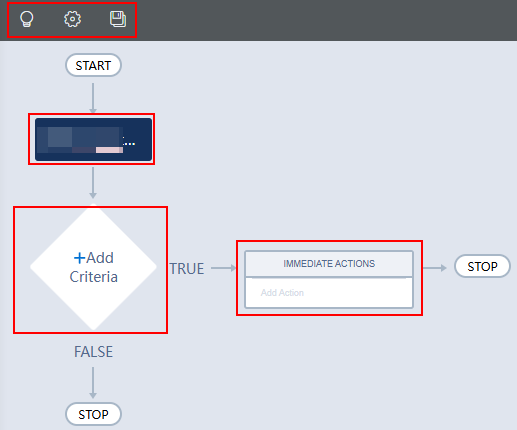
Table 1 Functions on the trigger editing page | Area | Function |
| 1 | Trigger condition, which is generated when a trigger is created. - Object: Select a value when creating a trigger. The value cannot be changed after being selected. The selected object determines the fields that can be accessed through the process.
- Start Process
- Only when a record is created: Start the trigger when a record is created.
- Only when a record is modified: This trigger is triggered when a system record is modified.
- Record creation or editing: This trigger is triggered when a record is created or updated.
- Advanced Settings > Recursion - Whether to allow a process to evaluate records multiple times in a single transaction: If Yes is selected, the process can evaluate the same record for a maximum of five times in a single transaction.
|
| 2 | Rule condition of a trigger. The system determines the operations to be performed by the trigger based on this condition. - Criteria Name: Name of the new rule.
- Execution Condition: Judgment criteria of the condition.
- When conditions are met: When the conditions are met, the operation is performed. If this option is selected, you need to configure conditions, for example, the value of the gender field is female.
- When condition expression is true: If the condition expression is met and the calculation result is true, perform the operation. If this option is selected, you need to configure a formula, for example, (A.a == "b") && (A.a != A.b) || (A.b > c).
- No conditions, execute directly: Execute the operation without checking the condition.
|
| 3 | Action to be executed when specified conditions are met. Set the operation type and related parameters based on service requirements. - Create a Record: Create a record.
- Update a Record: Update a record.
- Email Alerts: Send an alarm email.
- Trigger: Call a sub-trigger.
- Script: Call a script.
- Event: Call an event.
- Flow: Call a flow.
- BPM: Call a BPM.
- Send Event: Send an event.
|
| 4 | Function buttons of a trigger, such as enabling a trigger and saving a trigger as a new one. |


