

How Do I Change the Database Character Set of a TaurusDB Instance?
The utf8 character set in TaurusDB supports up to three bytes per character, whereas true UTF-8 supports up to four bytes per character. Emojis (a special type of Unicode character commonly used on mobile devices) and newly added Unicode characters cannot be stored using the MySQL utf8 character set. MySQL released the utf8mb4 character set in 2010 and added the utf8mb4 code after 5.5.3 to be compatible with the 4-byte unicode. The utf8mb4 character set is a superset of utf8. You only need to change utf8 to utf8mb4 without performing any other conversions.
Huawei Cloud Data Admin Service (DAS) is a professional database management tool. You can view the database and system character sets through the DAS console.
Procedure
- Log in to the TaurusDB console.
- On the Instances page, locate the instance and click Log In in the Operation column to go to the DAS console.
Alternatively, on the Instances page, click the instance name to go to the Basic Information page. Click Log In in the upper right corner of the page.
- On the displayed login page, enter the correct username and password and click Log In.
- On the top menu bar, choose SQL Operations > SQL Window.
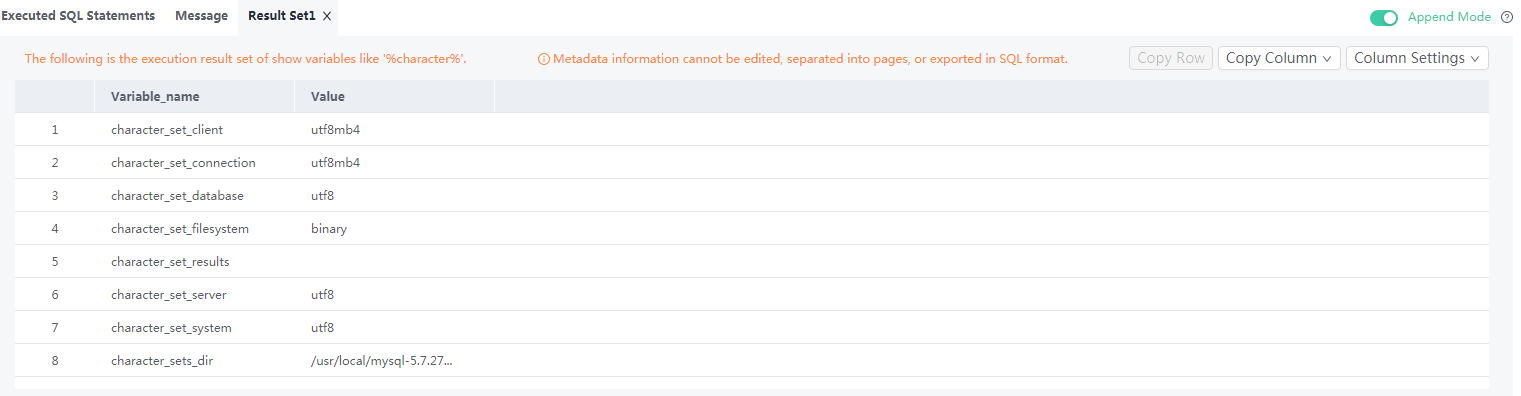
- To query the database character set, run the following SQL statement:
show variables like '%character%';
Figure 1 SQL execution result
- To query the database collation, run the following SQL statement:
show variables like 'collation%';
Figure 2 SQL execution result

- Change the character set to utf8mb4.
- Run the following SQL statement to change the database character set.
ALTER DATABASE DATABASE_NAME DEFAULT CHARACTER SET utf8mb4 COLLATE utf8mb4_general_ci;
- Run the following SQL statement to change the table character set.
ALTER TABLE TABLE_NAME DEFAULT CHARACTER SET utf8mb4 COLLATE utf8mb4_general_ci;

The SQL statement just changes the character sets of tables. The character sets of fields in the tables are not changed.
- Run the following SQL statement to change the character sets of all columns in the table.
ALTER TABLE TABLE_NAME CONVERT TO CHARACTER SET utf8mb4 COLLATE utf8mb4_general_ci;
- character_set_client, character_set_connection, and character_set_results are the settings of the client.
- character_set_system, character_set_server, and character_set_database are the settings of the server.
- The priorities of the parameters on the server are as follows: character_set_database > character_set_server > character_set_system.
- Run the following SQL statement to change the database character set.
What is your overall rating for this page?
Thank you very much for your feedback. We will continue working to improve the documentation.See the reply and handling status in My Cloud VOC.
For any further questions, feel free to contact us through the chatbot.
Chatbot


