

What Is Intelligent EdgeCloud?
Edge Computing
5th generation mobile networks (5G) and artificial intelligence (AI) make innovative services, such as augmented reality (AR), virtual reality (VR), interactive live streaming, automated driving, and smart manufacturing, a reality for the world. These services demand for low latency and high bandwidth. Centralized cloud computing is generally far away from devices and has the following disadvantages:
- High network latency: Centralized cloud computing cannot process and analyze data in a timely manner, resulting in slow application response and poor user experience.
- High bandwidth cost: Data generated by applications needs to be transmitted to the cloud, which consumes large bandwidth. As a result, service providers need to pay a large amount of money on bandwidth.
- Data compliance: Data generated by applications is stored on the cloud, whereas enterprises want sensitive data to be stored on premises to meet the requirement for data compliance.
Edge computing can resolve the preceding problems and becomes a good choice for these new services. Edge computing brings computation and data storage closer to where they are needed to improve response speed, save bandwidth, and ensure data compliance.
Figure 1 shows the differences between cloud computing and edge computing.
Edge computing can be seen as the extension of cloud computing to the edge of the network, and the two are mutually complementary. To fit into the requirements in different scenarios, you need to leverage both cloud computing and edge computing to form an edge-cloud synergy.
Figure 2 illustrates the scope of edge computing.
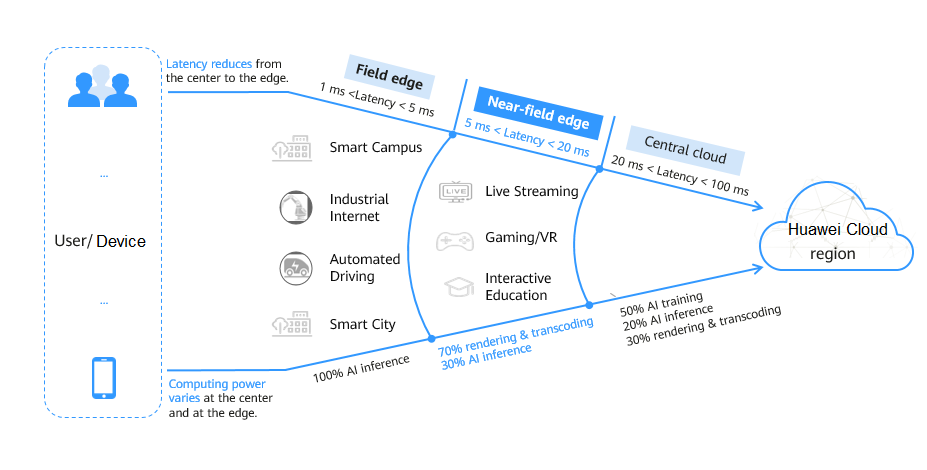
There are three rough categories of network latency, each defined by their distance from end users. From closest to farthest, these ranges are the field edge, the near-field edge, and the cloud.
- Field edge: The network latency ranges from 1 ms to 5 ms, and computing power is primarily used for AI inference. Real-time services, such as autonomous driving and industrial Internet perform well at the field edge.
- Near-field edge: The network latency ranges from 5 ms to 20 ms. 70% of the computing power is used for rendering, and the rest for AI inference. Video services are positioned to run at the near-field edge.
- Cloud (or central cloud): The network latency is between 20 ms and 100 ms, and workloads that are not delegated to the edge, such as massive data storage, data mining, and training, are generally deployed on the central cloud.
For field edge and near-field edge scenarios, Huawei Cloud has launched Intelligent EdgeCloud (IEC) and CloudPond.
- IEC provides a distributed edge cloud with wide coverage for customers to flexibly deploy services nearby.
- CloudPond provides a solution that integrates software and hardware in a rack that can be deployed in your on-premises data center.
IEC
IEC is deployed closer to enterprises and areas with a large number of active users and provides the same experience as the central cloud. It provides a latency of less than 10 ms for latency-sensitive services such as interactive entertainment, online education, and media creation, as well as local data storage for services with compliance requirements, such as finance, healthcare, manufacturing, and scientific research.
Figure 3 shows the IEC product architecture.
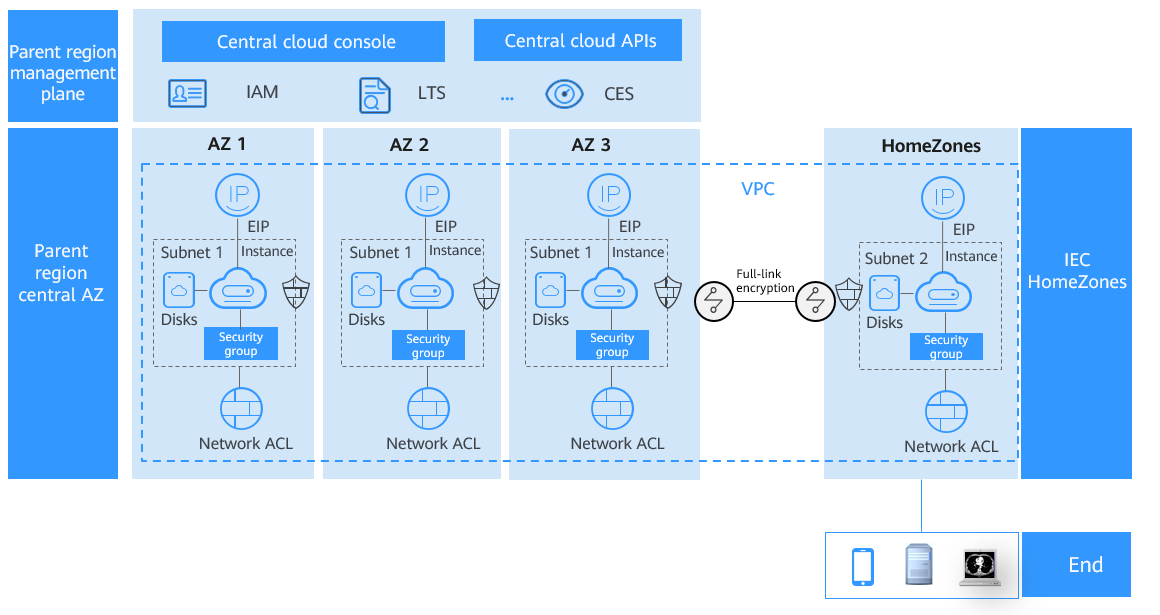
- IEC management plane is deployed in the central region where IEC belongs. The management plane shares the console and APIs with the central region. There is no independent console for IEC. You can access the Huawei unified management console to purchase, manage, and monitor cloud resources such as compute, network, and storage required by edge services.
- IEC uses Huawei Cloud Identity and Access Management (IAM) for account authentication, and Image Management Service (IMS) of Huawei Cloud to provide private images required for creating edge instances.
- IEC uses Huawei Cloud Virtual Private Cloud (VPC), Elastic IP (EIP), instances, subnets, security groups, network Access Control Lists (ACLs), and Elastic Cloud Servers (ECSs). Elastic Volume Service (EVS).
- IEC HomeZones is physically isolated from the central AZ of the parent region. You can create a cross-AZ VPC to enable communication between IEC HomeZones and the Huawei Cloud AZ over the VPC.
- After IEC HomeZones is enabled, you can select the HomeZones in the region where IEC is located to create compute and storage resources and cloud services in the HomeZones for low latency and local data storage.
Why IEC?
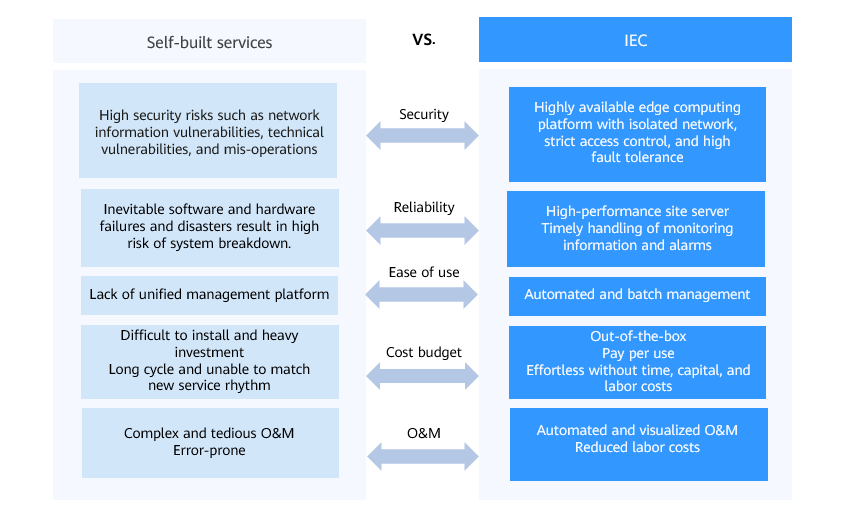
Self-built services cost more and have higher security risks than IEC, and cannot meet the high requirements of new services. Figure 4 shows comparison between self-built services and IEC.
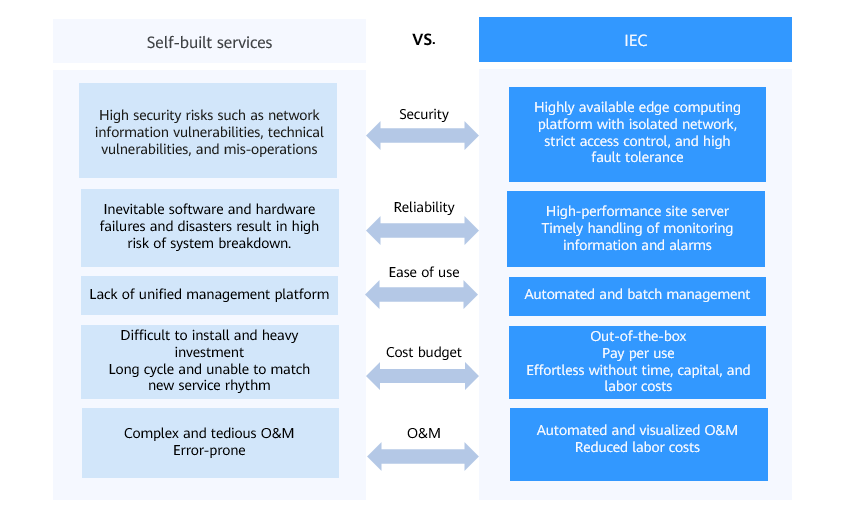
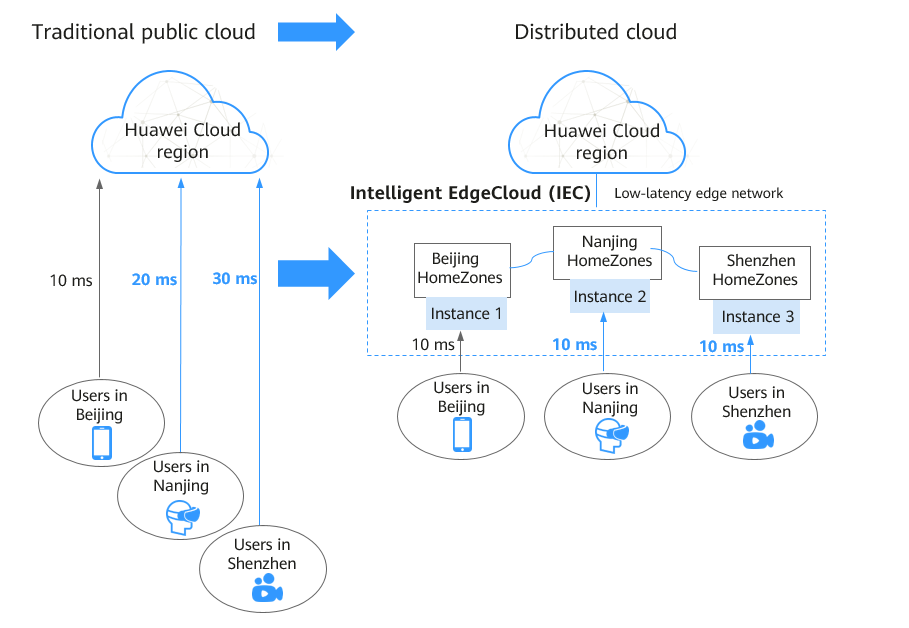
Figure 5 helps you further understand the IEC advantages in reducing network latency during edge service processing when compared with the traditional centralized public cloud.
For details about IEC advantages, see 1.2IEC Advantages.
Feedback
Was this page helpful?
Provide feedbackThank you very much for your feedback. We will continue working to improve the documentation.See the reply and handling status in My Cloud VOC.
For any further questions, feel free to contact us through the chatbot.
Chatbot


