Domain Name Hierarchy
The domain name resolution involves a hierarchical structure and often uses recursive queries.
The following uses example.com as an example to describe the structure and levels of a domain name.
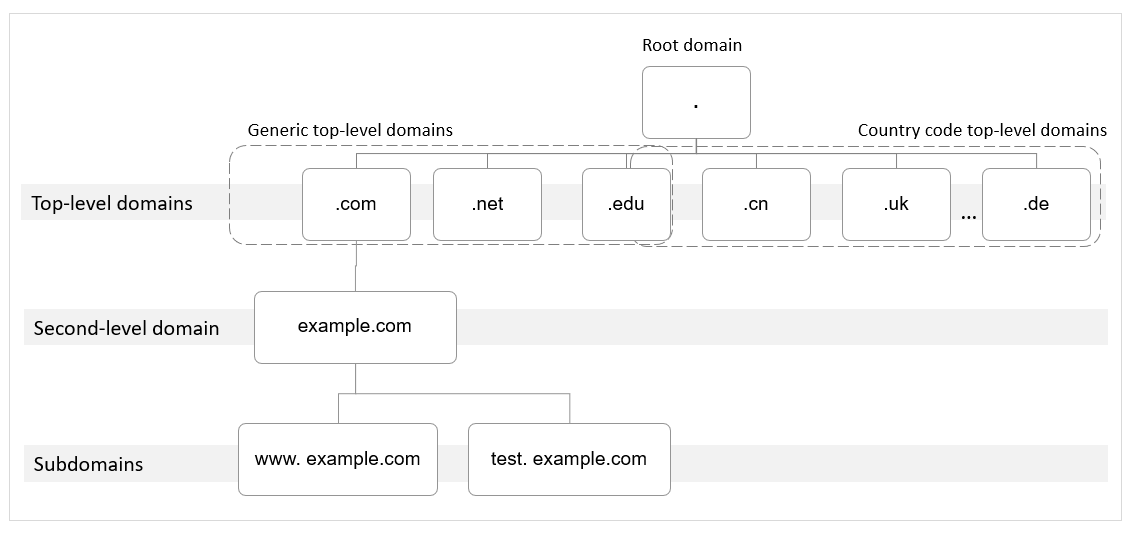
- Root domain
A period (.) is the designation for the root domain.
A fully qualified domain name (FQDN) ends with a period (example.com.). When you enter a domain name (example.com) in the browser, the DNS system will automatically add a period in the end.
Root domain names are resolved by root name servers that hold the addresses of top-level domain servers.
- Top-level domain
Below the root domain are top-level domains, which are categorized into two types:
- Generic top-level domain (gTLD), such as .com, .net, .org, and .top
- Country code top-level domain (ccTLD), such as .cn, .uk, and .de
Top-level domains are resolved by top-level domain servers that hold the addresses of second-level DNS servers. For example, the top-level domain server of .com saves the addresses of all DNS servers of second-level domains that end with .com.
- Second-level domain
Second-level domains (such as example.com) are subdomains of top-level domains and are resolved by second-level DNS servers, which provide authoritative domain name resolution services.
For example, if you purchase example.com from a domain name registrar and set a DNS server for the domain name, the DNS server will provide authoritative resolution for example.com, and its address will be recorded by all top-level domain servers.
If you host domain names on the Huawei Cloud DNS service, authoritative DNS servers will provide authoritative resolution services for your domain names.
- Subdomain
Second-level domains can be further divided into subdomains (such as www.example.com) to indicate specific servers or services.
DNS Hierarchy
DNS also operates through a hierarchical structure. At the top is the root name server, followed by top-level domain servers, authoritative servers, local DNS and cache servers. Each level plays a specific role in the resolution process and works together for domain name resolution. This structure ensures efficient, reliable, and scalable domain name resolution.
- Root name server (Root server)
Root name servers are at the top of the DNS hierarchy and direct queries for records to an appropriate top-level domain server. When a local DNS server does not have the IP address cached for a domain name, it will query a root name server, aiming to obtain the IP address.
- Top-level domain (TLD) server (TLD server)
TLD servers handle queries related to specific generic top-level domains such as .com, .org, and .net, and country code top-level domains, such as .cn and .us.
Each top-level domain has its own set of servers that manage the DNS entries for domains within that top-level domain. For example, when a client wants to access www.example.com, the local DNS server sends the request to the top-level domain server of .com. Then, the top-level domain server of .com returns the address of the authoritative DNS server of the second-level domain example.com.
- Authoritative server (NS server)
Authoritative DNS servers are the final word on the mapping between specific domain names and their associated IP addresses. For example, the authoritative DNS server of example.com will return the IP address mapped to the subdomain www.example.com.
- Local DNS server (Local DNS)
Local DNS servers are the DNS servers that user devices (like phones and computers) utilize to connect to the internet. They are often provided by Internet Service Providers (ISPs) or organizations and handle recursive DNS requests from clients. When a user requests a domain name, the local DNS server initiates a recursive query to find the corresponding IP address. It searches layer by layer through the DNS hierarchy until it finds the authoritative server that holds the correct IP address. Once found, the local server caches this information to speed up future requests for the same domain.
You can also choose a public DNS server, for example, 114.114.114.114 and 8.8.8.8, as your local DNS server.
DNS Resolution Process
Figure 1 shows the process for accessing a website using the domain name www.example.com.
Figure 1 Domain name resolution
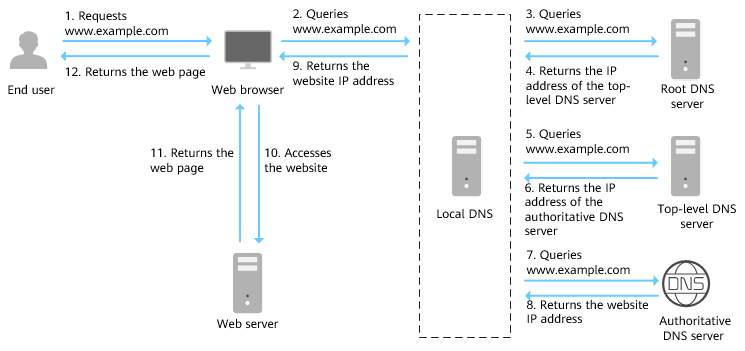
- An end user enters www.example.com in the address box of a browser.
- The query for www.example.com is routed to the local DNS server.
Local DNS servers are usually provided by the Internet service provider to cache domain name information and perform recursive lookup.
- If the local DNS server does not find any records in the cache, it routes the request for www.example.com to the root name server.
- The root name server returns the address of the top-level domain server of .com to the local DNS server.
- The local DNS server sends the request to the top-level domain server of .com.
- The top-level domain server of .com returns the address of the authoritative DNS server which provides authoritative records for example.com.
- The local DNS server sends the request to the authoritative DNS server of example.com.
If you have hosted www.example.com on the DNS service and configured Huawei Cloud DNS name servers, these name servers will provide authoritative DNS for the domain name.
- The authoritative DNS server returns the IP address mapped to www.example.com to the local DNS server.
- The local DNS server returns the IP address to the web browser.
- The web browser accesses the web server with the IP address.
- The web server returns the web page to the browser.
- The end user views the web page using the browser.
Glossary
DNS Cache
DNS cache is temporary storage that stores DNS records of domain names. It is usually found on user devices, routers, and the servers of Internet Service Providers (ISPs). DNS cache improves network performance and efficiency.
When a user device accesses a domain name, the device first checks the local DNS cache. If the DNS record is found in the local DNS cache, the device uses it directly. If the information is not found there, the device then queries its DNS server provided by the ISP or other DNS servers and stores the queried data in the cache for future use.
Helpful Links
TTL
TTL (time to live) specifies how long records are cached on a local DNS server. A proper TTL value helps balance DNS server load and resolution speed, while also affecting how quickly DNS changes take effect.
When receiving requests for a domain name, the local DNS server asks the authoritative DNS server for the required DNS record, and then caches the record for a period of time. During this period, if the local DNS server receives requests for this domain name again, it will not request the record from the authoritative DNS server, but directly returns the cached record.
The time records are cached on the local DNS server is specified by the TTL value. You can set it when adding record sets in public or private zones. For details, see Managing Record Sets.
The effective time of the following operations depends on the TTL value (to accelerate the process, decrease the TTL value):
Recursive Query/Recursive Resolution
Recursive query and recursive resolution are fundamental concepts in DNS resolution. A recursive query is initiated by a client to a DNS resolver, and that resolver is responsible for performing the recursive resolution and ultimately returning the DNS results to the client.
- Recursive query: a type of DNS queries sent from a client (such as a user's computer) to a DNS resolver. A client sends requests to a DNS resolver, and the resolver takes full responsibility for the entire resolution process until it finds the final answer and returns it to the client. In a recursive query, the client only sends the request to the first DNS server.
- Recursive resolution: a method used by a DNS resolver to process recursive queries. When receiving a recursive query, the DNS resolver will work down the hierarchy, starting from the root servers, then to top-level domain servers, and finally to the authoritative servers for the query result. Finally, the DNS resolver will return the query result to the client. Users do not need to handle complex query processes.
Helpful Links
Configuring Recursive Resolution for Subdomains
DNSSEC
Domain Name System Security Extensions (DNSSEC) provides digital signatures and public key cryptography to ensure the integrity and authenticity of DNS response packets and to defend against common attacks such as DNS spoofing and cache pollution. This prevents you from being redirected to unexpected addresses and protects your core services.
Working principles and main functions
- Digital signatures for data integrity: Digital signatures are added to DNS records so that data integrity can be verified. This ensures that DNS records are not tampered with.
- Public key cryptography for trusted data sources: Public keys are used to verify signatures for establishing trust in data sources.
- A full chain of trust to prevent DNS spoofing and cache pollution: A full chain of trust is formed from the root DNS servers to the top-level domain servers and then to the authoritative DNS servers. This prevents attackers from inserting false records into the DNS cache.
Helpful Links
Configuring DNSSEC
DKIM
DomainKeys Identified Mail (DKIM) is a technical standard used to verify the authenticity and integrity of email sources. It uses digital signatures to prevent email spoofing and tampering.
Key principles and working process
- Key generation and distribution
- DKIM uses a private/public key pair.
- The private key is kept on the sender's email server and is used to sign emails.
- The public key is added to the DNS records for the sending domain and is usually used as a TXT record for the receiver to query.
- Email signature process
- The sending email server uses the private key to generate a digital signature for the specific part of the email (such as the header and body).
- DKIM signatures are embedded within the DKIM-Signature header field, including a cryptographic hash of the email content, the algorithm used for signing (like RSA-SHA256), and the sending domain.
- Verification by the recipient
- The receiving server parses the DKIM-Signature header field of the email to extract the signature information.
- The receiving server looks up the DNS records for the sending domain and retrieves the public key for the sending domain.
- The public key decrypts the encrypted hash sent. The receiving server computes its own hash and compares it with the one received in the message.
- If the two match, the message is let through, meaning that the mail has not been tampered with and its source is authentic. Otherwise, the email may be flagged as spam or rejected.
Example:
Here is what a typical DKIM-Signature header field looks like:
DKIM-Signature: v=1; a=rsa-sha256; c=relaxed/relaxed; d=example.com;
s=mail; h=From:Subject:Date:Message-ID:To:MIME-Version:Content-Type;
bh=abc123==; b=def456==;
- v=1: Specifies the DKIM version.
- a=rsa-sha256: Indicates the algorithm used for signing the messages.
- c=relaxed/relaxed: Sets the canonicalization posture for the sending domain.
- d=example.com: Specifies the sending domain.
- s=mail: Indicates the selector of the DKIM key.
- h=...: Lists the header fields that were included in the signature.
- bh=...: Represents the hash of the email body.
- b=...: Contains the digital signature itself.
SPF
Sender Policy Framework (SPF) is a technique designed to authenticate email senders to prevent email spam and phishing attacks. It enables the receiving mail server to check whether an incoming email comes from a domain authorized by that domain's administrators, thereby verifying the legitimacy of the email.
Key principles and working process
- IP address authorization
The domain owner configures a TXT or SPF record in DNS that lists all authorized sending IP addresses or servers.
- Verification process
- When the email server receives an email, it checks the Return-Path (sender address) of the email.
- The email server queries the SPF record of the sender's domain name through DNS.
- This SPF record is used to check whether the IP address from which an email is sent is authorized.
- When the verification succeeds, the mail is legitimate. When the verification fails, the mail can be marked as spam or rejected.
Example:
The following is an example of an SPF TXT record.
v=spf1 include:spf.example.com -all
Wildcard DNS Record Set
A wildcard record set with its name set to an asterisk (*) can map all subdomains of a domain name to the same IP address or other destination.
For example, a wildcard DNS record like *.example.com acts as a catch-all for subdomains. www.example.com, abc.example.com, and test.example.com can all be mapped to the same IP address or destination that *.example.com will be mapped to.
Scenarios:
- Static resource hosting
All subdomains can be mapped to the same CDN or static resource server. This improves resource loading speed and management efficiency.
- Test and development environments
You can quickly create and test multiple subdomains without frequently adjusting DNS settings. This facilitates development.
- User-generated content platforms
Users can create personal subdomain-based blogs or websites. All subdomains are automatically mapped to the same server. This ensures easier management.
- API service
Multiple subdomains can be mapped to the same API service where API requests are centrally managed for more flexible services.
- Multilingual or multi-regional sites
All subdomains are mapped to the same multilingual or multi-regional website where users can view content in different languages or regions. This optimizes user experience.
- Temporary or dynamic subdomain
You can quickly create temporary subdomains for promotions or events without manual configuration, improving the response speed.
Helpful Links
Configuring a Wildcard DNS Record Set
Domain Name Owner
A domain name is owned by the person or organization who registered it through a domain registrar Details about a domain name owner are as follows:
- Ownership and control: Domain name owners have the right to use domain names as they see fit, for example, directing them to specific servers and creating subdomains.
- Registration and maintenance: Domain name owners must register their domain names with a registrar and pay annual renewal fees to maintain ownership and prevent expiration.
- Information management: Domain name owners are generally required to provide personal information, including their name, address, and email address, during the registration process. This information is stored in a publicly accessible database called the WHOIS database. However, privacy protection services can be used to hide their personal details.
- Management permissions: Domain name owners can manage DNS settings, control website resolution, implementing security measures like DKIM and SPF records, and transfer domain names to other registrars.
- Renewal and transfer: Domain name owners should renew their domain registrations before the expiration date. Domain names can be transferred through registrars or traded in the secondary market.
DNS Service Provider
A DNS service provider manages the Domain Name System (DNS), which translates domain names into server IP addresses. A DNS service provider provides the following functions:
- Domain name resolution: translates domain names into IP addresses so that users can access target websites by entering a domain name.
- DNS record management: allows users to set and manage various DNS records, like A, CNAME, and MX records.
- High availability and stability: leverages multi-node distribution to ensure the DNS resolution stability and efficiency.
- Value-added services: provides functions such as load balancing, CDN integration, anti-DDoS, and intelligent resolution to improve website performance and security.
Project
A project is used to group and isolate resources, including compute, storage, and networking resources. A project can be a department or a project team.
Multiple projects can be created under one account.
Public zones are global resources, while private zones and PTR records are regional resources. Private zones and PTR records are isolated and managed based on projects. You need to create, query, and configure private zones or PTR records in specific regions and projects.


