

Help Center/ FunctionGraph/ Developer Guide/ Automated Deployment/ Hosting Function Code with CodeArts/ Step 2: Host Function Code
Updated on 2025-12-10 GMT+08:00
Step 2: Host Function Code
- On the function project page, choose Code > Repo in the navigation pane on the left and click Create Repository.
- Set Repository Type to Custom and click Next.
- Set Repository Name to functions, retain the default values for other parameters, and click OK.
- Go to the functions repository. Create a deploy directory for storing the deploy.py code of the function. Figure 1 Creating a directory
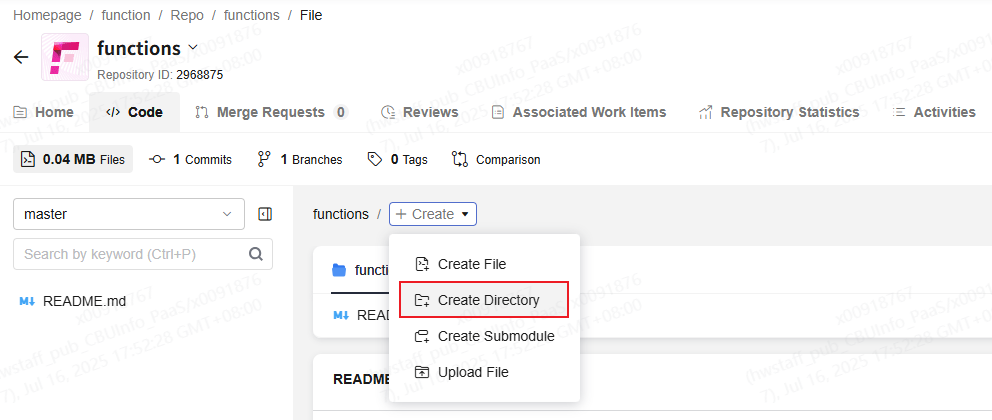

The deploy.py script will read the function configuration file cam.yaml and construct an hcloud command to update the function code and configuration. For details about the configurations in cam.yaml, see Analyzing cam.yaml. Logs generated when executing this script will be recorded in the /home/function/deploy/function.log file.
- Create another directory named helloworld, with a complete structure. Figure 2 Complete function directory structure
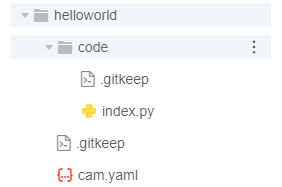
- helloworld: the helloworld function
- cam.yaml: the configuration file
- code: function code directory, which stores the index.py file
Parent topic: Hosting Function Code with CodeArts
What is your overall rating for this page?
0
1
2
3
4
5
6
7
8
9
10
Very dissatisfiedVery satisfied
Thank you very much for your feedback. We will continue working to improve the documentation.See the reply and handling status in My Cloud VOC.
The system is busy. Please try again later.
For any further questions, feel free to contact us through the chatbot.
Chatbot


