

Help Center/ TaurusDB/ Best Practices/ From ECS-hosted MySQL to TaurusDB/ Procedure/ ECS-hosted MySQL Server/ Creating a VPC and Security Group
Updated on 2026-08-18 GMT+08:00
Creating a VPC and Security Group
This section describes how to create a VPC and security group for your MySQL server and TaurusDB instance.
Creating a VPC
- Go to the Create VPC page.
- Configure required parameters.


- Click Create Now.
- Return to the VPC list and check whether the VPC is created.
If the VPC status becomes available, the VPC has been created.
Creating a Security Group
- Go to the Create Security Group page.
- In the displayed dialog box, configure parameters as needed.
- Click OK.
- Return to the security group list, locate the security group sg-mysql, and click its name.
- Click the Inbound Rules tab, and then click Add Rule.
- Configure an inbound rule to allow access from database port 3306.
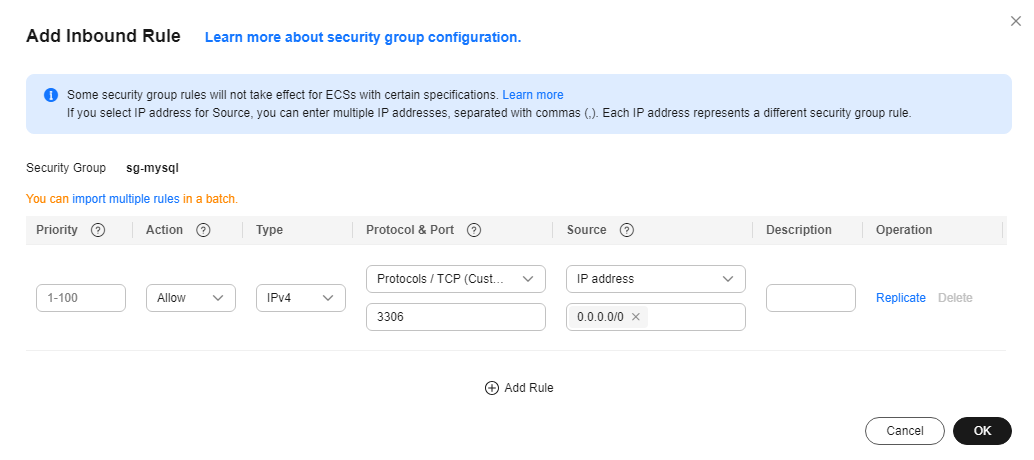
- Perform 5 and 6 to allow access from database port 22.
After the rules were configured, the figure similar to the following is displayed.

What is your overall rating for this page?
0
1
2
3
4
5
6
7
8
9
10
Very dissatisfiedVery satisfied
Thank you very much for your feedback. We will continue working to improve the documentation.See the reply and handling status in My Cloud VOC.
The system is busy. Please try again later.
For any further questions, feel free to contact us through the chatbot.
Chatbot


