

Help Center/ SecMaster/ User Guide (ME-Abu Dhabi Region)/ Security Orchestration/ Creating a Custom Layout/ Viewing a Layout Template
Updated on 2025-01-20 GMT+08:00
Viewing a Layout Template
Scenarios
There are many management page and details page templates, for example, alert, incident, and vulnerability management templates.
This section describes how to view layout templates you have.
Viewing a Layout Template
- Log in to the management console.
- Click
 in the upper part of the page and choose Security > SecMaster.
- In the navigation pane on the left, choose Workspaces > Management. In the workspace list, click the name of the target workspace. Figure 1 Workspace management page

- In the navigation pane on the left, choose . On the displayed page, click the Template tab. Figure 2 Layout template tab
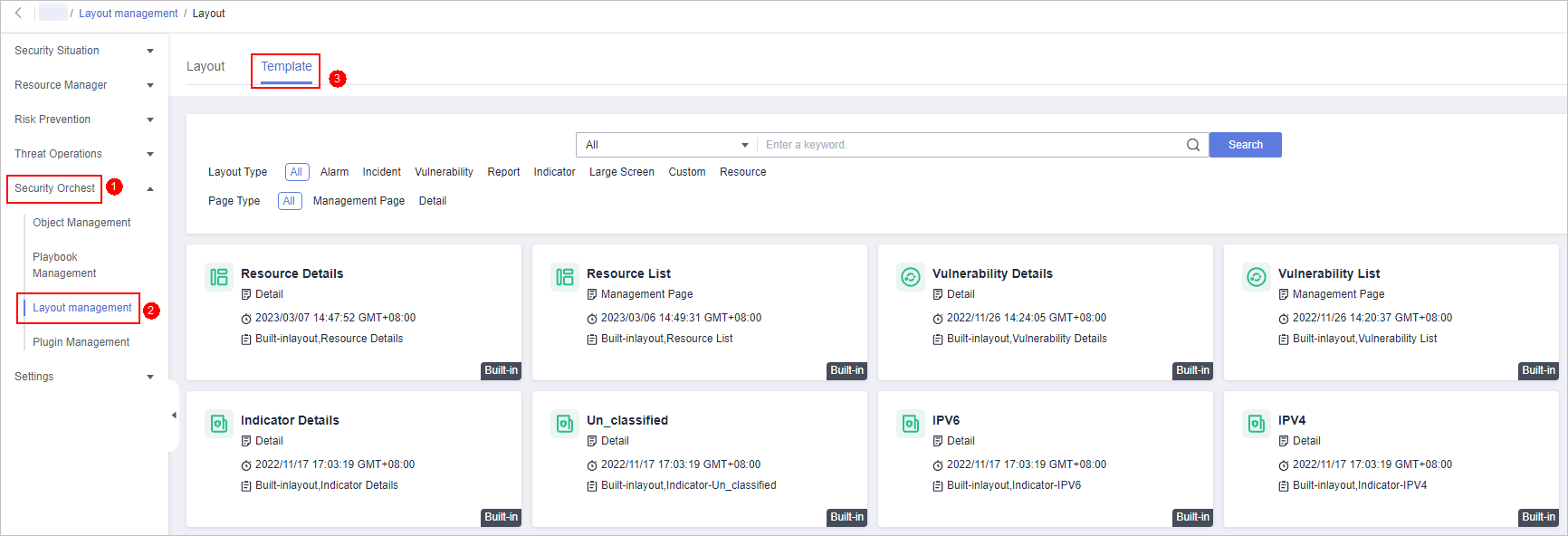
- On the Template tab, view the template information.
You can search for a specified layout template by Layout Type or Page Type.
- You can view the name, page type, and creation time of a template.
- You can edit the name and layout of a template.
Parent topic: Creating a Custom Layout
What is your overall rating for this page?
0
1
2
3
4
5
6
7
8
9
10
Very dissatisfiedVery satisfied
Thank you very much for your feedback. We will continue working to improve the documentation.See the reply and handling status in My Cloud VOC.
The system is busy. Please try again later.
For any further questions, feel free to contact us through the chatbot.
Chatbot


