

Updated on 2026-10-19 GMT+08:00
Recycle Bin
Scenarios
TaurusDB allows you to move unsubscribed yearly/monthly instances and deleted pay-per-use or serverless instances to the recycle bin. You can rebuild them from the recycle bin to restore data.
Constraints
- The recycle bin is enabled by default and cannot be disabled.
- Once an instance is deleted, the system keeps the most recent automated full backup of the previous day. If there is no automated full backup generated on that day, it retains the latest available one. A full backup is also triggered upon deletion. You can choose either backup to rebuild the instance.
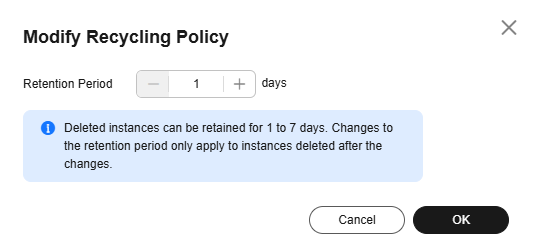
- Instances in the recycle bin are retained for one day by default. The updated recycling policy applies only to instances that were moved to the recycle bin after the change takes effect. Instances already in the recycle bin continue to follow the original policy.
Billing
Yearly/Monthly, pay-per-use, and serverless DB instances in the recycle bin are no longer billed, but manual backups retained for these DB instances are still billed. You can delete the manual backups to save costs. For details about backup pricing, see How Is TaurusDB Backup Data Billed?
Modifying a Recycling Policy
- Log in to the TaurusDB console.
- Click
 in the upper left corner and select a region.
 - On the Recycle Bin page, click Modify Recycling Policy. In the displayed dialog box, set Retention Period (value range: 1 to 7, in days). Figure 1 Modifying the recycling policy
- Click OK.
- After the modification is successful, click Modify Recycling Policy on the Recycle Bin page to view the new recycling policy.
What is your overall rating for this page?
0
1
2
3
4
5
6
7
8
9
10
Very dissatisfiedVery satisfied
Thank you very much for your feedback. We will continue working to improve the documentation.See the reply and handling status in My Cloud VOC.
The system is busy. Please try again later.
For any further questions, feel free to contact us through the chatbot.
Chatbot


