

Help Center/ TaurusDB/ User Guide/ Database Proxy (Read/Write Splitting)/ Changing Configurations of a Proxy Instance/ Binding an EIP to a Proxy Instance
Updated on 2026-09-16 GMT+08:00
Binding an EIP to a Proxy Instance
Scenarios
After a proxy instance is created, you can bind an EIP to it to access it over a public network. You can also unbind the EIP as needed.
Billing
Traffic generated by the public network is billed. You can unbind the EIP from your DB instance when the EIP is no longer used.
Procedure
- Log in to the TaurusDB console.
- Click
 in the upper left corner and select a region.
 - On the Instances page, click the instance name to go to the Basic Information page.
- In the navigation pane, choose Database Proxy.
- Click a proxy instance name to go to the Basic Information page.
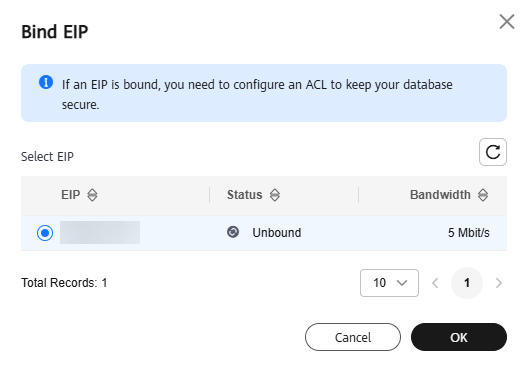
- In the Proxy Instance Information area, click Bind under Public IP Address (EIP).
- In the displayed dialog box, select an available EIP and click OK. Figure 1 Binding an EIP to a proxy instance
- On the Basic Information page, verify that the EIP has been bound to the proxy instance.
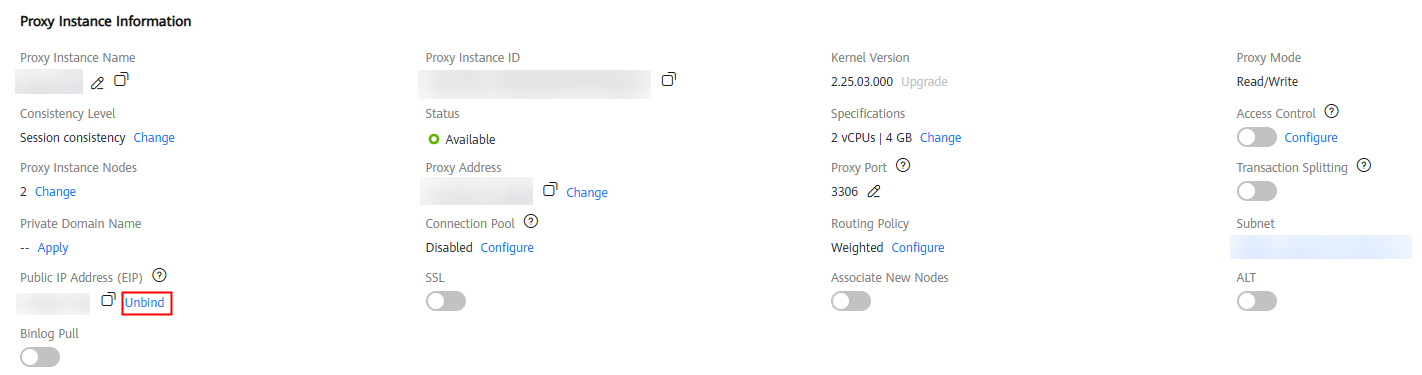
To unbind an EIP from the proxy instance, click Unbind under Public IP Address (EIP). In the displayed dialog box, click OK.
Figure 2 Unbinding an EIP from a proxy instance
What is your overall rating for this page?
0
1
2
3
4
5
6
7
8
9
10
Very dissatisfiedVery satisfied
Thank you very much for your feedback. We will continue working to improve the documentation.See the reply and handling status in My Cloud VOC.
The system is busy. Please try again later.
For any further questions, feel free to contact us through the chatbot.
Chatbot


