

Help Center/ Relational Database Service_RDS for MySQL/ User Guide/ Data Backup/ Binlog Cleanup/ Cleaning Up Binlogs
Updated on 2026-10-26 GMT+08:00
Cleaning Up Binlogs
Scenarios
You can clean up local binlogs with a few clicks for RDS for MySQL instances to free up storage space.
Local Binlog Settings and Cleanup
Based on the retention period defined in local binlog settings, the system purges binlogs that exceed the retention period.
Precautions
- There is a delay in cleaning up binlogs. Every time after cleaning up binlogs, check whether the storage occupied by these binlogs was released. Do not submit duplicate requests.
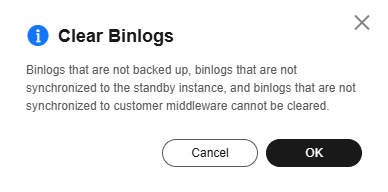
- The following binlogs cannot be cleaned up using this function:
- Local binlogs that are not backed up to OBS yet
- Binlogs that have not been synchronized to the standby instance
- Binlogs that have not been received by the incremental backup parsing tool
Procedure
- Log in to the RDS console.
- Click
 in the upper left corner and select a region.
- On the Instances page, click the target instance name.
- In the navigation pane, choose Backups & Restorations. On the Binlog Backups tab page, click Clear Binlogs.
- In the displayed dialog box, click OK. Figure 1 Binlog cleanup
What is your overall rating for this page?
0
1
2
3
4
5
6
7
8
9
10
Very dissatisfiedVery satisfied
Thank you very much for your feedback. We will continue working to improve the documentation.See the reply and handling status in My Cloud VOC.
The system is busy. Please try again later.
For any further questions, feel free to contact us through the chatbot.
Chatbot


