

Help Center/ Relational Database Service_RDS for MySQL/ User Guide/ Security and Encryption/ Using the Database of the Latest Version
Updated on 2026-09-18 GMT+08:00
Using the Database of the Latest Version
When the MySQL community releases new CVE vulnerabilities, we analyze the impacts of the vulnerabilities in a timely manner and determine patch release plans based on the analysis results. You are advised to upgrade your database and fix the vulnerabilities in a timely manner to prevent the vulnerabilities from affecting data security.
For more information about minor versions, see RDS for MySQL Kernel Version Description.
Procedure
- Log in to the RDS console.
- Click
 in the upper left corner and select a region.
- On the Instances page, click the primary instance name.
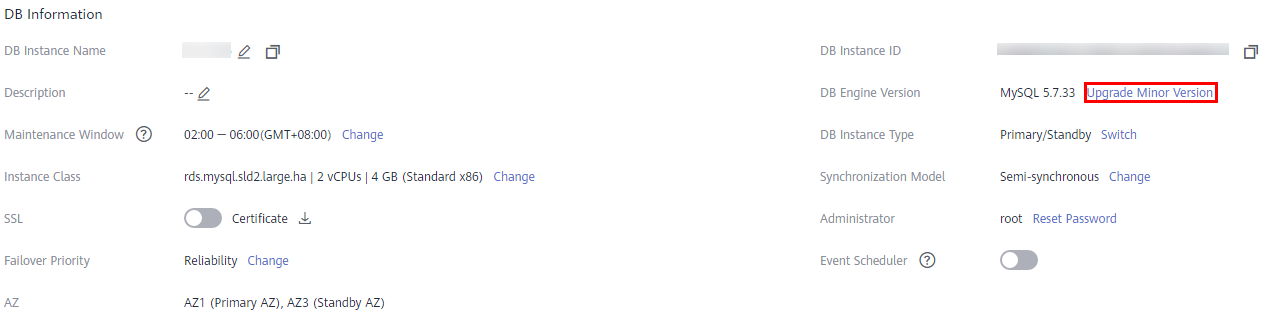
- On the Summary page, click Upgrade Minor Version next to DB Engine Version. Figure 1 Upgrading a minor version
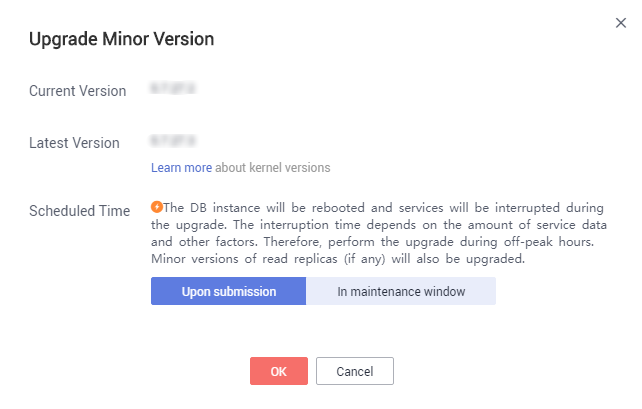
- In the displayed dialog box, select a scheduled time and click OK.
- Upon submission: The system upgrades the minor version immediately after you have submitted your upgrade request.
- In maintenance window: The system will upgrade the minor version during the maintenance window that you have configured.
Figure 2 Selecting a scheduled time
What is your overall rating for this page?
0
1
2
3
4
5
6
7
8
9
10
Very dissatisfiedVery satisfied
Thank you very much for your feedback. We will continue working to improve the documentation.See the reply and handling status in My Cloud VOC.
The system is busy. Please try again later.
For any further questions, feel free to contact us through the chatbot.
Chatbot


