

SET SESSION AUTHORIZATION
Function
During database O&M, administrators usually perform routine operations as themselves. However, in some scenarios, administrators need to perform operations as other users or verify permission configurations. For example, you may need to check whether a user's query permission is correct, execute a stored procedure as the target user, or verify whether the new permission takes effect after permission migration. If you log out of the current session and log in to the database as the target user each time, the operations are complex and the temporary objects and context in the current session will be interrupted.
The SET SESSION AUTHORIZATION statement allows administrators to switch the session user identifier and current user identifier of the current session to a specified role without re-login, so that they can continue to perform operations as the target user. After the operations are complete, you can run the RESET statement to restore the initial authentication user.
Precautions
The session identifier can be changed only when the initial session user has the system administrator rights. Otherwise, the system supports the command only when the authenticated user name is specified.
Syntax
- SET SESSION AUTHORIZATION sets the session user identifier and the current user identifier of the current session.
1SET [ SESSION | LOCAL ] SESSION AUTHORIZATION role_name PASSWORD '{password}';
- Reset the identifiers of the session and current users to the initially authenticated user names.
1
2
{SET [ SESSION | LOCAL ] SESSION AUTHORIZATION DEFAULT
    | RESET SESSION AUTHORIZATION};
Parameter Description
| Parameter | Description | Value Range |
|---|---|---|
| SESSION | Optional keyword. Specifies that this statement takes effect for the current session and remains effective throughout the lifetime of the current session. If SESSION and LOCAL are omitted, the default effect is the same as that of SESSION. | - |
| LOCAL | Optional keyword. Specifies that the command is valid only in the current transaction. After the transaction is committed or rolled back, the user identifier is restored to the status before the switching. The difference between this keyword and SESSION is that SESSION takes effect throughout the session, while LOCAL takes effect only in the current transaction. | - |
| role_name | Role name. Specifies the name of the target role to be switched to. | An existing role name |
| password | Specifies the password of a role. It must comply with the password convention. | - |
| DEFAULT | Reset the identifiers of the session and current users to the initially authenticated user names. | - |
Examples
- Set the current user to paul.
1SET SESSION AUTHORIZATION paul password '{password}';
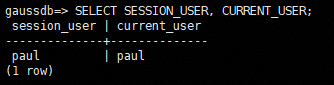
- Check the current session user and the current user to verify whether the identity switching is successful.
1SELECT SESSION_USER, CURRENT_USER;
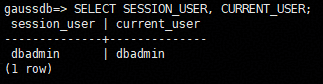
- Reset the current user to the initial authentication user.
1RESET SESSION AUTHORIZATION;
- Check whether the identity switching is successful.
1SELECT SESSION_USER, CURRENT_USER;
Helpful Links
FAQ
The Error Message "permission denied to set session authorization" Is Displayed When SET SESSION AUTHORIZATION Is Executed
- Cause: The current initial session user does not have the system administrator permissions and the password of the target role is not provided.
- Troubleshooting: Check whether the current user has the system administrator permissions. If the user does not have the system administrator permissions, the PASSWORD parameter must be specified in the command, and the password must be the same as the actual password of the target role.
What is your overall rating for this page?
Thank you very much for your feedback. We will continue working to improve the documentation.See the reply and handling status in My Cloud VOC.
For any further questions, feel free to contact us through the chatbot.
Chatbot


