

Unlocking an LDAP User in the MRS Cluster
To unlock a user who has been locked out due to excessive incorrect password attempts, log in to the MRS cluster node and run commands to unlock the user, or use Manager to unlock the user if they were created on Manager.
If the service is abnormal, the internal user of the system may be locked. Unlock the user promptly, or the cluster cannot run properly. For the internal user list, see MRS Cluster User Accounts. Internal users cannot be unlocked on Manager.
Unlocking a User Created on Manager
For MRS 3.x and later versions:
- Log in to FusionInsight Manager of the MRS cluster.
For details about how to log in to FusionInsight Manager, see Accessing MRS Manager.
- Choose System > Permission > User.
- Locate the row that contains the target user and click Unlock in the Operation column.
- In the window that is displayed, select I have read the information and understand the impact. Click OK.
For MRS 2.x and earlier:
- Log in to FusionInsight Manager of the MRS cluster.
For details about how to log in to FusionInsight Manager, see Accessing MRS Manager.
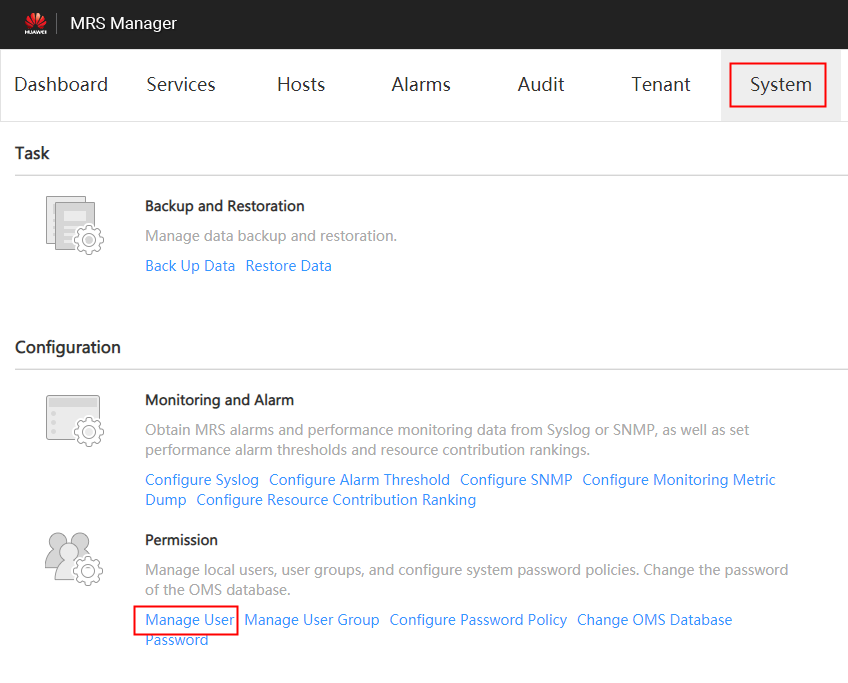
- Click System.
- In the Permission area, click Manage User. Figure 1 User management
- In the row of a user to be unlocked, click Unlock User. Figure 2 Unlocking a user
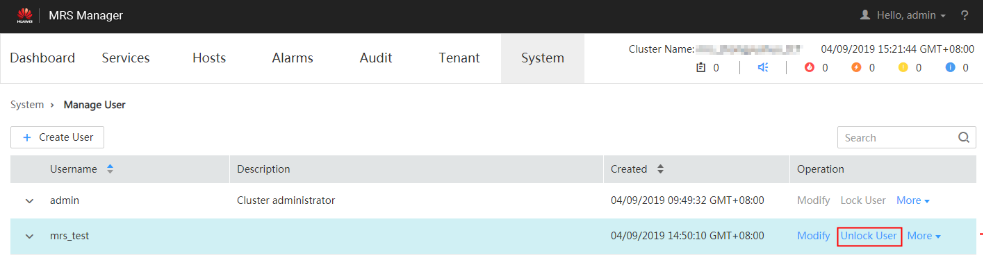
- In the window that is displayed, click OK to unlock the user.
Unlocking an Internal User
This function is available only in MRS 3.x or later.
- Use the following method to confirm whether the internal system username is locked:
- Method for obtaining the OLdap port number:
- Log in to Manager, choose .
- The LDAP Listening Port parameter value is oldap port.
- Method for obtaining the domain name:
- Log in to Manager, choose System > Permission > Domain and Mutual Trust.
- The Local Domain parameter value is the domain name.
For example, the domain name of the current system is 9427068F-6EFA-4833-B43E-60CB641E5B6C.COM.
- Run the following command on each node in the cluster as user omm to query the number of password authentication failures:
ldapsearch -H ldaps://OMS Floating IP Address:OLdap port -LLL -x -D cn=root,dc=hadoop,dc=com -b krbPrincipalName=Internal system username@Domain name,cn=Domain name,cn=krbcontainer,dc=hadoop,dc=com -w Password of LDAP administrator -e ppolicy | grep krbLoginFailedCount
- To obtain the floating IP address of OMS, log in to the Master2 node remotely, and run the ifconfig command. In the command output, eth0:wsom indicates the floating IP address of OMS. Record the value of inet. If the floating IP address of OMS cannot be queried on the Master2 node, switch to the Master1 node to query and record the floating IP address. If there is only one Master node, query and record the IP address on the Master node.
- Obtain the default password of LDAP administrator cn=root,dc=hadoop,dc=com by referring to MRS Cluster User Accounts.
For example, run the following command to check the number of password authentication failures for user oms/manager:
ldapsearch -H ldaps://10.5.146.118:21750 -LLL -x -D cn=root,dc=hadoop,dc=com -b krbPrincipalName=oms/manager@9427068F-6EFA-4833-B43E-60CB641E5B6C.COM,cn=9427068F-6EFA-4833-B43E-60CB641E5B6C.COM,cn=krbcontainer,dc=hadoop,dc=com -w Password of user cn=root,dc=hadoop,dc=com -e ppolicy | grep krbLoginFailedCount
krbLoginFailedCount: 5
- Log in to Manager, choose System > Permission > Security Policy > Password Policy.
- Check the value of the Password Retries parameter. If the value is less than or equal to the value of krbLoginFailedCount, the user is locked.
You can also check whether internal system users are locked by viewing run logs.
- Method for obtaining the OLdap port number:
- Log in to the active management node as user omm and run the following command to unlock the user:
sh ${BIGDATA_HOME}/om-server/om/share/om/acs/config/unlockuser.sh --userName Internal system username--pwdPolicyNamePassword policy
Example: sh ${BIGDATA_HOME}/om-server/om/share/om/acs/config/unlockuser.sh --userName oms/manager
Parameter --pwdPolicyName specifies the user password policy. This parameter is optional. When provided, it resets the user's password policy to the specified value and unlocks the user account.
If this script is used to unlock a human-machine user locked on MRS Manager and the user's password policy differs from the default, the --pwdPolicyName parameter must be provided to specify the correct policy. If the parameter is not specified, the password policy is automatically reset to the default. In other scenarios, you do not need to specify the --pwdPolicyName parameter


