

Changing the Passwords for Manager Users of an MRS Cluster
Passwords of human-machine system users must be regularly changed to ensure MRS cluster security. This section describes how to change passwords on Manager.
If you have the permission to use Manager, you can change the passwords on Manager.
If you do not have the permission to use Manager, you can change the passwords on the cluster client.
Impact on the System
If you have downloaded a user authentication file, download it again and obtain the keytab file after changing the password of the MRS cluster user.
Prerequisites
- You have obtained the current password policy. For details, see Configuring Password Policies for MRS Cluster Users.
- If you need to use a client to reset passwords, ensure that the cluster client has been installed on any node in the cluster.
Changing Passwords on Manager
- Log in to Manager as a user who has the user management permission, for example, admin.
For details about how to log in to MRS Manager, see Accessing MRS Manager.
- Hover over the username in the upper right corner of the page.
Choose Change Password.
Figure 1 Choosing Change Password
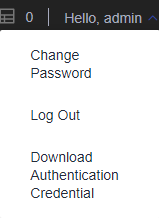
- On the displayed page, set Current Password, New Password, and Confirm Password, and click OK.
The default password complexity requirements are as follows:
- For MRS 2.x or earlier:
- The password must contain at least eight characters.
- The password must contain at least three types of the following: uppercase letters, lowercase letters, digits, spaces, and special characters '~!@#$%^&*()-_=+\|[{}];:'",<.>/?
- The password cannot be the username or the username spelled backwards.
- MRS 3.x or later:
- The password must contain at least eight characters.
- The password must contain at least four of the following character types: uppercase letters, lowercase letters, numbers, spaces, and special characters. Supported special characters: ~`!?,.;-_'(){}[]/<>@#$%^&*+|\=
- The password cannot be the same as the username or the username spelled backwards.
- The password cannot be a common or easily cracked password.
- The new password cannot be the same as any of the last N passwords. The value of N is determined by Repetition Rule in Configuring Password Policies for MRS Cluster Users.
- For MRS 2.x or earlier:
Changing Passwords on the Client
This function is only available in MRS 3.x or later.
- Log in to the node where the client is installed as the client installation user.
- Run the following command to switch to the client directory, for example, /opt/client:
cd /opt/client
- Run the following command to set environment variables:
source bigdata_env
- Change the user password.
kpasswd System username
For example, change the password of the system user test1.
kpasswd test1
Enter the old password as prompted and set a new password. The default password complexity requirements are as follows:
- The password must contain at least eight characters.
- The password must contain at least four of the following character types: uppercase letters, lowercase letters, numbers, spaces, and special characters. Supported special characters: ~`!?,.;-_'(){}[]/<>@#$%^&*+|\=
- The password cannot be the same as the username or the username spelled backwards.
- The password cannot be a common or easily cracked password.
- The new password cannot be the same as any of the last N passwords. The value of N is determined by Repetition Rule in Configuring Password Policies for MRS Cluster Users.
If an error occurs during the kpasswd command execution, try the following operations:
- Close the SSH session and reopen it.
- Run kdestroy and then kpasswd.


