

Help Center/ Cloud Firewall/ User Guide/ Access Control/ Configuring an Access Control Policy/ Example 2: Blocking Access from a Region
Updated on 2025-10-13 GMT+08:00
Example 2: Blocking Access from a Region
This section describes how to block access traffic from a region. For more parameter settings, see Configuring Protection Rules to Block or Allow Internet Border Traffic.
Blocking Access from a Region
The following figure shows a rule that blocks all access traffic from Ireland.
Figure 1 Intercepting the access traffic from Ireland
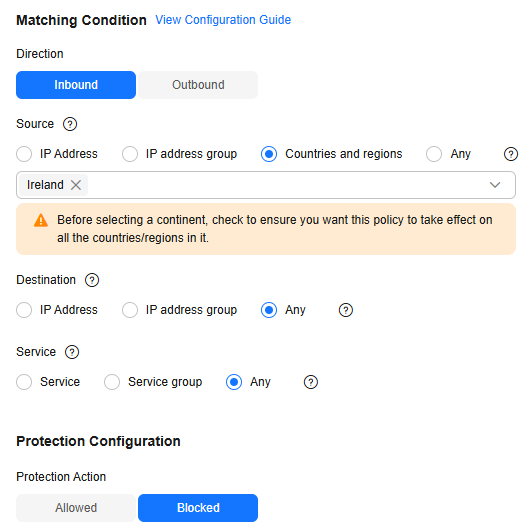
| Parameter | Example Value | Description |
|---|---|---|
| Direction | Inbound | Direction of the protected traffic. |
| Source | Countries and regions Ireland | Origin of network traffic. |
| Destination | Any | Receiver of network traffic. |
| Service | Any | Protocol, source port, and destination port of network traffic. |
| Action | Block | Action taken when traffic passes through the firewall. |
Follow-up Operations
Checking protection outcomes
- Policy hits: For details about the protection overview, see Viewing Protection Information Using the Policy Assistant. For details about logs, see Access Control Logs.
- For details about the traffic trend and statistics, see Traffic Analysis. For details about traffic records, see Traffic Logs.
References
- For details about protection rule parameters, see Configuring Protection Rules to Block or Allow Internet Border Traffic.
- For details about blacklist and whitelist configuration, see Adding Blacklist or Whitelist Items to Block or Allow Traffic.
- For details about how to batch add protection policies, see Importing and Exporting Protection Policies.
- For details about how to block network attacks, see Configuring Basic IPS Protection.
- For details about antivirus, see Configuring Virus Defense.
What is your overall rating for this page?
0
1
2
3
4
5
6
7
8
9
10
Very dissatisfiedVery satisfied
Thank you very much for your feedback. We will continue working to improve the documentation.
The system is busy. Please try again later.


