

Help Center/ Content Delivery Network/ User Guide/ Custom Domain Name Configuration/ Origin Settings/ Dynamic Content Pull Mode
Updated on 2026-06-17 GMT+08:00
Dynamic Content Pull Mode
This mode is used by CDN whole site acceleration to pull dynamic content from the origin server. CDN calculates the optimal route based on intelligent and real-time dynamic routing, improving network transmission stability and rate. You can choose to pull content from origin servers based on their weights.
Precautions
- The default pull mode for dynamic content is By performance.
- This function applies only to domain names whose Service Type is Whole site acceleration.
Procedure
- Log in to the CDN console.
- In the navigation pane, choose .
- In the domain list, click the target domain name or click Configure in the Operation column.
- Click the Origin Settings tab.
- In the Dynamic Content Pull Mode area, click Edit. Figure 1 Dynamic content pull mode
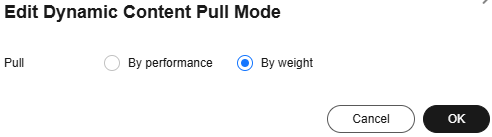
Table 1 Parameter description Pull Mode
Description
By performance
Default mode. CDN pulls content from the origin server with the shortest latency calculated through dynamic routing. This improves user experience, but cannot implement load balancing.
By weight
CDN pulls content from all origin servers weighted as configured, ensuring load balancing.
- Select a pull mode and click OK.
Parent topic: Origin Settings
What is your overall rating for this page?
0
1
2
3
4
5
6
7
8
9
10
Very dissatisfiedVery satisfied
Thank you very much for your feedback. We will continue working to improve the documentation.
The system is busy. Please try again later.


