

Updated on 2026-08-29 GMT+08:00
Overview
Built on container operations expertise, health diagnosis continuously monitors cluster and workload health to detect faults and identify risks in a timely manner. It also provides rectification suggestions.
Health Diagnosis Coverage
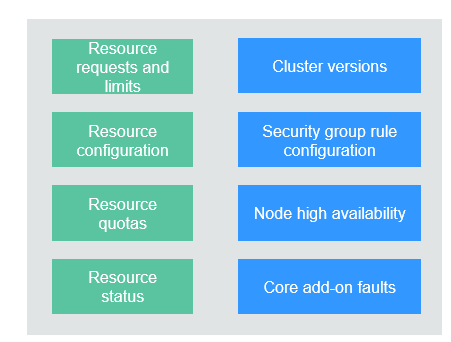
The following figure shows the health diagnosis coverage.
Figure 1 Health diagnosis coverage
Health Diagnosis Capabilities
- Out-of-the-box diagnosis (without Monitoring Center enabled)
- Comprehensive check of cluster health (with Monitoring Center enabled)
- Health scores based on diagnosis results
- Scheduled inspection and visualized inspection results
- Inspection history for analyzing fault causes
- Risk levels and rectification suggestions
Applications
- You can check the cluster health before a cluster change and perform health diagnosis at any time.
- You can set a scheduled inspection to identify cluster risks on schedule.
Health diagnosis leverages operations expertise and focuses on common fault cases. It checks the following dimensions.
| Category | Inspection Item |
|---|---|
| Operations |
|
| Resources and services |
|
For more information, see Diagnosis Items and Rectification Solutions.
Helpful Links
- Cluster Diagnosis: diagnoses clusters, nodes, workloads, core add-ons, and external dependencies to help you locate issues.
- Workload Diagnosis: uses Kubernetes-native APIs, events, logs, and metrics to comprehensively analyze issues and provide specific remediation suggestions.
What is your overall rating for this page?
0
1
2
3
4
5
6
7
8
9
10
Very dissatisfiedVery satisfied
Thank you very much for your feedback. We will continue working to improve the documentation.
The system is busy. Please try again later.


