

Help Center/ Cloud Bastion Host/ User Guide/ Resource/ Managing Container Resources/ Managing Kubernetes Servers
Updated on 2026-11-09 GMT+08:00
Managing Kubernetes Servers
After Kubernetes servers are managed by a bastion host, you can delete managed servers or modify information at any time.
Constraints
- The number of managed Kubernetes servers is restricted by the bastion host license you hold.
- You must have the permission to perform operations on the Kubernetes Server.
- To use this function, the bastion host version must be V3.3.48.0 or later.
Modifying Kubernetes Server Information
- Log in to your bastion host system.
- Choose Resource > Cloud Service. The Cloud Service is displayed.
- Click Kubernetes Server. The Kubernetes Server page is displayed.
- In the Operation column of the server whose information is to be modified, click Manage. Figure 1 Editing a Kubernetes server
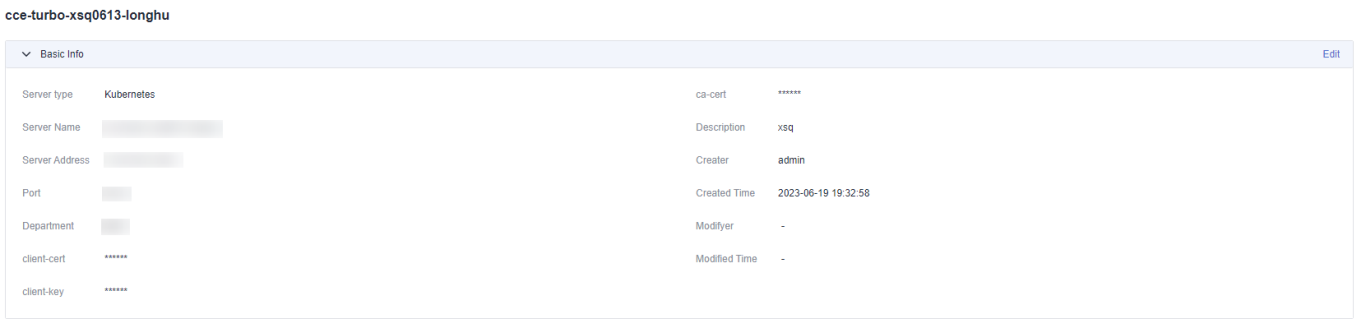
- Click Edit in the upper left corner to modify the Kubernetes server information. For details about the parameters, see Table 1.
- Click OK. The Kubernetes server information is modified.
Deleting a Kubernetes Server

- If a Kubernetes server is deleted, the containers associated with the server will also be deleted. Exercise caution when performing this operation.
- If you delete a server, resources that are using the server will be disconnected from the bastion host immediately. No more operations can be performed for the resources. Exercise caution when performing this operation.
- Log in to your bastion host system.
- Choose Resource > Cloud Service. The Cloud Service is displayed.
- Click Kubernetes Server. The Kubernetes Server page is displayed.
- In the Operation column of the server to be deleted, click Delete.
- Click OK. The Kubernetes server information is deleted.
Parent topic: Managing Container Resources
What is your overall rating for this page?
0
1
2
3
4
5
6
7
8
9
10
Very dissatisfiedVery satisfied
Thank you very much for your feedback. We will continue working to improve the documentation.
The system is busy. Please try again later.


