

Development Tools Supported by DLI
DLI offers a variety of client connection methods to cater to diverse user needs and scenarios. This section provides an overview of these supported connection types and their specific use cases.
In big data analysis and processing environments, you often need to choose the most suitable client connection method to access DLI based on your requirements. However, without sufficient knowledge of the available options, selecting the right approach can be challenging. To address this, DLI supports multiple client connection methods tailored to different user needs and applications.
This section will walk you through the various connection methods supported by DLI and their respective use cases, enabling you to make informed decisions for your specific needs.
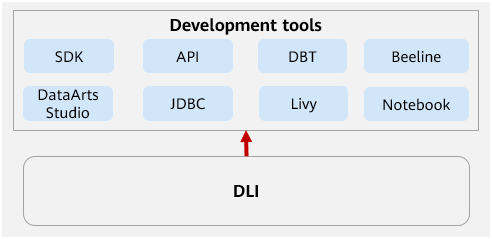
| Connection Method | Description | Supported Job Type | Application Scenario | Helpful Link |
|---|---|---|---|---|
| DLI management console | On the DLI management console, you can intuitively manage and use DLI, including creating elastic resource pools, adding or managing queues, submitting jobs, and monitoring job execution statuses. |
| Offers a graphical user interface (GUI) that is simple and intuitive, ideal for users unfamiliar with command-line operations. | For details about how to use the DLI console, see DLI Job Development Process. |
| DLI API | DLI offers a wide range of APIs that allow you to programmatically manage and use DLI, including creating queues, submitting jobs, and querying job statuses. |
| This method is ideal for users with foundational programming skills, enabling automated management and operations via APIs to enhance work efficiency. | For details, see Data Lake Insight API Reference. |
| DLI SDK | DLI offers SDKs in various languages (such as Python and Java), enabling you to integrate DLI into your own applications for implementing more complex business logic. |
| This method offers more functions and greater flexibility, ideal for users seeking deep integration of DLI within their applications. | You are advised to use DLI SDK V2. For details about how to use DLI SDKs, see Data Lake Insight SDK Reference. |
| Using JDBC | DLI supports JDBC connections. You can use JDBC tools (such as DBeaver and SQuirreL SQL) to connect to DLI and execute SQL statements for data query and analysis. | SQL job | Standard JDBC APIs are supported, ensuring high compatibility. | |
| Submitting a DLI job using DataArts Studio | DLI is deeply integrated with the Huawei Cloud DataArts Studio console. You can use DataArts Studio to achieve one-stop data development and analytics, including data integration, development, and governance. |
| This method provides a one-stop data development and analysis platform, streamlining data processing and analysis processes and enhancing development efficiency. | |
| Submitting a Spark job using Livy | Submit Spark jobs to DLI based on the open-source Apache Livy. | Spark job | Livy offers reliable REST APIs, ideal for submitting and managing Spark jobs in production environments. | |
| DBT | Data Build Tool (DBT) is an open-source data modeling and conversion tool that runs in Python environments. | SQL job | Connecting DBT to DLI can define and execute SQL transformations, supporting the entire data lifecycle management from integration to analysis. It is suitable for large-scale data analysis projects and complex data analysis scenarios. | Configuring DBT to Connect to DLI for Data Scheduling and Analysis |
| Beeline | Beeline is one of the essential tools for data analysts and data engineers. | SQL job | It is applicable to large-scale data processing scenarios. With its SQL engine, Beeline enables you to execute data queries, analysis, and management tasks using SQL language. | Configuring Beeline to Connect to DLI Using Kyuubi for Data Query and Analysis |


