

Updated on 2023-11-28 GMT+08:00
Setting Domains
- Domains can be added, edited, or deleted in a project.
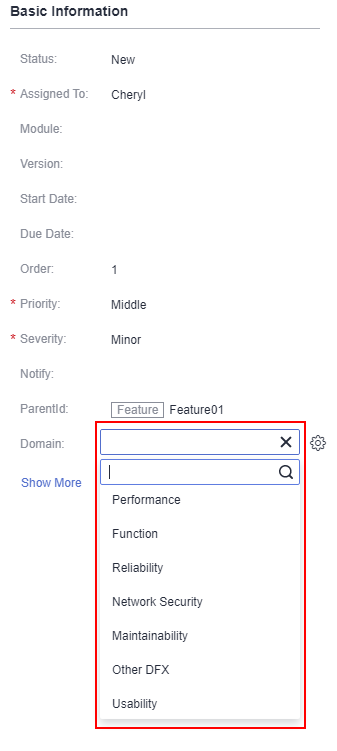
- You can select a domain when creating and editing a work item.
The default domains include performance, function, reliability, network security, maintainability, other DFX, and usability. You can add domains as required.
Procedure
- Go to the project details page.
- Choose .
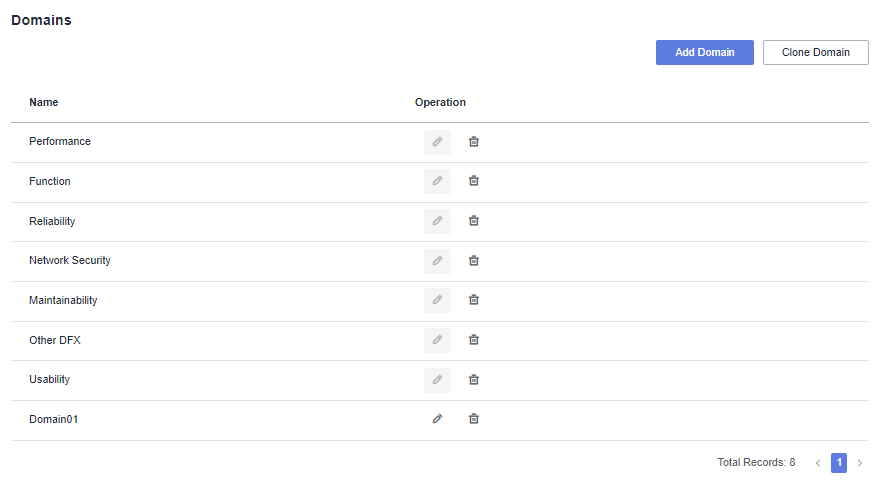
- Click
 to modify the corresponding project domain.
The system domain cannot be edited.
- Click
 to delete the corresponding project domain.
 - On the page for creating or editing a work item, select an added domain in the Domain field.
Parent topic: Configuring a Project
What is your overall rating for this page?
0
1
2
3
4
5
6
7
8
9
10
Very dissatisfiedVery satisfied
Thank you very much for your feedback. We will continue working to improve the documentation.
The system is busy. Please try again later.


