

Updated on 2025-07-17 GMT+08:00
Viewing Details About an OU
After an OU is created, you can view its details any time by following the steps below.
- Log in to Huawei Cloud as the organization administrator or using the management account, navigate to the Organizations console, and access the Organization page.
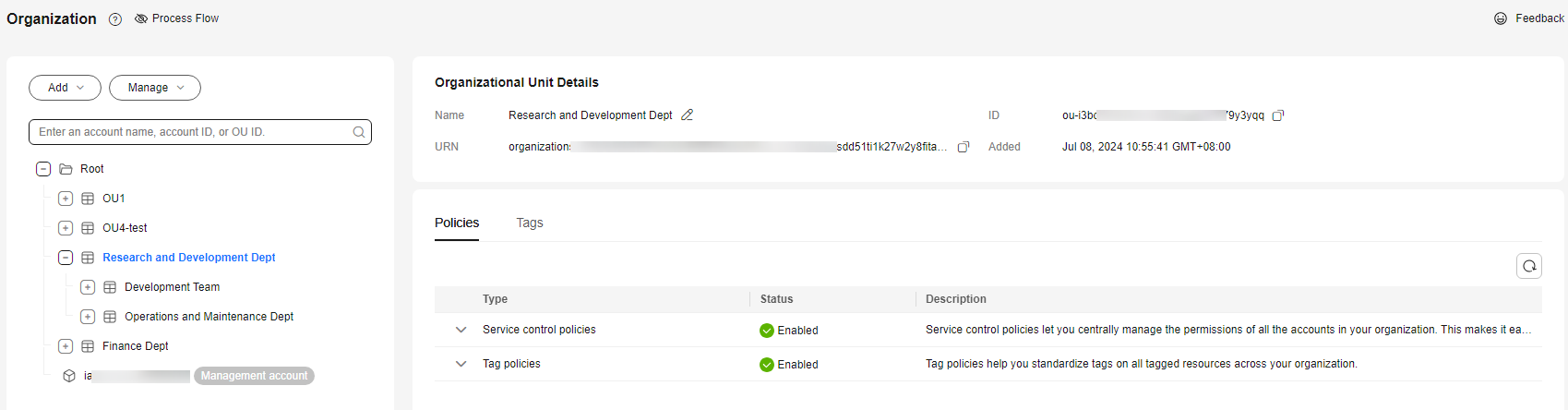
- Click the OU you want to view. Its details are displayed on the right of the OU tree, including the OU name, ID, URN, time of creation, policies, and tags. Figure 1 Viewing details about an OU
Parent topic: Managing OUs
What is your overall rating for this page?
0
1
2
3
4
5
6
7
8
9
10
Very dissatisfiedVery satisfied
Thank you very much for your feedback. We will continue working to improve the documentation.
The system is busy. Please try again later.


