

Help Center/ CodeArts Repo/ User Guide/ Configuring Repository Settings/ Configuring the Repository Settings/ Configuring Repository Information
Updated on 2025-03-27 GMT+08:00
Configuring Repository Information
Constraints
- You must have the set permission on the repository to configure the repository information. For details, see Configuring Repo-Level Permissions.
Configuring Repository Information
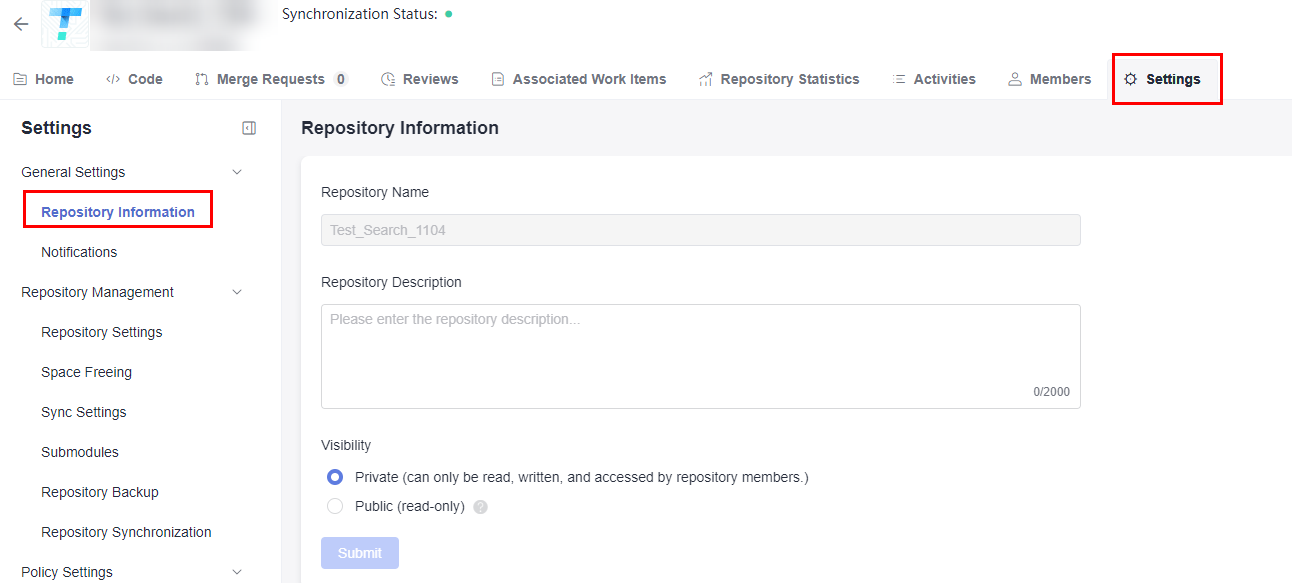
Go to the repository homepage to be configured, as shown in the following figure. In the navigation pane, choose Settings > General Settings > Repository Information. You can modify the repository's description and visibility on this page.
Figure 1 Repository information settings page
Parent topic: Configuring the Repository Settings
What is your overall rating for this page?
0
1
2
3
4
5
6
7
8
9
10
Very dissatisfiedVery satisfied
Thank you very much for your feedback. We will continue working to improve the documentation.
The system is busy. Please try again later.


