

Updated on 2025-03-17 GMT+08:00
How Do I Apply for a Higher Quota?
How Do I Apply for a Higher Quota?
- Log in to the management console.
- In the upper right corner of the page, choose Resources > My Quotas.
The Service Quota page is displayed.
Figure 1 My quotas
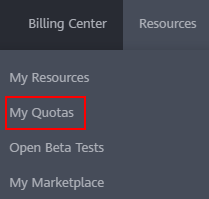
- Click Increase Quota.
- On the Create Service Ticket page, configure parameters as required.
In the Problem Description area, fill in the content and reason for adjustment.
- Select the agreement and click Submit.
Parent topic: DLI Resource Quotas
What is your overall rating for this page?
0
1
2
3
4
5
6
7
8
9
10
Very dissatisfiedVery satisfied
Thank you very much for your feedback. We will continue working to improve the documentation.
The system is busy. Please try again later.


