

Updated on 2026-08-05 GMT+08:00
Why Does Account Login Fail?
Symptom
When you log in to IAM using an account, the system displays a message indicating that your account name or password is incorrect.
Possible Causes
- The login link is incorrect.
- The login ID is incorrect.
- The password is incorrect.
Solutions
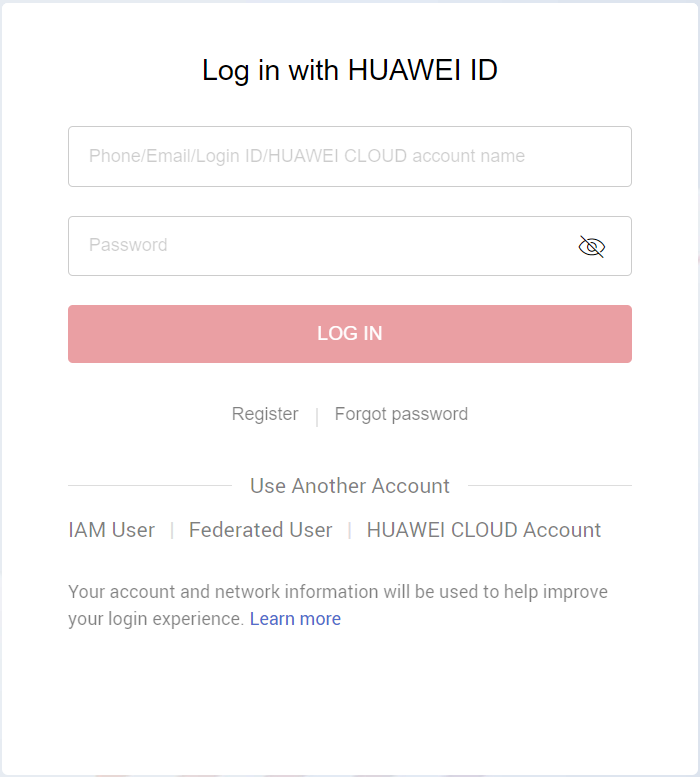
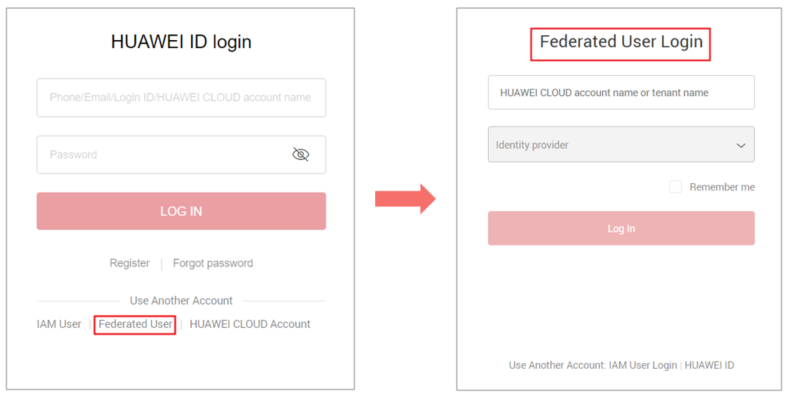
- Use the correct login link and enter a HUAWEI ID or Huawei Cloud account. If you have already upgraded your account to a HUAWEI ID, choose the HUAWEI ID login method, as shown in Figure 1. If you are still using a Huawei Cloud account, choose the account login method as shown in Figure 2.
- To log in as a federated user, see Logging In to Huawei Cloud.
- If you are an IAM user, log in by choosing IAM User on the login page. If the login fails, see Why Does IAM User Login Fail?.
- When logging in with a HUAWEI ID, enter the mobile number, email address, login ID, or Huawei Cloud account name. When logging in with a Huawei Cloud account, enter the name or email address of the account.
- If you have a HUAWEI ID, enter the mobile number or email address associated with the HUAWEI ID, or enter the login ID of this HUAWEI ID. For details, see Logging In Using a HUAWEI ID.
- If you do not have a HUAWEI ID but have a Huawei Cloud account, which has not been upgraded to a HUAWEI ID, enter the Huawei Cloud account name.
- If you log in with a HUAWEI ID, enter the password of the HUAWEI ID. If you log in with a Huawei Cloud account, enter the password of the Huawei Cloud account.
Parent topic: Account Management
What is your overall rating for this page?
0
1
2
3
4
5
6
7
8
9
10
Very dissatisfiedVery satisfied
Thank you very much for your feedback. We will continue working to improve the documentation.
The system is busy. Please try again later.


