

Help Center/ Server Migration Service/ FAQs/ Agent Installation and Startup/ How Do I Configure Certificate Verification in the SMS-Agent Configuration File?
Updated on 2025-07-30 GMT+08:00
How Do I Configure Certificate Verification in the SMS-Agent Configuration File?
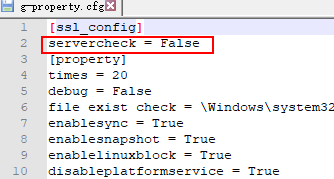
You can enable or disable certificate verification for requests from SMS-Agent to Huawei Cloud APIs. To do so, you need to configure the servercheck parameter in the SMS-Agent configure file g-property.cfg which is located in the SMS-Agent installation directory.
- If servercheck is set to True, certificate verification is enabled. When an API request is sent, certificate verification is performed.
- If servercheck is set to False, certificate verification is disabled. In this case, certificate verification is not performed when an API request is sent.
What is your overall rating for this page?
0
1
2
3
4
5
6
7
8
9
10
Very dissatisfiedVery satisfied
Thank you very much for your feedback. We will continue working to improve the documentation.
The system is busy. Please try again later.


