

Help Center/ Message & SMS/ API Reference/ APIs/ Application and Template APIs/ Obtaining Required Information/ Obtaining Account, User, and Project Information
Updated on 2026-02-11 GMT+08:00
Obtaining Account, User, and Project Information
- Using the console
- On the Huawei Cloud homepage, click Console in the upper right corner.
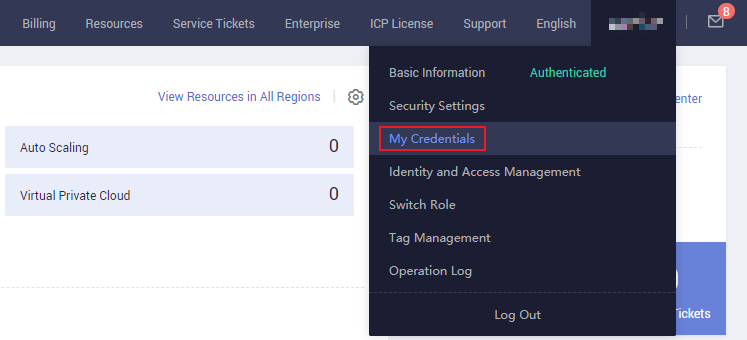
- Hover over the username in the upper right corner and choose My Credentials. Figure 1 My Credentials
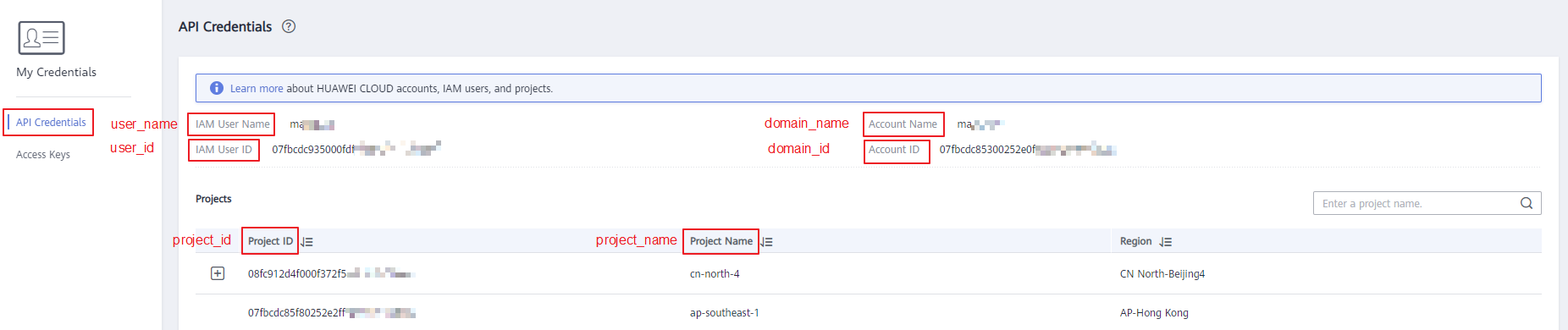
- View the account name, account ID, username, user ID, project name, and project ID on the API Credentials page. Figure 2 Viewing the account, user, and project information
- Calling an API
- For details about how to obtain a user ID, see Listing IAM Users.
- For details about how to obtain a project ID, see Querying Project Information.
Parent topic: Obtaining Required Information
What is your overall rating for this page?
0
1
2
3
4
5
6
7
8
9
10
Very dissatisfiedVery satisfied
Thank you very much for your feedback. We will continue working to improve the documentation.
The system is busy. Please try again later.


