

Help Center/ Cloud Eye/ User Guide/ Cloud Resource Monitoring/ Server Monitoring/ Cloud Eye Plug-in (Agent)/ Installing the Agent/ Installing the Agent on a Linux Server/ Installing the Agent on a Linux Server
Updated on 2025-12-02 GMT+08:00
Installing the Agent on a Linux Server
This topic describes how to manually install the Agent on a Linux server.
Constraints
Only Windows and Linux are supported.
Prerequisites
- Required permissions have been granted to the Agent in the current region. For details, see Granting Agent Permissions for Servers by Clicking Configure.
- You have modified DNS server addresses and added security group rules. For details, see Modifying the DNS Server Address and Adding Security Group Rules
- You have the read and write permissions for the installation directories. The Telescope process will not be stopped by other software after the installation.
Procedure
- Log in to a server as user root.
- Run either of the commands below to install the Agent.
cd /usr/local && curl -k -O https://uniagent-eu-west-101.obs.eu-west-101.myhuaweicloud.eu/package/agent_install.sh && bash agent_install.sh -r eu-west-101 -u 0.2.3 -t 2.7.6 -o myhuaweicloud.eu -d agent.ces.myhuaweicloud.eu
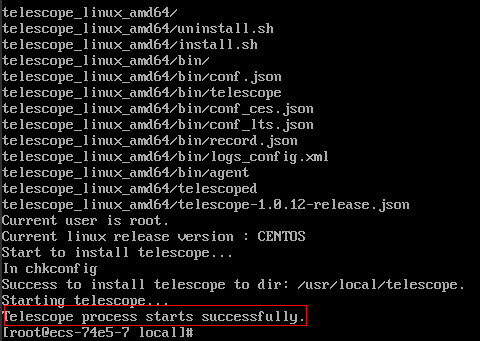
The Agent is installed if the command output similar to the following figure is displayed.Figure 1 Successful installation
- Clear the installation script.
if [[ -f /usr/local/uniagent/extension/install/telescope/bin/telescope ]]; then rm /usr/local/agent_install.sh; else rm /usr/local/agentInstall.sh; fi

After you configure the Agent, its status is still displayed as Uninstalled because the monitoring data has not been reported yet. Wait for 3 to 5 minutes and refresh the page.
What is your overall rating for this page?
0
1
2
3
4
5
6
7
8
9
10
Very dissatisfiedVery satisfied
Thank you very much for your feedback. We will continue working to improve the documentation.
The system is busy. Please try again later.


