

Configuring Passthrough Networking for a LoadBalancer Service
Applications
kube-proxy, which is responsible for forwarding intra-cluster traffic, adds the IP addresses of load balancers associated with the LoadBalancer Services to nodes' local forwarding rules by default. When a client from within a cluster accesses the IP address of a load balancer, the traffic is directly forwarded to the destination instead of being forwarded by the load balancer.
Solution
CCE supports passthrough networking. You can configure the kubernetes.io/elb.pass-through annotation for the LoadBalancer Services so that the load balancers forward the intra-cluster access to the IP addresses of the load balancers associated with the Services to their backend pods.
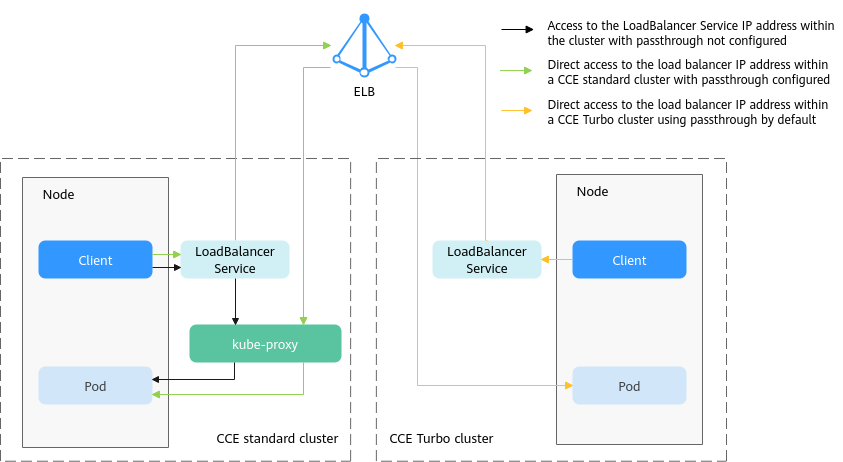
- CCE standard clusters
When a LoadBalancer Service is accessed from within the cluster, traffic is routed to the backend pods using iptables or IPVS by default.
When a LoadBalancer Service (configured with elb.pass-through) is accessed from within the cluster, traffic is first forwarded to the load balancer, then to the nodes, and finally routed to the backend pods using iptables or IPVS.
Constraints
- This function is only available in clusters v1.19 and later.
- In IPVS, the passthrough settings of Services connected to the same load balancer must be the same.
- If node-level (local) service affinity is used, kubernetes.io/elb.pass-through is automatically set to onlyLocal to enable passthrough networking.
Procedure
This section describes how to create a Deployment using an Nginx image and create a Service with passthrough networking enabled.
- Use kubectl to access the cluster. For details, see Accessing a Cluster Using kubectl.
- Use the Nginx image to create a Deployment.
Create an nginx-deployment.yaml file. The file content is as follows:
apiVersion: apps/v1
kind: Deployment
metadata:
  name: nginx
spec:
  replicas: 2
  selector:
    matchLabels:
      app: nginx
  template:
    metadata:
      labels:
        app: nginx
    spec:
      containers:
      - image: nginx:latest
        name: container-0
        resources:
          limits:
            cpu: 100m
            memory: 200Mi
          requests:
            cpu: 100m
            memory: 200Mi
      imagePullSecrets:
      - name: default-secret
Deploy the workload.kubectl create -f nginx-deployment.yaml - Create a LoadBalancer Service and set kubernetes.io/elb.pass-through to true. The content of the nginx-elb-svc.yaml file is shown below. In this example, a shared load balancer named james is automatically created.
apiVersion: v1 kind: Service metadata: annotations: kubernetes.io/elb.pass-through: "true" kubernetes.io/elb.class: union kubernetes.io/elb.autocreate: '{"type":"public","bandwidth_name":"cce-bandwidth","bandwidth_chargemode":"bandwidth","bandwidth_size":5,"bandwidth_sharetype":"PER","eip_type":"5_bgp","name":"james"}' labels: app: nginx name: nginx spec: externalTrafficPolicy: Local ports: - name: service0 port: 80 protocol: TCP targetPort: 80 selector: app: nginx type: LoadBalancer - Create the Service.
kubectl create -f nginx-elb-svc.yaml
Verification
- Log in to the ELB console and check the load balancer (named james in this example) associated with the Service.
- Click the load balancer name and click the Monitoring tab.
There are 0 connections to the load balancer.

- Log in to an Nginx container in the cluster using kubectl and access the IP address of the load balancer.
- Obtain the Nginx containers in the cluster.
kubectl get pod
Information similar to the following is displayed:NAME READY STATUS RESTARTS AGE nginx-7c4c5cc6b5-vpncx 1/1 Running 0 9m47s nginx-7c4c5cc6b5-xj5wl 1/1 Running 0 9m47s
- Log in to an Nginx container.
kubectl exec -it nginx-7c4c5cc6b5-vpncx -- /bin/sh - Access the load balancer IP address.
curl **.**.**.**
- Obtain the Nginx containers in the cluster.
- Wait for a while and check the monitoring data on the ELB console.
If a new access connection is displayed, the load balancer can forward access as expected.


