

Configuring Dumping for MRS Cluster Audit Logs
During MRS cluster O&M, MRS Manager automatically records audit logs for all user operations and management activities. These logs are used for security auditing and operation tracing. By default, audit logs are stored in the MRS Manager database. As the cluster runs over time, audit logs continue to accumulate, which may consume excessive disk space in the data directory and affect normal cluster operation. To release local disk space and retain audit logs for long-term storage, administrators need to periodically dump audit logs to an external archive server, such as an SFTP server or OBS. This section describes how to configure MRS cluster audit log dumping to an SFTP server or OBS.
- Audit log: Records all user operations and management activities in an MRS cluster, including login, configuration changes, service start/stop operations, and other activities. It records information such as the operator, operation time, operation details, and operation result, and is used for security auditing.
- Dumping: Refers to the process of automatically exporting audit logs from the MRS Manager database to an external server (SFTP or OBS). After dumping, archived logs are deleted from the database to release local storage space.
- Service audit log: Records service-level operations performed by MRS cluster components. These logs are automatically compressed and stored every day.
- Management audit log: Records management operations performed at the MRS Manager layer, such as user logins, permission changes, and configuration modifications.
If audit log dumping is not configured, when the number of audit logs reaches 100,000, the system automatically saves these audit logs to files. The files are stored in the following directory on the active management node: ${BIGDATA_DATA_HOME}/dbdata_om/dumpData/iam/operatelog. The file name format is OperateLog_store_YY_MM_DD_HH_MM_SS.csv. A maximum of 50 historical audit log files can be saved.
Archived audit logs will not be displayed on MRS Manager. Instead, only new audit logs generated are displayed.
Notes and Constraints
- Clusters of MRS 3.x or later support audit log dumping to an SFTP server.
- Clusters of versions earlier than MRS 3.x support audit log dumping to an OBS file system.
Configuring Audit Log Dumping to an SFTP Server
- Log in to FusionInsight Manager of the MRS cluster.
For details about how to log in to FusionInsight Manager, see Accessing MRS Manager.
- Choose Audit > Configuration.
- Click the switch on the right of Audit Log Dumping Flag.
Audit Log Dump is disabled by default. If
 is displayed, Audit Log Dump is enabled.
 - Set dumping parameters based on Table 1. Figure 1 Dumping parameters
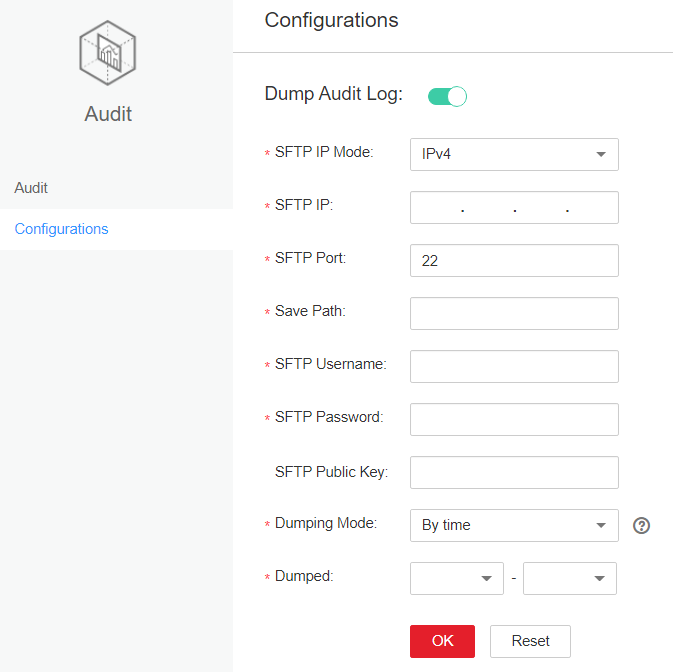
Table 1 Audit log dump parameters Parameter
Example Value
Description
SFTP IP Mode
IPv4
Mode of the destination IP address. The value can be IPv4 or IPv6.
SFTP IP
192.168.xxx.xxx
SFTP server for storing dumped audit logs. You are advised to use the SFTP service based on SSH v2 to prevent security risks.
SFTP Port
22
Connection port of the SFTP server for storing dumped audit logs
Save Path
/opt/omm/oms/auditLog
Path for storing audit logs on the SFTP server
SFTP Username
root
User name for logging in to the SFTP server
SFTP Password
-
Password for logging in to the SFTP server
SFTP Public Key
-
(Optional) Public key of the SFTP server. Set this parameter to the public key of the SFTP server; or, there may be security risks.
Dumping Mode
By Quantity
Dump mode. Value options are as follows:
- By Quantity: If the number of pieces of logs reaches the value of this parameter (100000 by default), the logs are dumped.
- By Time: specifies the date when logs are dumped. The dumping frequency is once a year.
Dumping Date
11-06
This parameter is available only when Dumping Mode is set to By time. After you select a dump date, the system starts dumping on this date. The logs to be dumped include all the audit logs generated before January 1 00:00 of the current year.
If the SFTP public key is empty, the system displays a security risk warning. Evaluate the security risk and then save the configuration.
- Click OK to complete the settings. Key fields in the audit log dump file are as follows:
- USERTYPE indicates the user type. Value 0 indicates the Human-machine user, and value 1 indicates the Machine-machine user.
- LOGLEVEL indicates the security level. Value 0 indicates Critical, value 1 indicates Major, value 2 indicates Minor, and value 3 indicates Warning.
- OPERATERESULT indicates the operation result. Value 0 indicates that the operation succeeded, and value 1 indicates that the operation failed.
Verification:
After completing the configuration, wait until the audit logs meet the dump conditions (100,000 logs for quantity-based dumping or the specified date for time-based dumping). Then log in to the SFTP server and check whether audit log dump files are generated in the specified directory. If the files exist and are not empty, the dump configuration is successful.
Configuring Audit Log Dumping to OBS
Storing MRS audit logs in the system may result in insufficient disk space of the data directory. To facilitate audit log management, you can enable automatic export of audit logs to a specified directory on the OBS server.
Audit logs exported to the OBS server include service audit logs and management audit logs.
- For MRS clusters earlier than 3.x, service audit logs are automatically compressed and stored in the /var/log/Bigdata/audit/bk/ directory on the active management node at 03:00:00 every day. Log files are named in the format of <yyyy-MM-dd_HH-mm-ss>.tar.gz. By default, only log files generated within the past seven days are stored, while those generated beyond seven days are automatically deleted.
- Management audit logs are exported to OBS starting from the date of the last export until the current execution date of the export task. When there are 100,000 entries in a management audit log file, the system automatically dumps the first 90,000 entries to a local file and keeps the remaining 10,000 in the database. Dumped log files are saved in the ${BIGDATA_DATA_HOME}/dbdata_om/dumpData/iam/operatelog directory of the active management node. These files are named in the format of OperateLog_store_YY_MM_DD_HH_MM_SS.csv. A maximum of 50 historical audit log files can be saved.
Prerequisites
- You have obtained the access key ID (AK) and secret access key (SK) of the account.
- A parallel file system has been created in OBS.
Procedure
- Log in to FusionInsight Manager of the MRS cluster.
For details about how to log in to FusionInsight Manager, see Accessing MRS Manager.
- Click System.
- Choose Export Audit Log under Maintenance.
Table 2 Parameters for exporting audit logs Parameter
Example Value
Description
Export Audit Log
On
(Mandatory) Whether to enable audit log export. The options are:
- On: Audit log export is enabled.
- Off: Audit log export is disabled.
Started
07/24/2017 09:00:00
(Mandatory) Start time for exporting audit logs.
Period
1 day
(Mandatory) Interval for exporting audit logs. The interval ranges from 1 to 5 days.
Bucket
mrs-bucket
(Mandatory) Name of the OBS file system to which audit logs are exported.
OBS Path
opt/omm/oms/auditLog
(Mandatory) OBS path to which audit logs are exported.
AK
-
(Mandatory) User's access key ID.
SK
-
(Mandatory) User's secret access key.
Service audit log files and management audit log files are stored in service_auditlog and manager_auditlog on OBS, respectively.
Verification:
After completing the configuration, wait until the configured export start time is reached and one export cycle has elapsed. Then log in to the OBS management console, navigate to the specified file system path, and check whether audit log files have been generated in the service_auditlog and manager_auditlog directories. If the files have been generated, the export configuration is successful.
FAQs
- What should I do if audit log dumping failed?
Common causes of audit log dumping failures include: unreachable SFTP server (due to network disconnection or port blocking), incorrect SFTP username or password, non-existent save path or lack of write permission, incorrect or expired AK/SK configuration for OBS, or non-existent or deleted OBS bucket.
Check the network connectivity and authentication information of the SFTP server. Ensure that the storage path exists and you have write permissions. If audit logs are dumped to OBS, verify that the AK/SK is valid and that the bucket name is correct. After troubleshooting, reconfigure the dump parameters in MRS Manager and wait for the next automatic trigger.
- What should I do if audit logs disappear from MRS Manager after being dumped?
After audit logs are dumped, archived audit logs are deleted from the database and are no longer displayed in the MRS Manager interface. The audit logs visible in MRS Manager include only those generated after the last automatic save up to the current time. This is expected behavior and does not indicate a fault.
To view historical audit logs that have been dumped, log in to the SFTP server or OBS and locate the audit log files for the required time period in the dump path.
- What should I do if the SFTP public key is not configured and a security risk is detected?
If an SFTP public key is not configured, audit logs may be intercepted or tampered with during transmission, creating data security risks. The system displays a security risk warning when saving the configuration.
You are advised to configure an SFTP public key to ensure secure transmission and use an SFTP service based on SSH v2. If you must use SFTP without a public key, ensure that the network environment is secure before saving the configuration.
Helpful Links
- For details about how to log in to MRS Manager, see Accessing MRS Manager.
- For details about how to view audit logs, see Viewing MRS Cluster Audit Logs.


