

Backend Server Group Overview
What Is a Backend Server Group?
A backend server group is a logical collection of one or more backend servers to receive massive concurrent requests at the same time. A backend server can be a cloud server, supplementary network interface, or IP address.
The following table describes how a backend server group works in the traffic forwarding process.
| Step 1 | A client sends a request to your application. The listeners added to your load balancer use the protocols and ports you have configured to forward the request to the associated backend server group. |
|---|---|
| Step 2 | Healthy backend servers in the backend server group receive the request based on the load balancing algorithm, handle the request, and return a result to the client. |
| Step 3 | In this way, massive concurrent requests can be processed at the same time, improving the availability of your applications. |
For dedicated load balancers, the backend server group type can be Hybrid or IP as a backend server. You can add cloud servers, supplementary network interfaces, or IP addresses to a hybrid backend server group. If you set the type to IP as a backend server, you can only add IP addresses as backend servers.
Figure 1 shows the architecture of different types of backend server groups. For details, see Table 2.
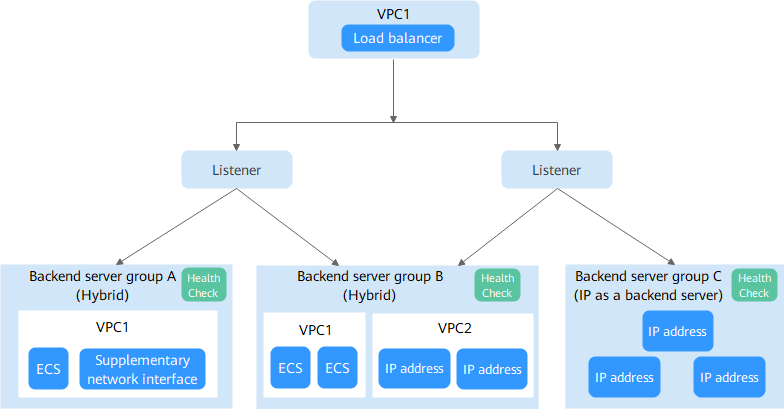
| Backend Server Group Type | Backend Server Type | Example |
|---|---|---|
| Hybrid |
| As shown in Figure 1:
|
| IP as a backend server | IP addresses of cloud or on-premises servers if IP as a backend is enabled for the load balancer | As shown in Figure 1, IP addresses can be added to backend server group C as backend servers. |
Advantages
Backend server groups can bring the following benefits:
- Reduced costs and easier management: You can add or remove backend servers as traffic changes over time. This can help avoid low resource utilization and make it easier to manage backend servers.
- Higher reliability: The health check function ensures traffic is routed only to healthy backend servers in the backend server group.
Controlling Traffic Distribution
You can configure the key functions listed in Table 3 for each backend server group to ensure service stability.
| Key Function | Description | Detail | |
|---|---|---|---|
| Forwarding Mode | Specifies the forwarding mode used by the load balancer to distribute traffic. There are two options: Load balancing and Active/Standby.
| ||
| Load Balancing Algorithm | Specifies the algorithm used by the load balancer to distribute traffic. | ||
| Sticky Session | Specifies whether to enable the sticky session option. If you enable this option, all requests from the same client during one session are sent to the same backend server. | ||
| Slow Start | Specifies whether to enable slow start. After you enable it, the load balancer linearly increases the proportion of requests to new backend servers in the backend server group. When the slow start duration elapses, the load balancer sends full share of requests to these backend servers and exits the slow start mode. | ||
| Forward to Same Port | Specifies whether to enable the forward to same port option. After you enable it, you do not need to specify a backend port when you add a backend server. The listener routes the requests to the backend server over the same port as the frontend port. | ||
Backend Server Group and Listener Protocols
You can associate a backend server group with different dedicated load balancers under the same enterprise project or different listeners.
The backend protocol of the new backend server group must match the frontend protocol of the listener, as described in Table 4.


