

Help Center/ Cloud Container Instance (CCI)/ User Guide/ Using CCI Through the Console/ Workload Management/ Workload Upgrade
Updated on 2025-11-13 GMT+08:00
Workload Upgrade
You can upgrade a workload after you create it. There are two ways to upgrade a workload.
- Rolling upgrade: gradually replaces old pods with new pods. During the upgrade, service traffic is evenly distributed to the old and new pods to ensure service continuity.
- In-place upgrade: deletes an old pod and then creates a new one. Services will be interrupted during the upgrade.
Upgrading a Workload
- Log in to the CCI 2.0 console.
- In the navigation pane, choose Workloads. On the Deployments tab, locate the target workload and click Edit YAML in the Operation column.
- Modify the fields in the YAML file to upgrade the workload. For example, to update an image, modify the fields highlighted in the following figure:
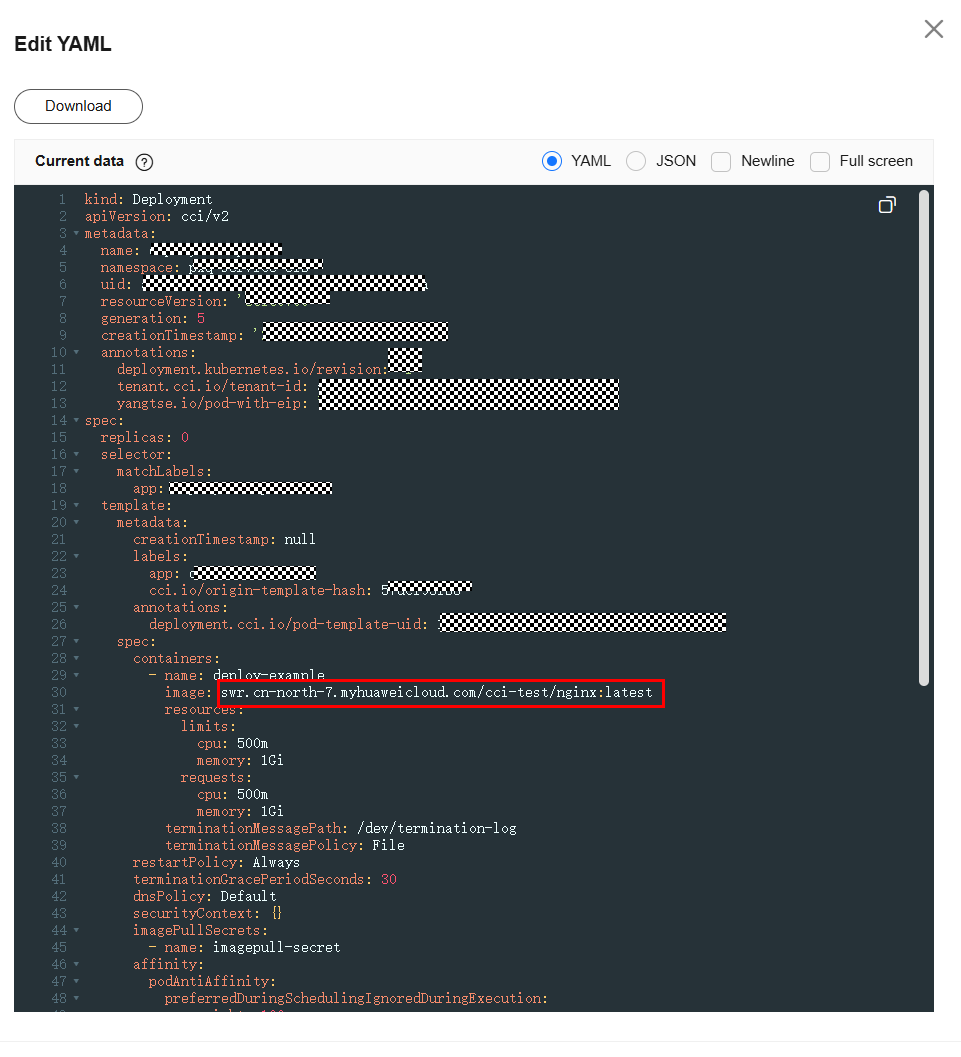
- Click OK.
What is your overall rating for this page?
0
1
2
3
4
5
6
7
8
9
10
Very dissatisfiedVery satisfied
Thank you very much for your feedback. We will continue working to improve the documentation.
The system is busy. Please try again later.


