

Updated on 2026-08-29 GMT+08:00
Migrating a Node
Migrating Nodes from a Custom Node Pool to the Default Node Pool
- Log in to the CCE console and click the cluster name to access the cluster console.
- In the navigation pane, choose Nodes and click the Node Pools tab.
- Click View Node in the Operation column of the node pool to be migrated.
- Choose More > Migrate Node in the Operation column of the target node to migrate the node. Figure 1 Migrating nodes to the default node pool

- In the Migrate Node dialog box, confirm the information.

- The migration does not affect custom resource tags, and Kubernetes labels and taints of the node.
- The migration does not affect the kubelet, kube-proxy, container runtime, and node OS settings of the node.
- After the migration, system labels cce.cloud.com and cce-nodepool on the node will be deleted. If an existing workload uses these labels for affinity or anti-affinity scheduling, the existing pods on the node will be stopped and rescheduled when kubelet is restarted.
Migrating Nodes from the Default Node Pool to a Custom Node Pool

Nodes cannot be migrated to spot pricing node pools.
- Log in to the CCE console and click the cluster name to access the cluster console.
- In the navigation pane, choose Nodes and click the Node Pools tab.
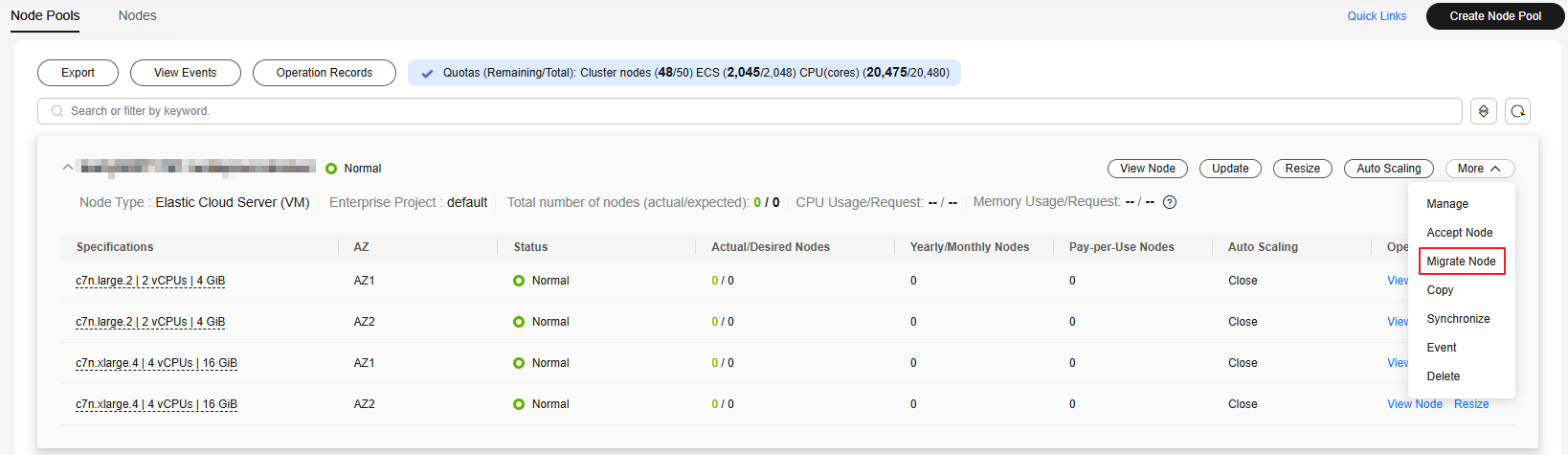
- Locate the target node pool and choose More > Migrate Node. Figure 2 Migrating nodes to a custom node pool
- In the Migrate Node dialog box, select the nodes that meet the following conditions:
- The nodes and the current node pool are deployed in the same VPC and subnet.
- The nodes and the current node pool belong to the same enterprise project.
- The nodes and the current node pool are in the same cloud server group.
- The nodes are running and they are from the default node pool.
- The flavor, AZ, container runtime, OS, and resource reservation settings of the nodes must match those of the node pool.
- Click OK.
- After migration, node pool configurations (including resource tags, Kubernetes labels, taints, and Kubernetes component settings) will overwrite conflicting node settings.
- After the migration, the pool's security group will take over the nodes' original security group.
- After the migration, the pool's agency will take over the nodes' original agency.
- After the migration, the nodes' original login mode will remain unchanged.
- Nodes migrated to a node pool after acceptance may be removed during scale-in.
Helpful Links
Node migration refers to moving nodes between different node pools within the same cluster. To add an external cloud server to a cluster node pool, see Accepting Nodes in a Node Pool.
What is your overall rating for this page?
0
1
2
3
4
5
6
7
8
9
10
Very dissatisfiedVery satisfied
Thank you very much for your feedback. We will continue working to improve the documentation.
The system is busy. Please try again later.


