

Help Center/ Cloud Bastion Host/ User Guide/ Resource/ Cloud Servers (Using a Bastion Host to Manage Container Resources)/ Container Resource Management
Updated on 2025-09-04 GMT+08:00
Container Resource Management
After a container is managed by a bastion host, you can delete the container or modify the container information at any time.
Constraints
- You must have the permission on the container module.
- To use this function, the bastion host version must be V3.3.48.0 or later.
Editing a Container
- Log in to your bastion host.
- Choose Resource > Cloud Service. The Cloud Service is displayed.
- Click Manage in the Operation column of the container whose information is to be modified. The Container Detail page is displayed. Figure 1 Container detail
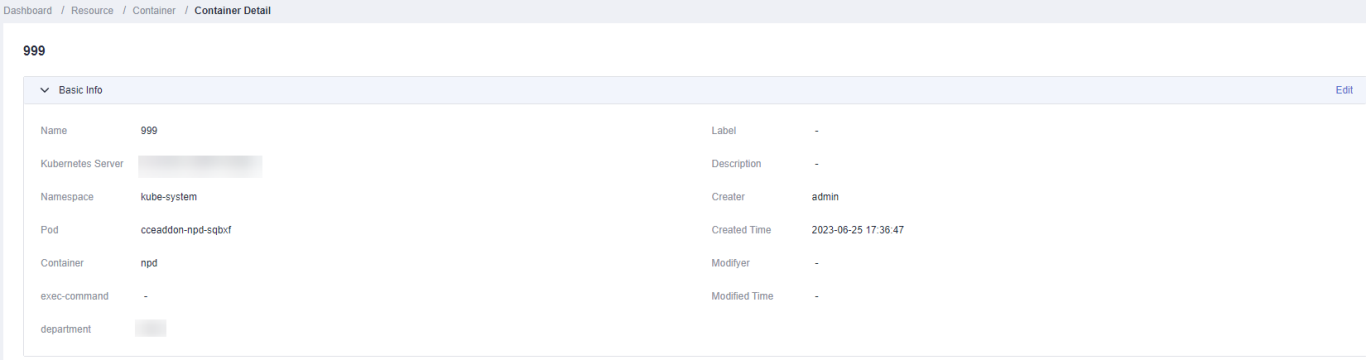
- Click Edit on the right of the Basic Info row. In the dialog box that is displayed, modify the container information. For details about the parameter rules, see Table 1.
- After modifying the parameters, click OK. The container information is modified.
Delete Containers
- Log in to your bastion host.
- Choose Resource > Cloud Service. The Cloud Service is displayed.
- Click Delete in the Operation column of the container to be deleted.
- In the dialog box that is displayed, click OK. The container is deleted.
What is your overall rating for this page?
0
1
2
3
4
5
6
7
8
9
10
Very dissatisfiedVery satisfied
Thank you very much for your feedback. We will continue working to improve the documentation.
The system is busy. Please try again later.


