

Help Center/ Cloud Bastion Host/ FAQs/ Billing, Renewals, and Unsubscriptions/ How Do I Purchase a CBH Instance When the System Prompts that Resources Are Sold Out?
Updated on 2025-09-04 GMT+08:00
How Do I Purchase a CBH Instance When the System Prompts that Resources Are Sold Out?
When you are prompts that resources are sold out during purchase a CBH instance, you can perform either of the following methods to solve the problem.
- Click
 in the upper left corner of the management console and try another region or an AZ where you can find available instances.
 - You can also submit a service ticket.
Submitting a Service Ticket
- Log in to the CBH console.
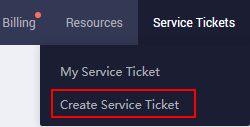
- In the upper right corner of the page, choose Service Tickets > Create Service Ticket.
- In the Products area, choose More Products, and click Cloud Bastion Host under Security & Compliance.
- Select a subtype, and click Create Service Ticket, and fill in required information.
In the Problem Description area, describe what you need and why.
- After all mandatory parameters are configured, select I have read and agree to the Tenant Authorization Letter and click Submit.
Parent topic: Billing, Renewals, and Unsubscriptions
What is your overall rating for this page?
0
1
2
3
4
5
6
7
8
9
10
Very dissatisfiedVery satisfied
Thank you very much for your feedback. We will continue working to improve the documentation.
The system is busy. Please try again later.


