

Help Center/ Bare Metal Server/ Private Image Creation Guide/ Linux/ Configuring Remote Login to a BMS/ x86: Oracle Linux 6 series/Red Hat 6 series/CentOS 6
Updated on 2022-09-09 GMT+08:00
x86: Oracle Linux 6 series/Red Hat 6 series/CentOS 6

This section uses the configuration files of Red Hat 6.7 as an example. Configuration files of other types of OSs may be different.
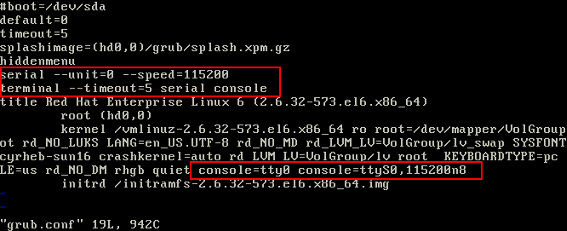
- Use the vi editor to open the /boot/grub/grub.conf file, locate hiddenmenu, and add the following information after hiddenmenu:
serial --unit=0 --speed=115200
terminal --timeout=5 serial console
Add the following information to the end of the line that contains kernel:
consoleblank=600 console=tty0 console=ttyS0,115200n8
- To enable user root to log in to the BMS through a serial port, add ttyS0 to the end of the security configuration file /etc/securetty.
Parent topic: Configuring Remote Login to a BMS
What is your overall rating for this page?
0
1
2
3
4
5
6
7
8
9
10
Very dissatisfiedVery satisfied
Thank you very much for your feedback. We will continue working to improve the documentation.
The system is busy. Please try again later.


