

Help Center/ Cloud Operations Center/ FAQs/ FAQs About Resource O&M/ Patch Management FAQs/ What Can I Do If the Compliance Report Still Reports Non-compliance for a Patch After the Patch Has Been Repaired?
Updated on 2025-04-02 GMT+08:00
What Can I Do If the Compliance Report Still Reports Non-compliance for a Patch After the Patch Has Been Repaired?
- Click the button for viewing the summary of the compliance report that reports non-compliance. Figure 1 Viewing the compliance report summary
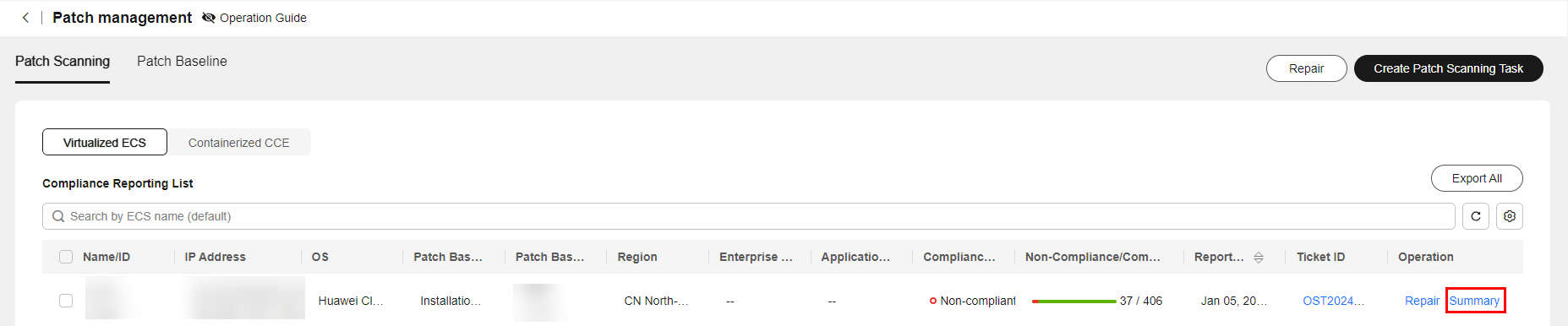
- View the status of the non-compliant patch and view different solutions based on the compliance status.
Table 1 Solutions for different compliance statuses Non-compliance Status
Solution
Failed
View the log of the patch service ticket that generates the compliance report and rectify the fault based on the failure log.
Installed-to be restarted
A newly installed patch can only take effect after the host is restarted. Therefore, you need to restart the host.
Rejected
If a patch is rejected in the patch baseline, the compliance report shows that the patch is rejected. To cancel the rejection, edit the corresponding baseline in the patch baseline.
Parent topic: Patch Management FAQs
What is your overall rating for this page?
0
1
2
3
4
5
6
7
8
9
10
Very dissatisfiedVery satisfied
Thank you very much for your feedback. We will continue working to improve the documentation.
The system is busy. Please try again later.


