

What Should I Do If PostgreSQL or GaussDB Failed to Be Connected?
Question
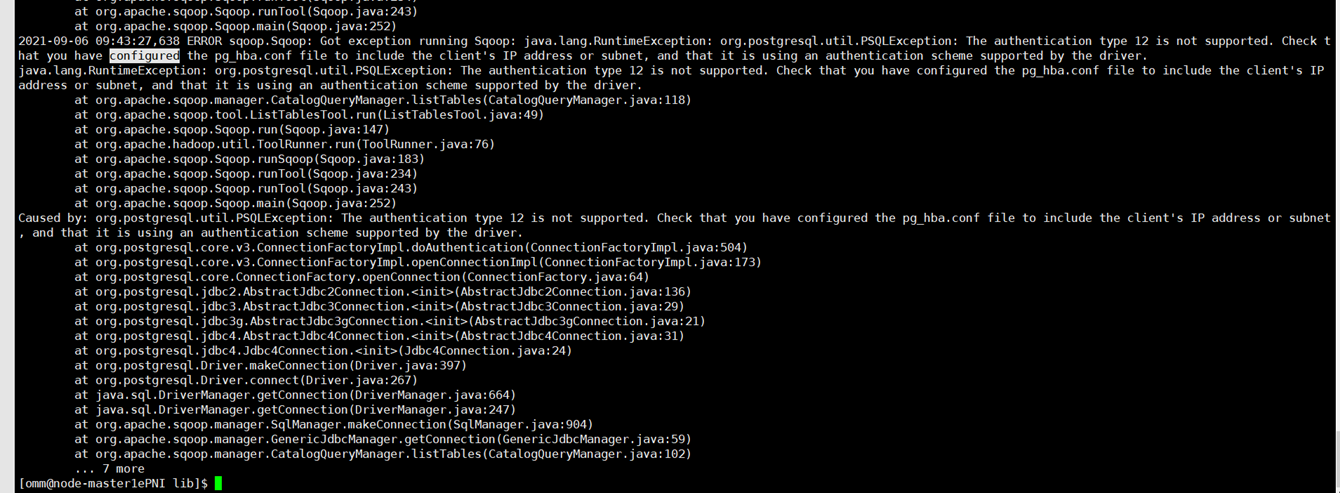
An error is reported when PostgreSQL or GaussDB is connected.
Answer
- Symptom:
The sqoop command can be executed to query PostgreSQL tables, but an error is reported when the sqoop import command is executed.
The authentication type 5 is not supported. Check that you have configured the pg_hba.conf file to include the client's IP address or subnet, and that it
The authentication type 12 is not supported. Check that you have configured the pg_hba.conf file to include the client's IP address or subnet, and that it
- Root cause:
- If the authentication type is 5, the root cause is as follows: When the sqoop import command is executed, a MapReduce job is started. The PostgreSQL driver package gsjdbc4-*.jar exists in the MRS Hadoop installation directory ${BIGDATA_HOME}/FusionInsight_HD_*/1_*_NodeManager/install/hadoop/share/hadoop/common/lib, which is incompatible with the open source PostgreSQL service. As a result, an error is reported.
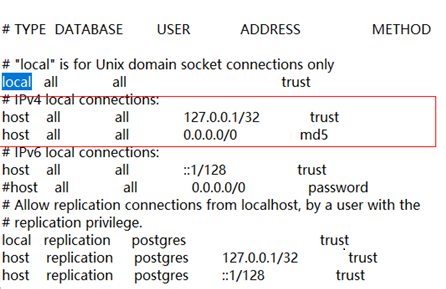
- If the authentication type is 12, the root cause is as follows: The pg_hba.conf file of the database is incorrectly configured.
- Answer:
- If the authentication type is 5, the solution is as follows: Move the driver package gsjdbc4-*.jar to the tmp directory on each node where MRS NodeManager instance is deployed.
mv ${BIGDATA_HOME}/FusionInsight_HD_*/1_*_NodeManager/install/hadoop/share/hadoop/common/lib/gsjdbc4-*.jar /tmp
- If the authentication type is 12, the solution is as follows: Modify the pg_hba.conf file of the database by changing the value of ADDRESS to the IP address of the node where Sqoop resides.
- If the authentication type is 5, the solution is as follows: Move the driver package gsjdbc4-*.jar to the tmp directory on each node where MRS NodeManager instance is deployed.
- Symptom:
The sqoop command can be executed to query PostgreSQL tables, but an error is reported when the sqoop export command is executed.
The authentication type 5 is not supported. Check that you have configured the pg_hba.conf file to include the client's IP address or subnet, and that it
- Root cause:
When the sqoop export command is executed, a MapReduce job is started. The PostgreSQL driver package gsjdbc4-*.jar exists in the MRS Hadoop installation directory ${BIGDATA_HOME}/FusionInsight_HD_*/1_*_NodeManager/install/hadoop/share/hadoop/common/lib, which is incompatible with the open-source PostgreSQL service. As a result, an error is reported.
- Answer:
- Move the driver package gsjdbc4-*.jar to the tmp directory on each node where MRS NodeManager instance is deployed.
mv ${BIGDATA_HOME}/FusionInsight_HD_*/1_*_NodeManager/install/hadoop/share/hadoop/common/lib/gsjdbc4-*.jar /tmp
- Delete /opt/client/Hive/Beeline/lib/gsjdbc4-*.jar.
- Move the driver package gsjdbc4-*.jar to the tmp directory on each node where MRS NodeManager instance is deployed.


