
Quotas
What Is a Quota?
A quota is a limit on the quantity or capacity of a certain type of service resources that you can use. For example, the maximum number of ECSs or EVS disks that can be created.
If a quota cannot meet your needs, apply for a higher quota.
How Do I View My Quota?
- Log in to the management console.
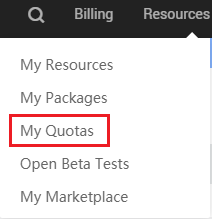
- In the upper right corner of the page, choose Resources > My Quotas.

- On the Service Quota page, view the used and total quotas of resources.
If a quota cannot meet your needs, apply for a higher quota by performing the following operations.
How Do I Increase My Quota?
- Log in to the management console.
- In the upper right corner of the page, choose Resources > My Quotas. The Service Quota page is displayed.
- Click Increase Quota.
- On the Create Service Ticket page, set the parameters.
In the Problem Description area, enter the required quota and reason for the adjustment.
- Read the agreements and confirm that you agree to them, and then click Submit.
Parent topic: Basic Operations
Last Article: RI Management
Next Article: Advanced Operations

Did this article solve your problem?
Thank you for your score!Your feedback would help us improve the website.