
Evaluating Orders
You can evaluate a part of newly purchased hardware orders that have been completed.
Procedure
- Go to the My Orders page.
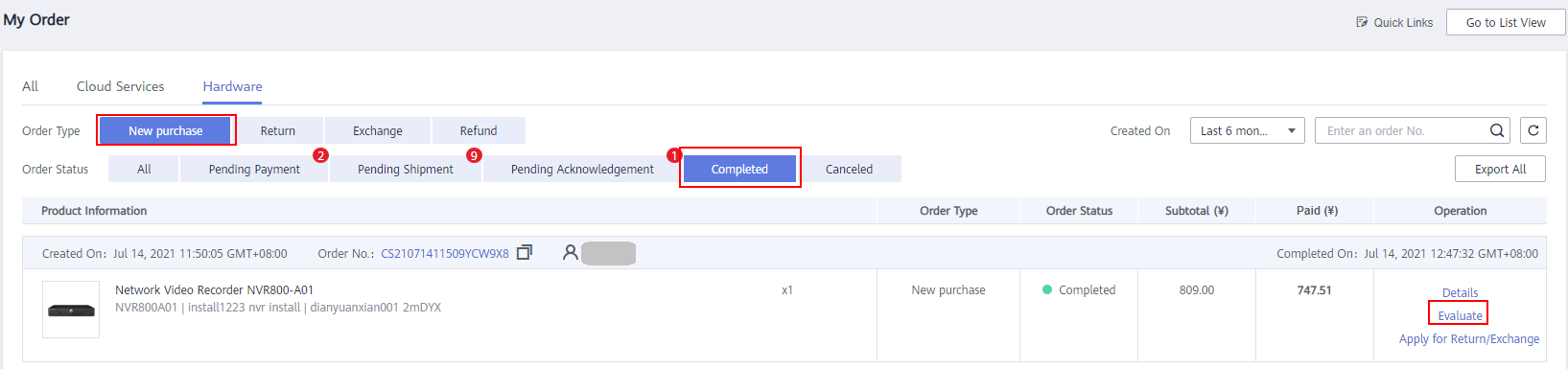
- Click Hardware and filter orders by order type (New purchase) or order status (Completed), or directly search for an order by creation time or order No.

- Click Evaluate in the Operation column of the target order. The order evaluation page is displayed.
- You can rate the product quality, delivery speed, and service attitude (from 1 to 5 stars). Optionally select product tags, enter review comments, and upload images, and then click Write Review.

- After your comment is published, it will be under review. You can modify or delete the comment.

- After the comment is approved, you can modify or delete the comment, or append an additional comment.


- If a comment is rejected, you can view the rejection reason on the page and re-publish the comment.
- After a comment is approved, it will be displayed on the hardware product purchase page and visible to all people.
- Whenever you modify a comment or append an additional comment, the comment will be under review. After an additional comment is approved, no more comment can be added again. If an additional comment is rejected, you can append another comment until it is approved.
Parent topic: My Orders
Last Article: Modifying Shipping Date
Next Article: Exporting Orders

Did this article solve your problem?
Thank you for your score!Your feedback would help us improve the website.