
Developing Functions in Python
Function Syntax

You are advised to use Python 3.6.
FunctionGraph supports Python 2.7 and Python 3.6.
Syntax for creating a handler function in Python:
def handler (event, context)
- handler: name of the function that FunctionGraph invokes to execute your code. The name must be consistent with that you define when creating a function.
- event: event parameter defined for the function. The parameter is in JSON format.
- Context: runtime information provided for executing the function. For details, see SDK APIs.
SDK APIs
Table 1 describes the context methods provided by FunctionGraph.
| Method | Description |
|---|---|
| getRequestID() | Obtains a request ID. |
| getRemainingTimeInMilliSeconds () | Obtains the remaining running time of a function. |
| getAccessKey() | Obtains the AK (valid for 24 hours) of an agency. If you use this method, you need to configure an agency for the function. |
| getSecretKey() | Obtains the SK (valid for 24 hours) of an agency. If you use this method, you need to configure an agency for the function. |
| getUserData(string key) | Uses keys to obtain the values passed by environment variables. |
| getFunctionName() | Obtains the name of a function. |
| getRunningTimeInSeconds () | Obtains the timeout of a function. |
| getVersion() | Obtains the version of a function. |
| getMemorySize() | Obtains the allocated memory. |
| getCPUNumber() | Number of CPU millicores used by the function (1 core = 1000 millicores). The value of this field is proportional to that of MemorySize. By default, 100 CPU millicores are required for 128 MB memory. The number of CPU millicores is calculated as follows: Memory/128 x 100 + 200 (basic CPU millicores). |
| getProjectID() | Obtains a project ID. |
| getPackage() | Obtains a function group, that is, an app. |
| getToken() | Obtains the token (valid for 24 hours) of an agency. If you use this method, you need to configure an agency for the function. |
| getLogger() | Obtains the logger method provided by the context and returns a log output class. Logs are output in the format of Time-Request ID-Content by using the info method. For example, use the info method to output logs: logg = context.getLogger() logg.info("hello") |

Results returned by using the getToken(), getAccessKey(), and getSecretKey() methods contain sensitive information. Exercise caution when using these methods.
Developing a Python Function
Perform the following steps to develop a Python function:
Python 2.7 is used an example.
- Create a function project.
- Write code for printing text helloworld.
Open the text editor, compile a HelloWorld function, and save the code file as helloworld.py. The code is as follows:
1
2
def printhello():
    print 'hello world!'
- Define a FunctionGraph function.
Open the text editor, define a function, and save the function file as index.py under the same directory as the helloworld.py file. The function code is as follows:
1
2
3
4
5
6
7
import json
import helloworld

def handler (event, context):
    output =json.dumps(event)
    helloworld.printhello()
    return output
FunctionGraph can return only the following types of values:
- None: The HTTP response body is empty.
- String: The content in this string is the body of an HTTP response.
- Other: For a value rather than None or String, FunctionGraph encodes the value in JSON, and uses the encoded object as the body of an HTTP response. The Content-Type header of the HTTP response is set to application/json.
- Write code for printing text helloworld.
- Package the project files.
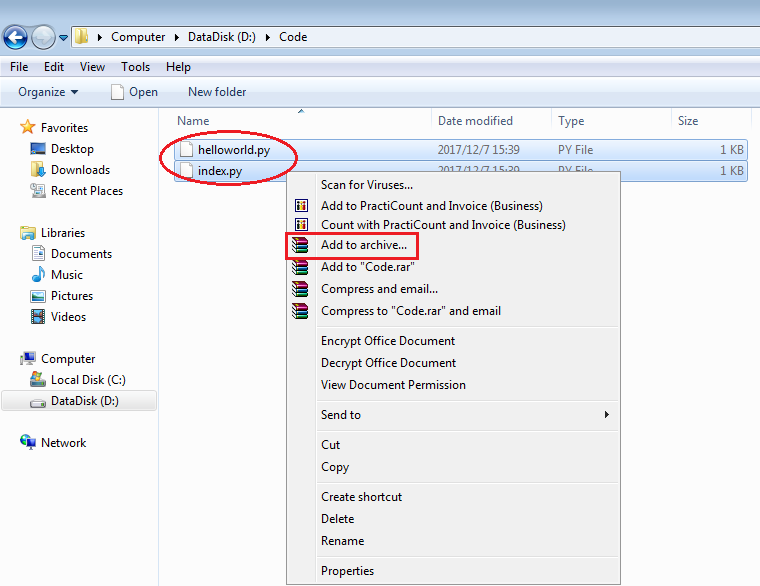
After creating the function project, you get the following directory. Select all files under the directory and package them into the fss_examples_python2.7.zip file, as shown in Figure 1.

- In this example, the function project files are saved under the ~/Code/ directory. Select and package all files under the directory to ensure that the index.py file, the handler of your FunctionGraph function, is under the root directory when the ZIP file is decompressed.
- When you write code in Python, do not name your package with the same suffix as a standard Python library, such as json, lib, and os. Otherwise, an error will be reported indicating a module loading failure.
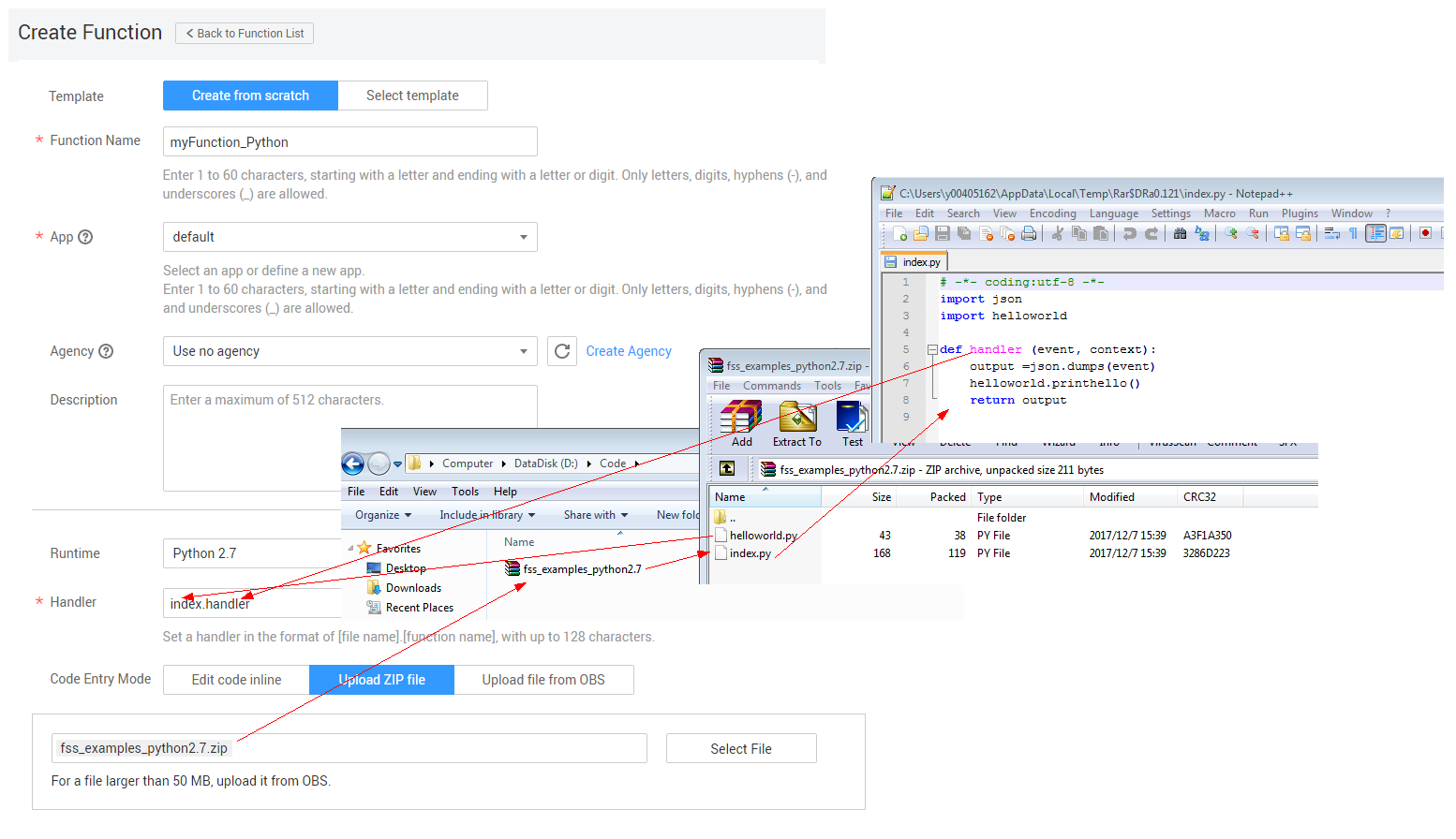
- Create a FunctionGraph function and upload the code package. Log in to the FunctionGraph console, create a Python function, and upload the fss_examples_python2.7.zip file, as shown in Figure 2.
- The index of the handler must be consistent with the file name of your function, because the file name will help to locate the function file.
- The handler is a function name, which must be consistent with that defined in the index.py file.
- After you upload the fss_examples_python2.7.zip file to OBS, when the function is triggered, FunctionGraph decompresses the file to locate the function file through index and locate the function defined in the index.py file through handler, and then executes the function.
- Test the function.
- Create a test event.
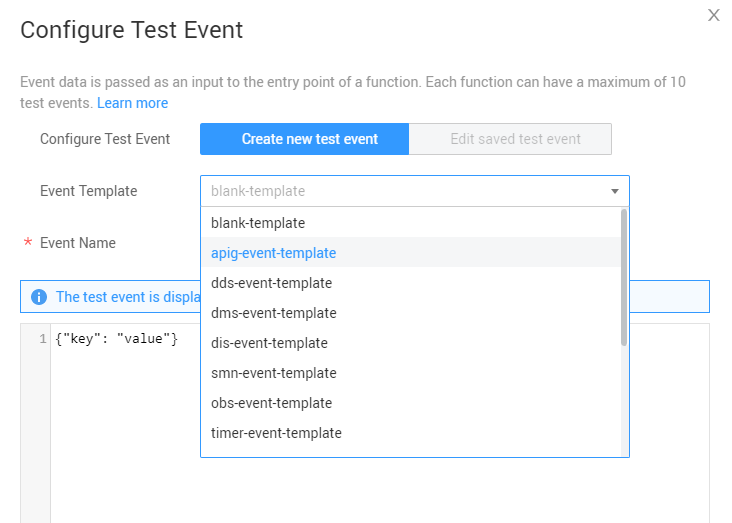
On the function details page that is displayed, choose Select test event > Configure test event. Configure the test event information, as shown in Figure 3, and then click Save.
- On the function details page, select the configured test event, and click Test.
- Create a test event.
- View the function execution result.
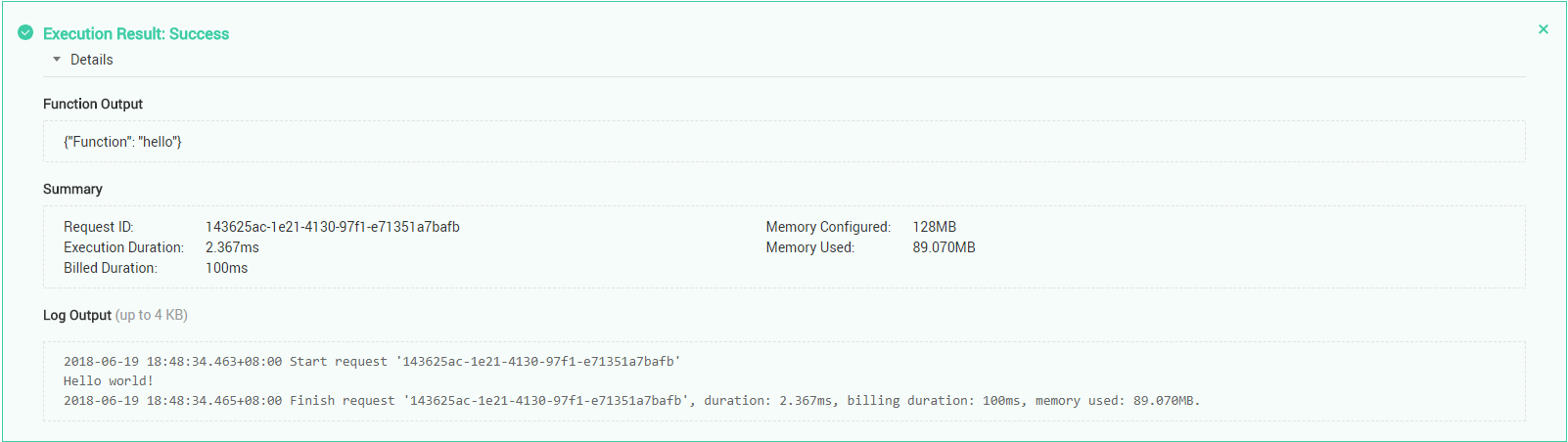
The function execution result consists of three parts: function output (returned by callback), summary, and logs (output by using the console.log or getLogger() method), as shown in Figure 4.
Execution Result
The execution result consists of the function output, summary, and log output.
| Parameter | Successful Execution | Failed Execution |
|---|---|---|
| Function Output | The defined function output information is returned. | A JSON file that contains errorMessage, errorType, and stackTrace is returned. The format is as follows: {
"errorMessage": "",
"errorType": "",
"stackTrace": []
} errorMessage: Error message returned by the runtime. errorType: Error type. stackTrace: Stack error information returned by the runtime. |
| Summary | Request ID, Memory Configured, Execution Duration, Memory Used, and Billed Duration are displayed. | Request ID, Memory Configured, Execution Duration, Memory Used, and Billed Duration are displayed. |
| Log Output | Function logs are printed. A maximum of 4 KB logs can be displayed. | Error information is printed. A maximum of 4 KB logs can be displayed. |
Example of the function output when a function fails to be executed:
{
    "errorMessage": "Syntax error in module 'index'(invalid syntax (index.py, line 5))",
    "errorType": "SyntaxError",
    "stackTrace": [
        "File \"./index.py\", line 5",
        "  for i in range (1,1000000):"
    ]
}
Example of the log output when a function fails to be executed:
2020/07/27 14:28:14 GMT+08:00  Start invoke request '7b37809b-a086-49c9-9bfd-fdf55ec7f8d3', version: latest
2020/07/27 14:28:14 GMT+08:00  7b37809b-a086-49c9-9bfd-fdf55ec7f8d3 Syntax error in module 'index'(invalid syntax (index.py, line 5))
Traceback (most recent call last):
  File "/opt/function/code/index.py", line 5
    for i in range (1,1000000):
                              ^
SyntaxError: invalid syntax
2020/07/27 14:28:14 GMT+08:00 Finish invoke request '7b37809b-a086-49c9-9bfd-fdf55ec7f8d3'(invoke Failed), duration: 9.593ms, billing duration: 100ms, memory used: 65.000MB Last Article: Developing Functions in Node.js
Next Article: Developing Functions in Java

Did this article solve your problem?
Thank you for your score!Your feedback would help us improve the website.