

Replicating Images Across Regions
Scenarios
An image is a regional resource. If you want to use a private image in another region, you can replicate it to the target region.

Video Tutorial
Background
| Scenario | Description | Procedure |
|---|---|---|
| Cross-region replication under the same account | After the replication is complete, a new image is generated in the target region. The new image has an ID that is different from the source image ID. | See this section. |
| Cross-region, cross-account replication | Replicate the image to the target region and share it with other accounts. | See this section and Sharing Specified Images. |
| Cross-account replication in the same region | After the replication is complete, the image is shared with the target tenant. The target tenant can use the image (with the same ID as the source image) but the image owner is still the tenant who shared it. | See Sharing Specified Images and Replicating a Shared Image. |
Constraints
| Item | Description |
|---|---|
| Image type |
|
| Image size | The size of each image to be replicated across regions cannot exceed 128 GiB. |
| Concurrent replication | Each user can replicate a maximum of five images across regions at a time. |
| Function | You can select multiple images for cross-region replication at a time. However, you are not allowed to select an ISO image, encrypted image, frozen image, or the image that is being created. |
| Time | It takes a while to complete a cross-region replication task. The time required for replicating an image across regions depends on the network speed, image size, and number of concurrent tasks. |
| Permissions | An agency is required for cross-region image replication. This agency must have the permissions needed for cross-region image replication in the destination region. For example, if you want to replicate a system or data disk image from region A to region B, the agency must have the permissions of IMS CrossCopyAgencyPolicy in region B. For details about how to create an agency, see Creating an Agency. |
| Billing | When a full-ECS image is replicated across regions, the associated CSBS or CBR backups will also be replicated. Therefore, you will be charged for these backups in the target region. |


- √ indicates replication is supported.
- × indicates replication is not supported. You can export the desired image and then import it to the target region.
- - indicates that the source and destination regions are the same.
- Region adjustment or function open-beta testing may affect cross-region image replication. Existing users are not affected. You can see on the console if cross-region can be performed for a given region.
- Regions not listed in the figure above do not support cross-region replication of system or data disk images.
Procedure
Cross-region image replication allows you to replicate a single image or multiple images across regions.
- Log in to the IMS console.
- Locate the row that contains the image to be replicated and choose More > Replicate in the Operation column.
- In the displayed Replicate Image dialog box, set the following parameters. Figure 3 Replicating an image across regions

Table 2 Parameters Parameter
Description
Example Value
Replication Mode
Images can be replicated within a region or across regions.
NOTE:This parameter is available only when the current region supports cross-region replication.
Across Regions
Name
Enter a name that is easy to identify. The default image name is in the following format: copy_<name-of-the-region-where-the-source-image-is-located>_<source-image-name>.
-
Destination Region
Select a region from the drop-down list. For details about the supported destination regions, see Figure 2.
-
Destination Project
Select a project from the drop-down list. After you select the destination region, the system automatically displays available projects.
-
Target Server Backup Vault
This parameter is available only for full-ECS images created using CBR. Select a vault for storing backups.
If no CBR backup vault is available in the destination region, click Create Server Backup Vault to create one. Ensure that you select Replication for Protection Type. For other parameters, see Purchasing a Server Backup Vault. After the vault is created, click
 to refresh the page and select the vault from the drop-down list box.
-
IAM Agency
Select a created IAM agency for cross-region image replication. The agency must be one created for IMS and granted the required permissions. For details about how to create an IAM agency, see Creating an Agency.
-
Description
This parameter is optional. Enter a description for the image.
-
Disclaimer
Read the disclaimer and select I have read and agree to the disclaimer.
-
- Click OK.
Switch to the destination region. If the image status becomes Normal, the image replication is successful.
- Log in to the IMS console.
- In the private image list, select the images to be replicated and click Cross-region replication above the list.
If Cross-region replication is unavailable, the current region does not support cross-region image replication.
- In the displayed Replicate Image dialog box, confirm the selected image that can be replicated across regions and specify the required parameters. Figure 4 Replicating multiple images across regions

Table 3 Parameters Parameter
Description
Example Value
Destination Region
Select a region from the drop-down list. For details about the supported destination regions, see Figure 2.
-
Destination Project
Select a project from the drop-down list. After you select the destination region, the system automatically displays available projects.
-
Target Server Backup Vault
This parameter is available only for full-ECS images created using CBR. Select a vault for storing backups.
If no CBR backup vault is available in the destination region, click Create Server Backup Vault to create one. Ensure that you select Replication for Protection Type. For other parameters, see Purchasing a Server Backup Vault. After the vault is created, click
 to refresh the page and select the vault from the drop-down list box.
-
IAM Agency
Select a created IAM agency for cross-region image replication. The agency must be one created for IMS and granted the required permissions. For details about how to create an IAM agency, see Creating an Agency.
-
Description
This parameter is optional. Enter a description for the image.
-
Disclaimer
Read the disclaimer and select I have read and agree to the disclaimer.
-
- Click OK.
Switch to the destination region. If the image status becomes Normal, the image replication is successful.
Related Documents
During cross-region image replication, an agency is required to verify cloud service permissions in the destination region. Therefore, you need to create a cloud service agency in advance. For details about how to create an agency in IAM, see Creating an Agency.
Creating an Agency
- Log in to the IAM console.
- In the navigation pane, choose Agencies.
- Click Create Agency.
- Set the following parameters:
- Agency Name: Enter an agency name, for example, ims_copy_image_agency. Figure 5 Creating an agency
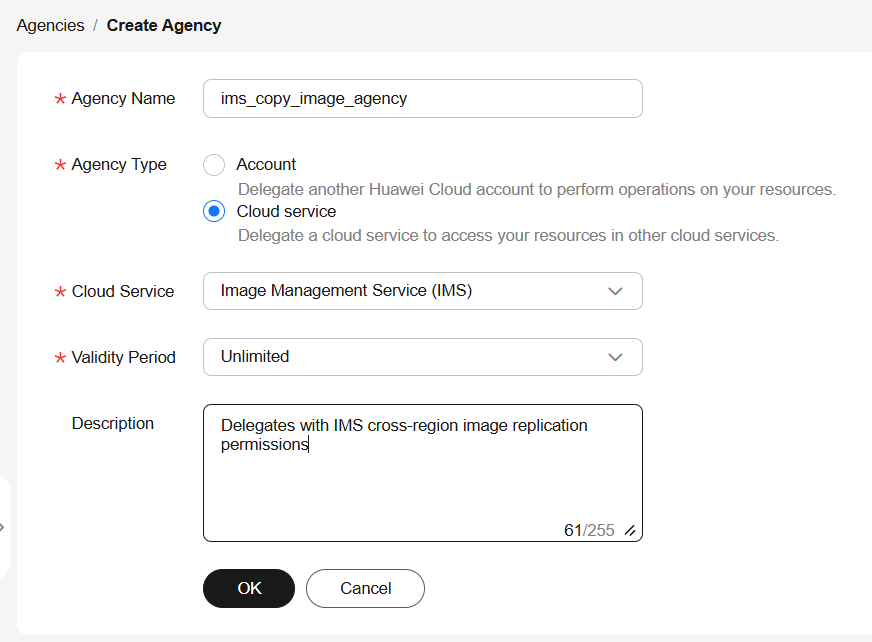
- Agency Type: Select Cloud service.
- Cloud Service: This parameter is available only if you select Cloud service for Agency Type. Select Image Management Service (IMS) from the drop-down list.
- Validity Period: Select Unlimited.
- Description: This parameter is optional. You can enter "Delegates with IMS cross-region replication permissions".
- Agency Name: Enter an agency name, for example, ims_copy_image_agency.
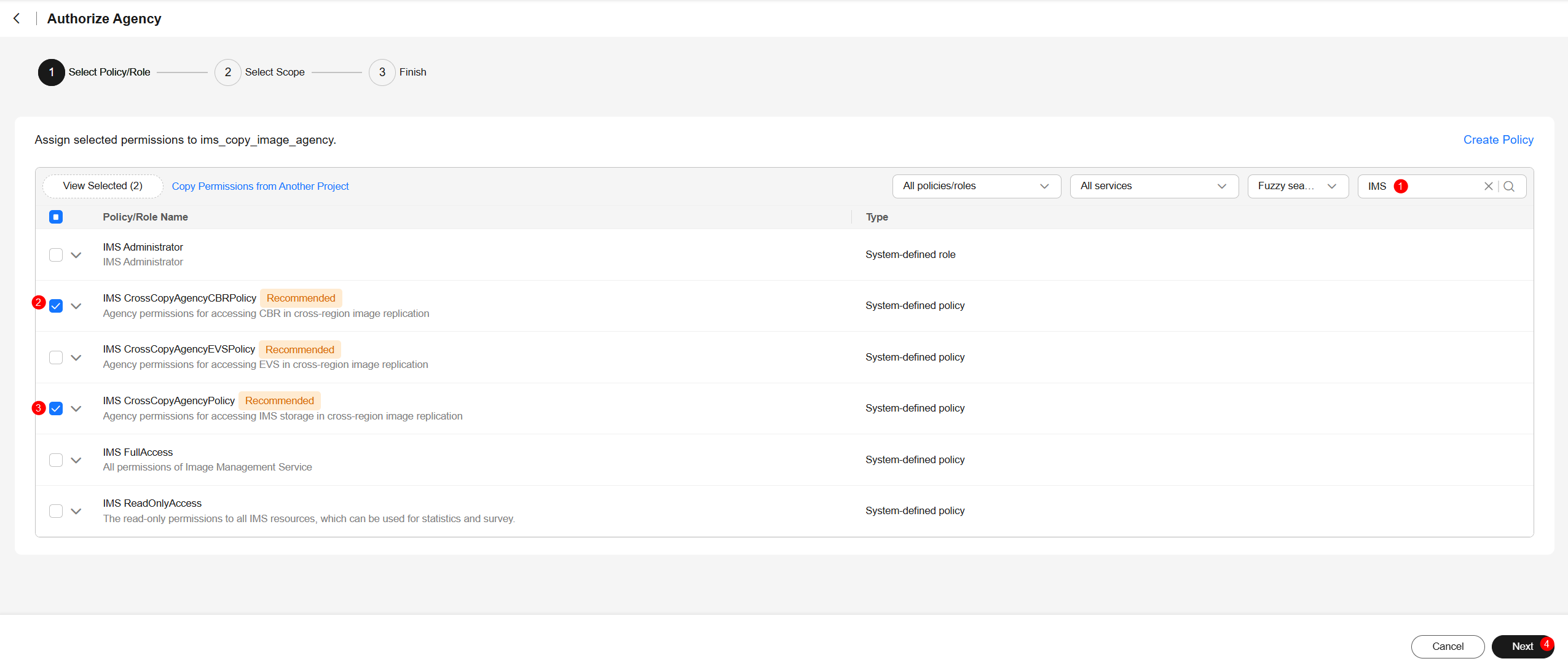
- Click OK. In the displayed dialog box, click Authorize. Select the permissions to be granted to the agency based on the image type. Figure 6 Granting permissions to an agency
- Click Next and specify the authorization scope. Figure 7 Specifying the authorization scope

Currently, enterprise projects cannot be used to specify an authorization scope. Only IAM projects can be used.
- Click OK. Figure 8 New agency

If the Tenant Administrator or IMS Administrator role is in the permission list, you are advised to delete it to avoid risks caused by excessive permissions. IMS provides fine-grained system policies to allow you to minimize permissions. For example, if the permissions of the agent for cross-region image replication are excessive, you are advised to grant only permissions in the following table.
Table 4 Permissions required for cross-region image replication Scenario
System-defined Policy
Cross-region replication of a system or data disk image
IMS CrossCopyAgencyPolicy
Cross-region replication of a full-ECS image
IMS CrossCopyAgencyCBRPolicy
What is your overall rating for this page?
Thank you very much for your feedback. We will continue working to improve the documentation.See the reply and handling status in My Cloud VOC.
For any further questions, feel free to contact us through the chatbot.
Chatbot


