

Adding a Website to EdgeSec
This section describes how to connect a domain name to EdgeSec.

Verify that the policy associated with the domain name includes CC rules to effectively mitigate CC attacks and prevent unauthorized traffic that could lead to increased fees.
Prerequisites
A domain name has been added on the Domains page. For details about domain name management, see Domain Name Management.
Constraints
- A protected domain name can only be added once.
- You can add only domain names whose Status is Enabled on the Domains page of the CDN console.
Procedure
- Log in to the EdgeSec console.
- In the navigation pane on the left, choose . The Website Settings page is displayed.
- In the upper left corner of the list, click Add Domain Names. For details about the parameters, see Table 1. Figure 1 Adding a website
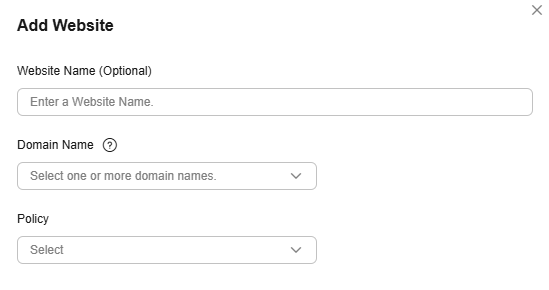
Table 1 Parameters for adding a protected website Parameter
Description
Domain Name
Select a domain name to be protected. You can select a domain name whose Service Type is Website, File download, On-demand services, or Whole site on the Add Domain Name page.
NOTE:Add a domain name on the Domains page of the CDN console. You only need to select the domain name to be protected.
Policy
The System-generated policy is selected by default. You can select a policy you configured before.
- Click OK.

It takes a long time to add a domain name.
What is your overall rating for this page?
Thank you very much for your feedback. We will continue working to improve the documentation.See the reply and handling status in My Cloud VOC.
For any further questions, feel free to contact us through the chatbot.
Chatbot


