

HBase Usage Process
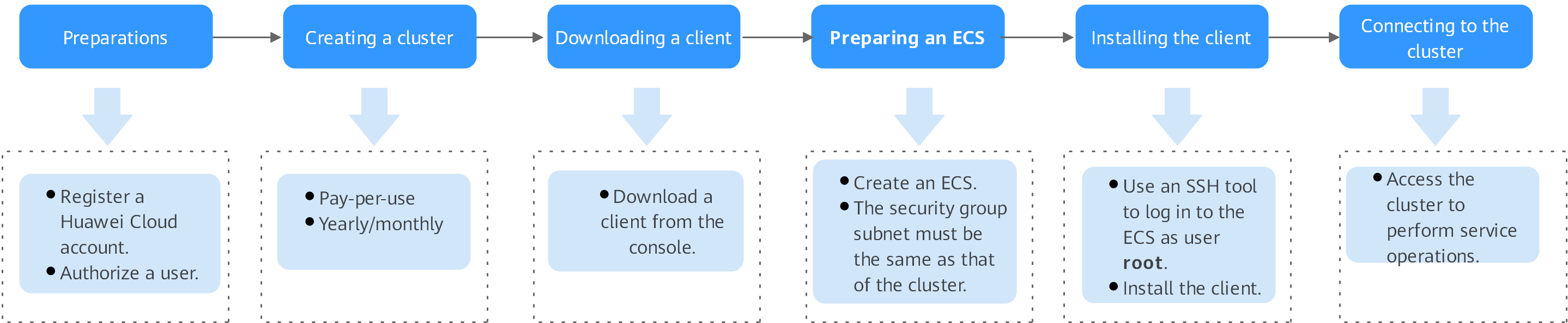
| Step | Substep | Description | Detailed Instructions |
|---|---|---|---|
| Preparations | Creating a user and granting permissions |
| |
| Creating a cluster | Creating an HBase cluster | Before using HBase to execute tasks, you need to create an HBase cluster. | |
| Downloading the client | Downloading the HBase client | After creating a cluster, download and install the client. After the client is installed, you can use the SSH tool to connect to the cluster. | |
| Preparing an ECS | - | If the client tool runs on Linux, you need to prepare a Linux ECS that is in the VPC as an HBase cluster and the Linux ECS serves as a client host. If the client tool runs on Windows, you need to prepare a Windows ECS that is in the VPC as an HBase cluster and the Windows ECS serves as a client host. | |
| Installing the client | - | Place the downloaded client on the ECS, decompress the package, and install the client. | |
| Connecting to the cluster | - | After installing the MySQL client on the ECS, you can run commands to connect to the cluster and perform service operations. |
What is your overall rating for this page?
Thank you very much for your feedback. We will continue working to improve the documentation.See the reply and handling status in My Cloud VOC.
For any further questions, feel free to contact us through the chatbot.
Chatbot


