

Startup Command
Starting the container is to start the main process. However, some preparations must be made before the main process is started. For example, you need to configure or initialize MySQL databases before running MySQL servers. You can set ENTRYPOINT or CMD in the Dockerfile when you create an image. For example, the ENTRYPOINT ["top", "-b"] command below is set in the Dockerfile and will be executed during container startup.
FROM ubuntu
ENTRYPOINT ["top", "-b"]

The startup command must be supported by the container image. Otherwise, the container startup will fail.
You can also set the container startup command on the CCI console. For example, to add the preceding command in the Dockerfile, you can click Add and enter the top command. Then click Add again and enter -b in Arguments when you add a container.
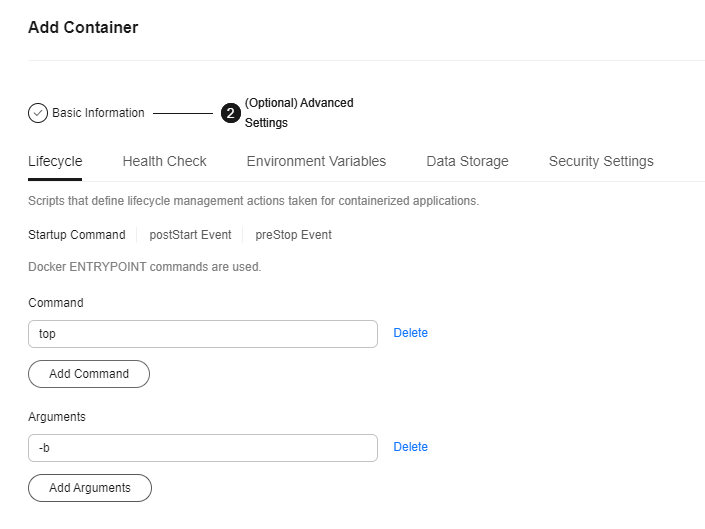
Because the container runtime supports only one ENTRYPOINT command, the startup command that you set on the CCI console will overwrite the ENTRYPOINT and CMD commands that you set in the Dockerfile when you create the image. The following table lists the rules.
| Image Entrypoint | Image CMD | Command for Running a Container | Parameter for Running a Container | Command Executed |
|---|---|---|---|---|
| [touch] | [/root/test] | Not set | Not set | [touch /root/test] |
| [touch] | [/root/test] | [mkdir] | Not set | [mkdir] |
| [touch] | [/root/test] | Not set | [/opt/test] | [touch /opt/test] |
| [touch] | [/root/test] | [mkdir] | [/opt/test] | [mkdir /opt/test] |
What is your overall rating for this page?
Thank you very much for your feedback. We will continue working to improve the documentation.See the reply and handling status in My Cloud VOC.
For any further questions, feel free to contact us through the chatbot.
Chatbot


