

Overview
You can create backups for GeminiDB Redis instances to ensure data reliability. After an instance is deleted, its automated backups are also deleted while manual backups are retained. The backups cannot be exported. GeminiDB Redis instances support only full backups.
Usage Notes
Backing up data consumes a few CPUs. Uploading backup files to OBS occupies bandwidth of compute nodes, causing slight latency and jitter.
Backup Methods
Both automatic backup and manual backup are supported.
- Automated backup
You can modify a backup policy on the GeminiDB console, and the system will automatically back up your instance data based on the time window and backup cycle you configure in the backup policy and will store the data for a length of time you specify.
Automated backups cannot be manually deleted. You can adjust their retention period by referring to Modifying an Automated Backup Policy, and backups that expire will be automatically deleted.
- Manual backup
A manual backup is a full backup of a DB instance and can be retained until you manually delete it. A manual backup can be triggered at any time to meet your service requirements.
Regularly backing up your database is recommended. If your database becomes faulty or data is corrupted, you can restore it from a backup.
Table 1 Backup methods Method
Scenario
After you set a backup policy, the system automatically backs up your database based on the policy. You can also modify the policy based on service requirements.
You can manually create full backups for your instance based on service requirements.
How Backup Works
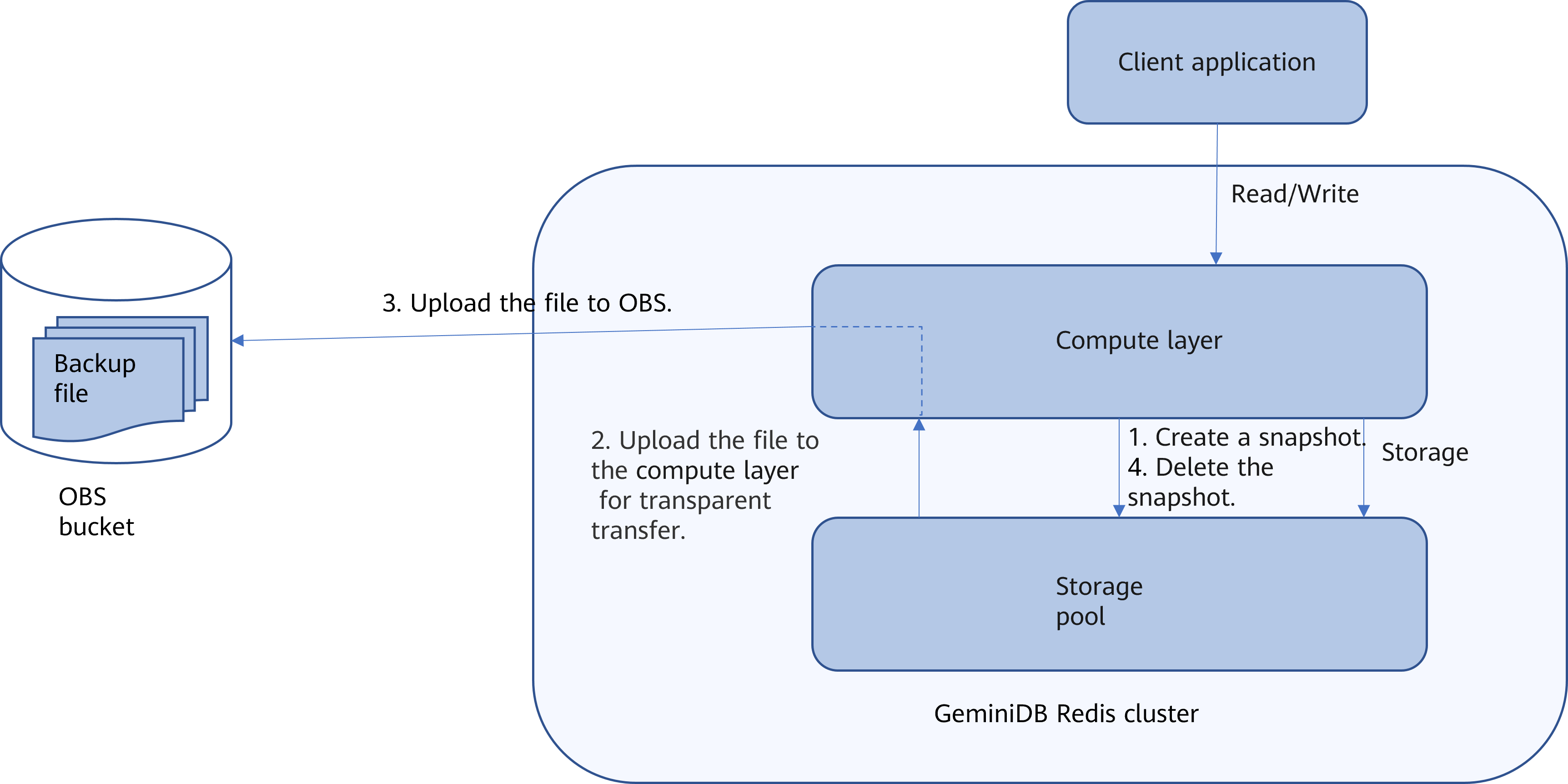
GeminiDB Redis API uses an architecture with decoupled storage and compute. Figure 1 shows how GeminiDB Redis API backs up data. GeminiDB Redis API takes snapshots of data in the storage pool in seconds and transmits them to the compute layer, which will then pass them to OBS. Snapshots are stored as compressed files in OBS buckets and do not occupy any storage space of your instance. Snapshot creation and deletion have no impacts on the computing layer. When snapshots are uploaded, some compute resources are consumed, so the instance CPU and memory usage may go high.
GeminiDB Redis API backs up data faster than Redis and does not produce jitter.
Backup Storage
Backups are stored in OBS buckets to provide disaster recovery and save storage space.
After you purchase an instance, GeminiDB Redis will provide additional backup storage of the same size as what you purchased. For example, if you purchase an instance with 100 GB of storage, you will obtain additional 100 GB of storage free of charge. If the backup data does not exceed 100 GB, it is stored on OBS free of charge. If there is more than 100 GB of data, you will be billed at standard OBS rates.
Feedback
Was this page helpful?
Provide feedbackThank you very much for your feedback. We will continue working to improve the documentation.See the reply and handling status in My Cloud VOC.
For any further questions, feel free to contact us through the chatbot.
Chatbot


